Salesforce Credentials
Manage your Salesforce Credentials and login with one click.
Wat is Salesforce Credentials?
Salesforce Credentials is een Chrome-extensie ontwikkeld door Alexandr Kurevlev, en de belangrijkste functie is "Manage your Salesforce Credentials and login with one click.".
Extensie Screenshots
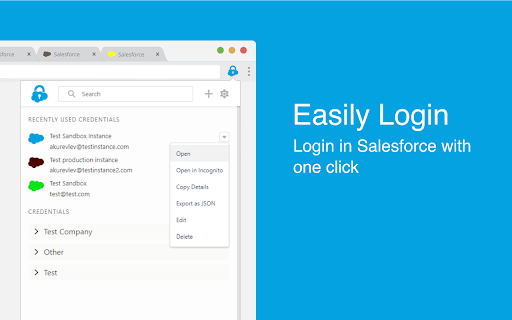


Download het CRX-bestand van de extensie Salesforce Credentials
Download Salesforce Credentials-extensiebestanden in crx-indeling, installeer Chrome-extensies handmatig in de browser of deel de crx-bestanden met vrienden om Chrome-extensies eenvoudig te installeren.
Instructies voor het Gebruik van de Extensie
                        This extension allows you to manage and store your Salesforce Credentials, login with one click and more...

Key features:

- Manage your credentials: Add/Edit/Delete your credentials within the extension

- Easily Login: Login in Salesforce with one click without the verification code

- Add credentials by logging in: Login in Salesforce as you usually do and click 'Add' to add credential

- Login from Address Bar: Enter 'sf' and space in your address bar and start typing username, name or group to login

- Never lose tab: Set your own color for every credential to work on multiple instances at the same time

- Collaborate with your сolleagues: Import and export credentials to file or clipboard to share with your colleagues

- Always in Sync: Keep your Credentials synced with your Google Account in Chrome
Basisinformatie over de Extensie
| Naam |  Salesforce Credentials Salesforce Credentials |
| ID | mneimgababoaidaajoibedahomnpmbja |
| Officiële URL | https://chromewebstore.google.com/detail/salesforce-credentials/mneimgababoaidaajoibedahomnpmbja |
| Beschrijving | Manage your Salesforce Credentials and login with one click. |
| Bestandsgrootte | 584 KB |
| Aantal Installaties | 874 |
| Huidige Versie | 1.4.3 |
| Laatst Bijgewerkt | 2020-05-05 |
| Publicatiedatum | 2020-05-05 |
| Beoordeling | 4.67/5 Totaal 3 Beoordelingen |
| Ontwikkelaar | Alexandr Kurevlev |
| [email protected] | |
| Betalingswijze | free |
| Ondersteunde Talen | en |
| manifest.json | |
{
    "update_url": "https:\/\/clients2.google.com\/service\/update2\/crx",
    "manifest_version": 2,
    "name": "Salesforce Credentials",
    "description": "Manage your Salesforce Credentials and login with one click.",
    "version": "1.4.3",
    "browser_action": {
        "default_icon": "icons\/logo\/icon48.png",
        "default_title": "Salesforce Credentials",
        "default_popup": "popup.html"
    },
    "icons": {
        "16": "icons\/logo\/icon16.png",
        "48": "icons\/logo\/icon48.png",
        "128": "icons\/logo\/icon128.png"
    },
    "content_scripts": [
        {
            "run_at": "document_end",
            "matches": [
                "https:\/\/*.salesforce.com\/*",
                "https:\/\/*.force.com\/*",
                "https:\/\/*.visualforce.com\/*"
            ],
            "js": [
                "js\/utils.js",
                "js\/setTabs.js"
            ]
        },
        {
            "matches": [
                "https:\/\/*.salesforce.com\/*",
                "https:\/\/*.force.com\/*",
                "https:\/\/*.visualforce.com\/*"
            ],
            "js": [
                "js\/loginHelper.js"
            ]
        }
    ],
    "web_accessible_resources": [
        "addCredentialPopup.html"
    ],
    "omnibox": {
        "keyword": "sf"
    },
    "background": {
        "scripts": [
            "js\/utils.js",
            "js\/background.build.js"
        ],
        "persistent": false
    },
    "permissions": [
        "https:\/\/*.salesforce.com\/*",
        "https:\/\/*.force.com\/*",
        "https:\/\/*.visualforce.com\/*",
        "storage",
        "tabs",
        "downloads",
        "cookies"
    ]
} | |