Elementary New Tab
Elementary New Tab is a new elegant, lightweight and incredibly beautiful tab for your browser
Wat is Elementary New Tab?
Elementary New Tab is een Chrome-extensie ontwikkeld door Gamake, en de belangrijkste functie is "Elementary New Tab is a new elegant, lightweight and incredibly beautiful tab for your browser".
Extensie Screenshots
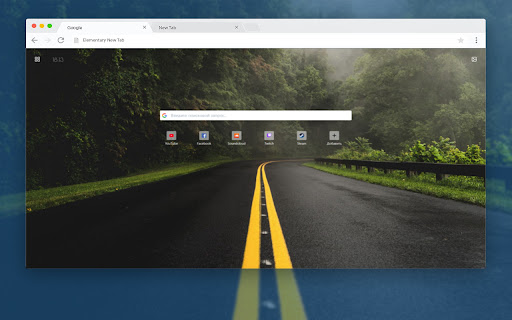


Download het CRX-bestand van de extensie Elementary New Tab
Download Elementary New Tab-extensiebestanden in crx-indeling, installeer Chrome-extensies handmatig in de browser of deel de crx-bestanden met vrienden om Chrome-extensies eenvoudig te installeren.
Instructies voor het Gebruik van de Extensie
                        💎 Elementary New Tab is a new elegant, lightweight and incredibly beautiful tab for your browser.

✨ Fast switching of the search service Google, Yandex, Bing, choose what you need with one click.

✨ Extensive gallery of quality images for the background of your page

✨ Minimalistic customizable tabs for quick access to your favorite sites
Basisinformatie over de Extensie
| Naam |  Elementary New Tab Elementary New Tab |
| ID | nkchlojdkebfdanfjngpdimocljgpfhh |
| Officiële URL | https://chromewebstore.google.com/detail/elementary-new-tab/nkchlojdkebfdanfjngpdimocljgpfhh |
| Beschrijving | Elementary New Tab is a new elegant, lightweight and incredibly beautiful tab for your browser |
| Bestandsgrootte | 2.92 MB |
| Aantal Installaties | 72 |
| Huidige Versie | 1.0.4 |
| Laatst Bijgewerkt | 2021-01-17 |
| Publicatiedatum | 2020-12-20 |
| Beoordeling | 5.00/5 Totaal 4 Beoordelingen |
| Ontwikkelaar | Gamake |
| [email protected] | |
| Betalingswijze | free |
| Ondersteunde Talen | de,en,fr,tr,ru |
| manifest.json | |
{
    "update_url": "https:\/\/clients2.google.com\/service\/update2\/crx",
    "name": "Elementary New Tab",
    "description": "__MSG_extDescription__",
    "version": "1.0.4",
    "default_locale": "en",
    "manifest_version": 2,
    "icons": {
        "16": "assets\/images\/icons\/icon_16.png",
        "48": "assets\/images\/icons\/icon_48.png",
        "128": "assets\/images\/icons\/icon_128.png"
    },
    "chrome_url_overrides": {
        "newtab": "index.html"
    },
    "background": {
        "scripts": [
            "background.js"
        ]
    },
    "permissions": [
        "storage",
        "topSites",
        "*:\/\/wallhaven.cc\/*"
    ]
} | |