Image Downloader For Chrome
Image Downloader is browse and download images on a web page. %100 WORKING, FREE
Wat is Image Downloader For Chrome?
Image Downloader For Chrome is een Chrome-extensie ontwikkeld door imgelemt, en de belangrijkste functie is "Image Downloader is browse and download images on a web page. %100 WORKING, FREE".
Extensie Screenshots
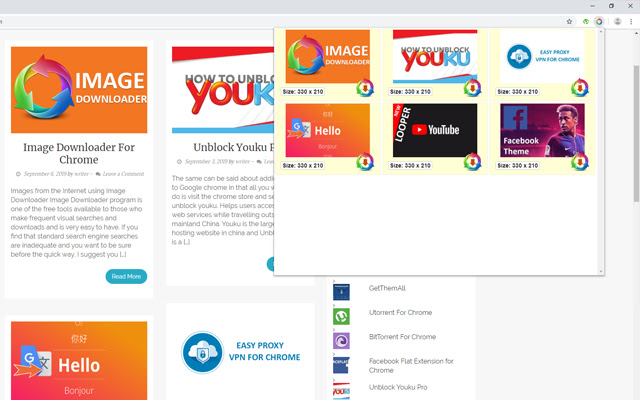
Download het CRX-bestand van de extensie Image Downloader For Chrome
Download Image Downloader For Chrome-extensiebestanden in crx-indeling, installeer Chrome-extensies handmatig in de browser of deel de crx-bestanden met vrienden om Chrome-extensies eenvoudig te installeren.
Instructies voor het Gebruik van de Extensie
                        What can you do with Image Downloader For Chrome?

- You can download the images on a web page in bulk.
- You can select the picture to download by seeing the size of the plugin.
- A download pictures with a click.
Basisinformatie over de Extensie
| Naam |  Image Downloader For Chrome Image Downloader For Chrome |
| ID | okpmdnjflijeciighokpeemlfnglijhp |
| Officiële URL | https://chrome.google.com/webstore/detail/image-downloader-for-chro/okpmdnjflijeciighokpeemlfnglijhp |
| Beschrijving | Image Downloader is browse and download images on a web page. %100 WORKING, FREE |
| Bestandsgrootte | 145 KB |
| Aantal Installaties | 425 |
| Huidige Versie | 1.3.6 |
| Laatst Bijgewerkt | 2021-01-18 |
| Publicatiedatum | 2021-01-18 |
| Beoordeling | 1.00/5 Totaal 1 Beoordelingen |
| Ontwikkelaar | imgelemt |
| [email protected] | |
| Betalingswijze | free |
| Ondersteunde Talen | id,de,en-US,fr,nl,no,vi,tr,ca,da,et,es,hr,it,lv,lt,hu,pl,pt-BR,pt-PT,ro,sk,sl,fi,sv,cs,el,sr,bg,ru,uk,mr,hi,bn,gu,ta,te,th,zh-CN,zh-TW,ja,ko |
| manifest.json | |
{
    "background": {
        "scripts": [
            "jquery.js",
            "background.js"
        ]
    },
    "default_locale": "en_US",
    "browser_action": {
        "default_icon": "img\/ico_19.png",
        "default_popup": "popup.html"
    },
    "content_security_policy": "script-src 'self'; object-src 'self'",
    "description": "__MSG_appDesc__",
    "icons": {
        "128": "img\/ico_128.png",
        "16": "img\/ico_16.png",
        "48": "img\/ico_48.png"
    },
    "manifest_version": 2,
    "name": "__MSG_appName__",
    "permissions": [
        "downloads",
        "activeTab",
        "tabs"
    ],
    "update_url": "https:\/\/clients2.google.com\/service\/update2\/crx",
    "version": "1.3.6"
} | |