NoteView for Jupyter
Easily share results from your local jupyter notebooks
Co to jest NoteView for Jupyter?
NoteView for Jupyter to rozszerzenie Chrome opracowane przez https://noteview.co, a jego główną funkcją jest „Easily share results from your local jupyter notebooks”.
Zrzuty ekranu rozszerzenia

Pobierz plik CRX rozszerzenia NoteView for Jupyter
Pobierz pliki rozszerzeń NoteView for Jupyter w formacie crx, zainstaluj ręcznie rozszerzenia Chrome w przeglądarce lub udostępnij pliki crx znajomym, aby łatwo zainstalować rozszerzenia Chrome.
Instrukcja Użytkowania Rozszerzenia
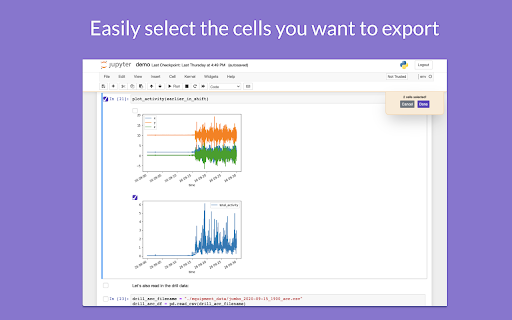
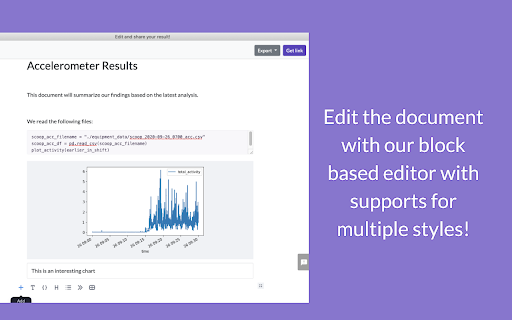
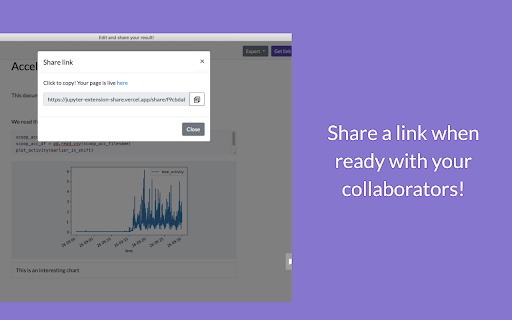
                        Easily select the cells you want to highlight, and then convert into a beautiful shareable link for your team and clients (with ability to comment). Become a more productive data scientists and communicate the results of your analysis easily!

No need to spend minutes to copy paste different screenshots - with this extension it takes a minute to create a beautiful report. You can also export as PDF or a PNG to share as a message.

This extension works on any local running Jupyter notebook (with plans to add more support shortly).
Podstawowe informacje o rozszerzeniu
| Nazwa |  NoteView for Jupyter NoteView for Jupyter |
| ID | aahgmjlaldifaebpcnlnifgehafnelbj |
| Oficjalny URL | https://chromewebstore.google.com/detail/noteview-for-jupyter/aahgmjlaldifaebpcnlnifgehafnelbj |
| Opis | Easily share results from your local jupyter notebooks |
| Rozmiar pliku | 237 KB |
| Liczba instalacji | 138 |
| Aktualna Wersja | 0.3 |
| Ostatnia Aktualizacja | 2020-12-10 |
| Data Publikacji | 2020-12-09 |
| Ocena | 5.00/5 Łącznie 3 Oceny |
| Deweloper | https://noteview.co |
| [email protected] | |
| Typ Płatności | free |
| Strona Rozszerzenia | https://noteview.co |
| Obsługiwane Języki | en-US |
| manifest.json | |
{
    "update_url": "https:\/\/clients2.google.com\/service\/update2\/crx",
    "manifest_version": 2,
    "name": "NoteView for Jupyter",
    "version": "0.3",
    "description": "Easily share results from your local jupyter notebooks",
    "icons": {
        "128": "Icon-128.png",
        "48": "Icon-48.png",
        "16": "Icon-16.png"
    },
    "page_action": {
        "default_icon": "Icon-48.png",
        "default_title": "PageFontStyle"
    },
    "background": {
        "scripts": [
            "background.js"
        ],
        "persistent": false
    },
    "content_scripts": [
        {
            "matches": [
                "http:\/\/localhost\/*"
            ],
            "js": [
                "jquery-3.5.1.min.js",
                "content.js",
                "editor.js",
                "editor_inline_code.js",
                "supabase.min.js",
                "html2canvas.min.js"
            ],
            "css": [
                "content.css"
            ]
        }
    ],
    "permissions": [
        "storage",
        "http:\/\/localhost\/*",
        "https:\/\/xrw4xyfdrb.execute-api.us-east-1.amazonaws.com\/"
    ],
    "content_security_policy": "script-src 'self' https:\/\/w.appzi.io https:\/\/cdnjs.cloudflare.com https:\/\/stackpath.bootstrapcdn.com\/; object-src 'self';"
} | |