Neopets Shop Highlighter
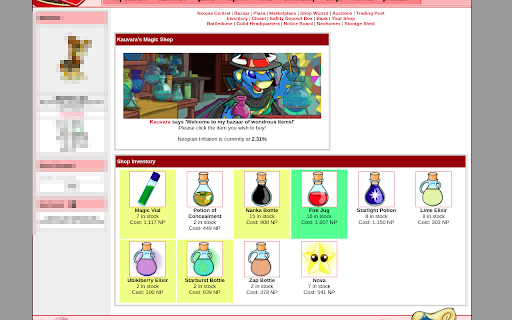
Highlights items in Neopets shops that appear on page refresh
Co to jest Neopets Shop Highlighter?
Neopets Shop Highlighter to rozszerzenie Chrome opracowane przez Elizabeth Harper, a jego główną funkcją jest „Highlights items in Neopets shops that appear on page refresh”.
Zrzuty ekranu rozszerzenia
Pobierz plik CRX rozszerzenia Neopets Shop Highlighter
Pobierz pliki rozszerzeń Neopets Shop Highlighter w formacie crx, zainstaluj ręcznie rozszerzenia Chrome w przeglądarce lub udostępnij pliki crx znajomym, aby łatwo zainstalować rozszerzenia Chrome.
Instrukcja Użytkowania Rozszerzenia
                        Adds a searchable shop list and customizable highlighting to items in Neopets shops based on user set criteria.

Allows:
- Highlighting items added to shops by mini stocks
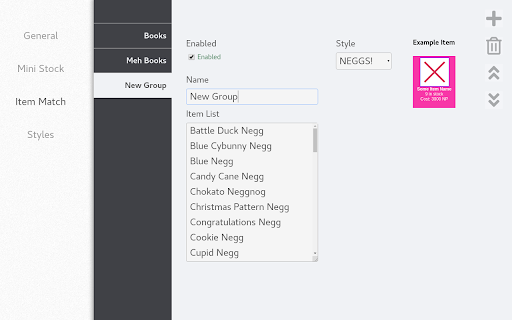
- Highlighting items based on custom item lists (supporting wildcards)
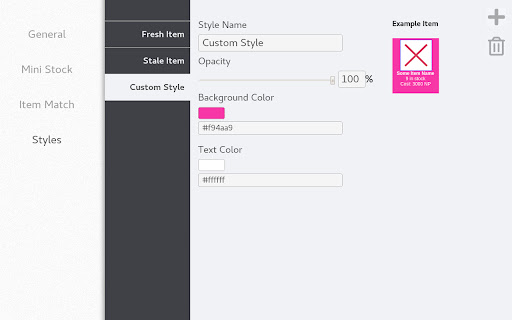
- Customizing the way different items or lists are highlighted
- Quickly search for any shop by it's name (Alt+M to activate shop search)

See the homepage for more detailed info.
Podstawowe informacje o rozszerzeniu
| Nazwa |  Neopets Shop Highlighter Neopets Shop Highlighter |
| ID | aeflneddfelkgikdfnmgiabepophecje |
| Oficjalny URL | https://chromewebstore.google.com/detail/neopets-shop-highlighter/aeflneddfelkgikdfnmgiabepophecje |
| Opis | Highlights items in Neopets shops that appear on page refresh |
| Rozmiar pliku | 179 KB |
| Liczba instalacji | 760 |
| Aktualna Wersja | 1.10.3 |
| Ostatnia Aktualizacja | 2021-03-28 |
| Data Publikacji | 2020-03-01 |
| Ocena | 4.80/5 Łącznie 5 Oceny |
| Deweloper | Elizabeth Harper |
| [email protected] | |
| Typ Płatności | free |
| Strona Rozszerzenia | https://github.com/Foxcapades/np-shop-highlight |
| Adres URL Strony Pomocy | https://github.com/Foxcapades/np-shop-highlight/issues |
| Obsługiwane Języki | en |
| manifest.json | |
{
    "update_url": "https:\/\/clients2.google.com\/service\/update2\/crx",
    "manifest_version": 2,
    "name": "Neopets Shop Highlighter",
    "description": "Highlights items in Neopets shops that appear on page refresh",
    "version": "1.10.3",
    "permissions": [
        "storage",
        "activeTab"
    ],
    "content_scripts": [
        {
            "matches": [
                "*:\/\/*.neopets.com\/*"
            ],
            "js": [
                "active-tab.js"
            ]
        }
    ],
    "background": {
        "scripts": [
            "background.js"
        ],
        "persistent": false
    },
    "browser_action": {
        "default_popup": "action-menu.html"
    },
    "commands": {
        "_execute_browser_action": {
            "suggested_key": {
                "windows": "Alt+M",
                "mac": "Alt+M",
                "chromeos": "Alt+M",
                "linux": "Alt+M"
            }
        }
    },
    "options_page": "settings-menu.html",
    "icons": {
        "16": "res\/icon-16.png",
        "48": "res\/icon-48.png",
        "128": "res\/icon-128.png",
        "256": "res\/icon-256.png"
    }
} | |