Later
Creates bookmarks for browser tabs to access them later.
Co to jest Later?
Later to rozszerzenie Chrome opracowane przez CodeCodingCoder, a jego główną funkcją jest „Creates bookmarks for browser tabs to access them later.”.
Zrzuty ekranu rozszerzenia
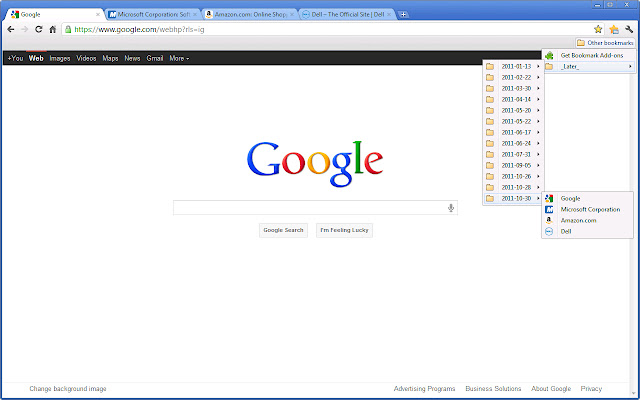
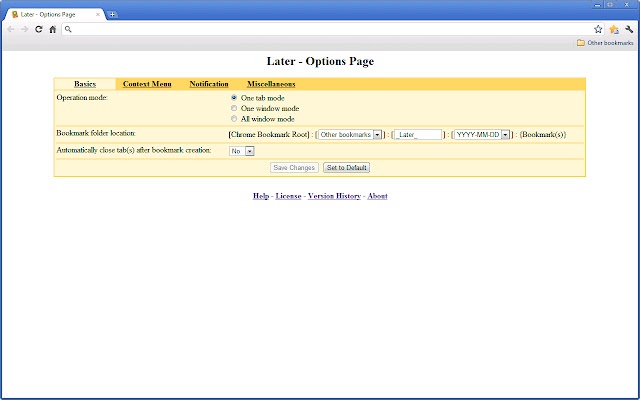
Pobierz plik CRX rozszerzenia Later
Pobierz pliki rozszerzeń Later w formacie crx, zainstaluj ręcznie rozszerzenia Chrome w przeglądarce lub udostępnij pliki crx znajomym, aby łatwo zainstalować rozszerzenia Chrome.
Instrukcja Użytkowania Rozszerzenia
                        Simply put, this extension creates a bookmark.

It makes the bookmark in, by default:

    [Bookmark Root]:[Other bookmarks]:[_Later_]:[YYYY-MM-DD]:{Bookmark(s)}

User can configure behaviors of the extension a bit in the Options Page:

  1. The extension has three operation modes: OneTab, OneWin, and AllWin.
  2. The bookmark root for the extension can be changed from "_Later_".
  3. Close the tab/window(s) automatically afterwards.

I made this extension for "my" convenience, but it would be nice to see usefulness for other people.  Please let me know what you think.  Thanks.
Podstawowe informacje o rozszerzeniu
| Nazwa |  Later Later |
| ID | aokignajbinhiblkcbnckmgleljfomld |
| Oficjalny URL | https://chrome.google.com/webstore/detail/later/aokignajbinhiblkcbnckmgleljfomld |
| Opis | Creates bookmarks for browser tabs to access them later. |
| Rozmiar pliku | 189 KB |
| Liczba instalacji | 83 |
| Aktualna Wersja | 2.0.0.0 |
| Ostatnia Aktualizacja | 2013-02-27 |
| Data Publikacji | 2013-02-27 |
| Ocena | 4.00/5 Łącznie 11 Oceny |
| Deweloper | CodeCodingCoder |
| Typ Płatności | free |
| Obsługiwane Języki | en |
| manifest.json | |
{
    "update_url": "http:\/\/clients2.google.com\/service\/update2\/crx",
    "name": "Later",
    "version": "2.0.0.0",
    "manifest_version": 2,
    "description": "Creates bookmarks for browser tabs to access them later.",
    "icons": {
        "16": "icons\/later16.png",
        "48": "icons\/later48.png",
        "128": "icons\/later128.png"
    },
    "browser_action": {
        "default_icon": "icons\/laterBase19.png",
        "default_title": "Later extension: Creates bookmarks for tabs to access them later."
    },
    "background": {
        "page": "laterBackground.html"
    },
    "incognito": "split",
    "minimum_chrome_version": "4.0.222.0",
    "options_page": "laterOptions.html",
    "permissions": [
        "tabs",
        "bookmarks",
        "contextMenus",
        "management"
    ]
} | |