Zaposta Chrome Extension
Shop and Ship from over a thousand shops and have it delivered to you in Nigeria
Co to jest Zaposta Chrome Extension?
Zaposta Chrome Extension to rozszerzenie Chrome opracowane przez http://www.zaposta.com, a jego główną funkcją jest „Shop and Ship from over a thousand shops and have it delivered to you in Nigeria”.
Zrzuty ekranu rozszerzenia


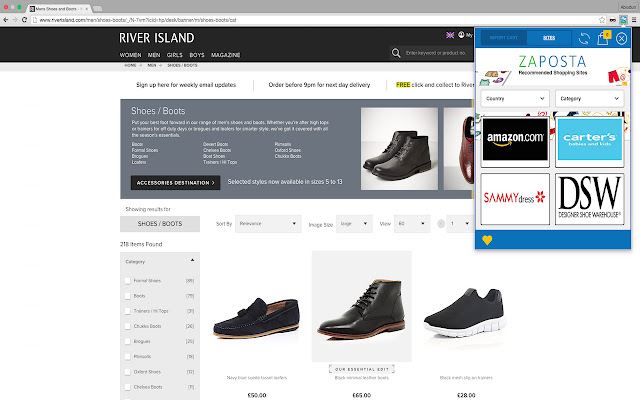

Pobierz plik CRX rozszerzenia Zaposta Chrome Extension
Pobierz pliki rozszerzeń Zaposta Chrome Extension w formacie crx, zainstaluj ręcznie rozszerzenia Chrome w przeglądarce lub udostępnij pliki crx znajomym, aby łatwo zainstalować rozszerzenia Chrome.
Instrukcja Użytkowania Rozszerzenia
An extension that automates making a shopping or shipping list on Zaposta.com. When users place orders or make shipment bookings on Zaposta.com, they can click on the extension to import their shopping cart from the international vendor website and recreate the list, including product images, on the Zaposta shopping cart. This removes the need to manually type and populate shopping cart list on the web application. Podstawowe informacje o rozszerzeniu
| Nazwa |  Zaposta Chrome Extension Zaposta Chrome Extension |
| ID | apfmmeplcfanojoeaphhkiigkjemoodm |
| Oficjalny URL | https://chrome.google.com/webstore/detail/apfmmeplcfanojoeaphhkiigkjemoodm |
| Opis | Shop and Ship from over a thousand shops and have it delivered to you in Nigeria |
| Rozmiar pliku | 436 KB |
| Liczba instalacji | 29 |
| Aktualna Wersja | 1.0.2.3 |
| Ostatnia Aktualizacja | 2016-05-05 |
| Data Publikacji | 2016-05-05 |
| Ocena | 5.00/5 Łącznie 2 Oceny |
| Deweloper | http://www.zaposta.com |
| Typ Płatności | free |
| Strona Rozszerzenia | http://www.zaposta.com |
| Adres URL Strony Pomocy | http://www.zaposta.com/faq |
| Obsługiwane Języki | en-GB |
| manifest.json | |
{
"update_url": "https:\/\/clients2.google.com\/service\/update2\/crx",
"name": "Zaposta Chrome Extension",
"short_name": "Zaposta",
"version": "1.0.2.3",
"manifest_version": 2,
"description": "Shop and Ship from over a thousand shops and have it delivered to you in Nigeria",
"icons": {
"16": "icons\/icon16.png",
"48": "icons\/icon48.png",
"128": "icons\/icon128.png"
},
"browser_action": {
"default_icon": "icons\/icon128.png",
"default_popup": "popup.html"
},
"web_accessible_resources": [
"img\/*"
],
"permissions": [
"tabs",
"storage",
" | |