Push Message to Mobile
Select content on HTML and push it to mobile device
Co to jest Push Message to Mobile?
Push Message to Mobile to rozszerzenie Chrome opracowane przez www.3x.com.tw, a jego główną funkcją jest „Select content on HTML and push it to mobile device”.
Zrzuty ekranu rozszerzenia


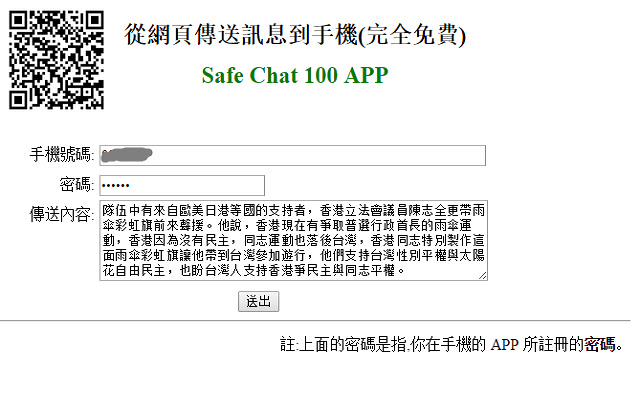

Pobierz plik CRX rozszerzenia Push Message to Mobile
Pobierz pliki rozszerzeń Push Message to Mobile w formacie crx, zainstaluj ręcznie rozszerzenia Chrome w przeglądarce lub udostępnij pliki crx znajomym, aby łatwo zainstalować rozszerzenia Chrome.
Instrukcja Użytkowania Rozszerzenia
                        1.
Push html message to mobile
2.
From the computer to the phone,
you can easily push text or web content to your phone.
Typing on the Computer →
phone notified →
copy, send text messages, open a URL or map.
3.Translation : the process of translating words or text from one language into another.
Podstawowe informacje o rozszerzeniu
| Nazwa |  Push Message to Mobile Push Message to Mobile |
| ID | bcagbbkmockgkkdggjimkijinbabcapp |
| Oficjalny URL | https://chrome.google.com/webstore/detail/push-message-to-mobile/bcagbbkmockgkkdggjimkijinbabcapp |
| Opis | Select content on HTML and push it to mobile device |
| Rozmiar pliku | 196 KB |
| Liczba instalacji | 14 |
| Aktualna Wersja | 1.9 |
| Ostatnia Aktualizacja | 2014-10-30 |
| Data Publikacji | 2014-10-30 |
| Ocena | 3.00/5 Łącznie 1 Oceny |
| Deweloper | www.3x.com.tw |
| Typ Płatności | free |
| Obsługiwane Języki | en |
| manifest.json | |
{
    "update_url": "https:\/\/clients2.google.com\/service\/update2\/crx",
    "version": "1.9",
    "name": "__MSG_manifest_name__",
    "manifest_version": 2,
    "default_locale": "en",
    "description": "__MSG_manifest_description__",
    "author": "www.3x.com.tw",
    "icons": {
        "16": "images\/icon_16.png",
        "48": "images\/icon_48.png",
        "128": "images\/icon_128.png"
    },
    "permissions": [
        "tabs",
        "http:\/\/*\/*",
        "https:\/\/*\/*"
    ],
    "background": {
        "scripts": [
            "background.js"
        ]
    },
    "browser_action": {
        "default_icon": "images\/icon_128.png",
        "default_popup": "popup.html"
    },
    "content_scripts": [
        {
            "matches": [
                "http:\/\/dict.cn\/*"
            ],
            "js": [
                "my_dict.js"
            ],
            "run_at": "document_end",
            "all_frames": true
        },
        {
            "matches": [
                "http:\/\/*\/*",
                "https:\/\/*\/*"
            ],
            "js": [
                "my.js"
            ],
            "run_at": "document_end",
            "all_frames": true
        }
    ]
} | |