Colors Dev Panel
Colors, in your dev inspector
Co to jest Colors Dev Panel?
Colors Dev Panel to rozszerzenie Chrome opracowane przez Roy Kolak, a jego główną funkcją jest „Colors, in your dev inspector”.
Zrzuty ekranu rozszerzenia
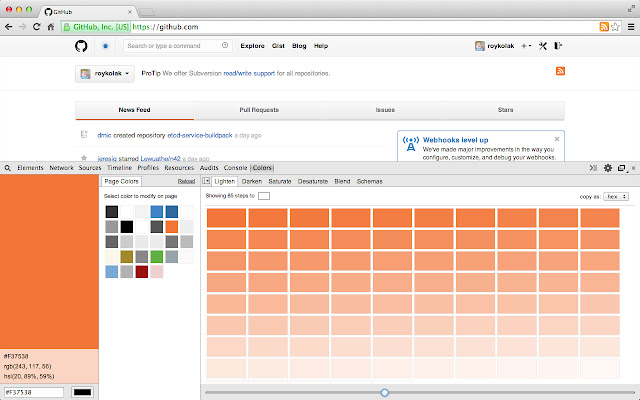


Pobierz plik CRX rozszerzenia Colors Dev Panel
Pobierz pliki rozszerzeń Colors Dev Panel w formacie crx, zainstaluj ręcznie rozszerzenia Chrome w przeglądarce lub udostępnij pliki crx znajomym, aby łatwo zainstalować rozszerzenia Chrome.
Instrukcja Użytkowania Rozszerzenia
                        The Color Panel you have been searching for all your life... is here.

• Get the inspected site's palette of colors
• Modify any site's palette in real-time
• Precise color step control for manipulation
• Lighten and darken colors
• Saturate and desaturate colors
• Blend colors to find that perfect shade
• Convert between Hex, RGB, and HSL
• Easily copy colors to the clipboard
• View recently selected colors
• Explorable color schemas...
     - Complementary
     - Split complementary
     - Triadic
     - Tetradic
     - Analogous
     - Neutral

Oh and it's Open Source!
https://github.com/roykolak/colors-dev-panel
Podstawowe informacje o rozszerzeniu
| Nazwa |  Colors Dev Panel Colors Dev Panel |
| ID | bgmflgfbiohkjpmoglkmfadokpichgln |
| Oficjalny URL | https://chrome.google.com/webstore/detail/colors-dev-panel/bgmflgfbiohkjpmoglkmfadokpichgln |
| Opis | Colors, in your dev inspector |
| Rozmiar pliku | 344 KB |
| Liczba instalacji | 134 |
| Aktualna Wersja | 1.2.1 |
| Ostatnia Aktualizacja | 2014-03-31 |
| Data Publikacji | 2014-03-31 |
| Ocena | 3.40/5 Łącznie 5 Oceny |
| Deweloper | Roy Kolak |
| Typ Płatności | free |
| Obsługiwane Języki | en |
| manifest.json | |
{
"update_url": "https:\/\/clients2.google.com\/service\/update2\/crx",
"name": "Colors Dev Panel",
"short_name": "Colors Panels",
"version": "1.2.1",
"manifest_version": 2,
"description": "Colors, in your dev inspector",
"minimum_chrome_version": "29",
"devtools_page": "devtools.html",
"background": {
"scripts": [
"js\/background.js"
]
},
"icons": {
"16": "images\/icons\/icon16.png",
"48": "images\/icons\/icon48.png",
"128": "images\/icons\/icon128.png"
},
"permissions": [
"clipboardWrite",
"clipboardRead",
"tabs",
"storage"
],
"content_scripts": [
{
"matches": [
" | |