Gitlab CI Dashboard
Manage your Gitlab pipelines in 2 clicks!
Co to jest Gitlab CI Dashboard?
Gitlab CI Dashboard to rozszerzenie Chrome opracowane przez https://pixel-perfect.dev, a jego główną funkcją jest „Manage your Gitlab pipelines in 2 clicks!”.
Zrzuty ekranu rozszerzenia
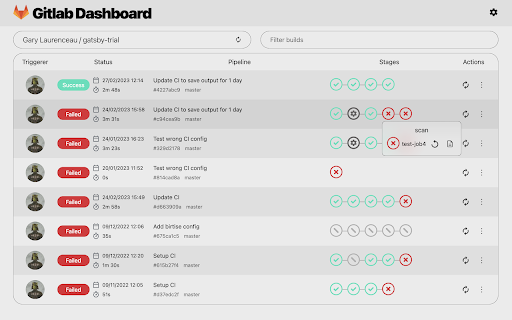
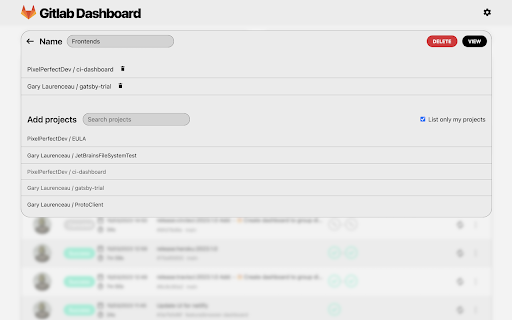
Pobierz plik CRX rozszerzenia Gitlab CI Dashboard
Pobierz pliki rozszerzeń Gitlab CI Dashboard w formacie crx, zainstaluj ręcznie rozszerzenia Chrome w przeglądarce lub udostępnij pliki crx znajomym, aby łatwo zainstalować rozszerzenia Chrome.
Instrukcja Użytkowania Rozszerzenia
                        Features:
- 🔐️ Use your Gitlab account from gitlab.com, self-hosted GitLab Community Edition (CE) or self-hosted GitLab Enterprise Edition (EE) server.
- 🔎 Search for your personal depots and public ones.
- 🖥 Keep track of pipelines and show jobs details.
- 🛠 Trigger, abort and retry pipeline or job.

Plugin is in beta, send your feedback here: https://tally.so/r/3jebP4

Also available on your JetBrains IDE with more features: https://plugins.jetbrains.com/plugin/15457-gitlab-ci-dashboard
Podstawowe informacje o rozszerzeniu
| Nazwa |  Gitlab CI Dashboard Gitlab CI Dashboard |
| ID | cmemccamcgimfmellbnblebeajdfjogl |
| Oficjalny URL | https://chromewebstore.google.com/detail/gitlab-ci-dashboard/cmemccamcgimfmellbnblebeajdfjogl |
| Opis | Manage your Gitlab pipelines in 2 clicks! |
| Rozmiar pliku | 1.27 MB |
| Liczba instalacji | 87 |
| Aktualna Wersja | 2023.0.2 |
| Ostatnia Aktualizacja | 2023-04-15 |
| Data Publikacji | 2023-03-02 |
| Ocena | 3.00/5 Łącznie 2 Oceny |
| Deweloper | https://pixel-perfect.dev |
| [email protected] | |
| Typ Płatności | in_app |
| Strona Rozszerzenia | https://pixel-perfect.dev |
| Adres URL Strony Polityki Prywatności | https://pixel-perfect.dev/privacy-policy.html |
| Obsługiwane Języki | en |
| manifest.json | |
{
    "update_url": "https:\/\/clients2.google.com\/service\/update2\/crx",
    "name": "Gitlab CI Dashboard",
    "version": "2023.0.2",
    "description": "Manage your Gitlab pipelines in 2 clicks!",
    "manifest_version": 3,
    "icons": {
        "16": "icons\/ic_plugin_gitlab_16.png",
        "48": "icons\/ic_plugin_gitlab_48.png",
        "128": "icons\/ic_plugin_gitlab_128.png"
    },
    "action": {
        "default_icon": "icons\/ic_plugin_gitlab_48.png",
        "default_popup": "index.html?popup=true",
        "default_title": "Gitlab Dashboard"
    },
    "browser_specific_settings": {
        "gecko": {
            "id": "[email protected]"
        }
    }
} | |