GlobiMail for Podio
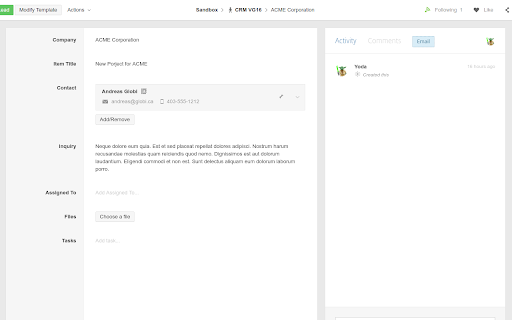
Initiate an email conversation from any Citrix Podio item - just click on the Email button on top of the Activity stream in Podio.
Co to jest GlobiMail for Podio?
GlobiMail for Podio to rozszerzenie Chrome opracowane przez https://www.globimail.com, a jego główną funkcją jest „Initiate an email conversation from any Citrix Podio item - just click on the Email button on top of the Activity stream in Podio.”.
Zrzuty ekranu rozszerzenia

Pobierz plik CRX rozszerzenia GlobiMail for Podio
Pobierz pliki rozszerzeń GlobiMail for Podio w formacie crx, zainstaluj ręcznie rozszerzenia Chrome w przeglądarce lub udostępnij pliki crx znajomym, aby łatwo zainstalować rozszerzenia Chrome.
Instrukcja Użytkowania Rozszerzenia
                        GlobiMail is a powerful add-on for Citrix Podio that enables you to communicate via email with your external Podio contacts.

 - Communicate with your customers using Email, and customers reply to Email as normal.
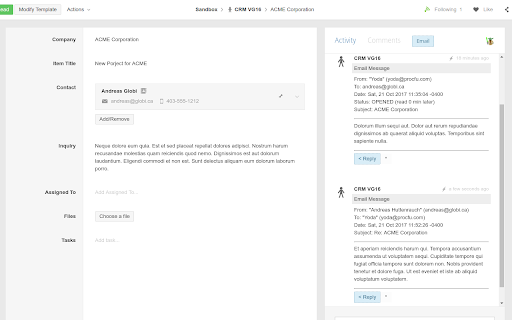
 - All emails are automatically added to Podio as comments on the relevant item.
 - Works on your Desktop, Tablet, and Mobile Phone, including email attachments.
 - Emails are tracked - know when your contacts read your messages.

With the GlobiMail Browser Extension, you can initiate an email conversation from ANY Podio item - just click on the Email button on top of the Activity stream of any item.
Podstawowe informacje o rozszerzeniu
| Nazwa |  GlobiMail for Podio GlobiMail for Podio |
| ID | dinfkhgjokdhpcaeajmfmnohbfcooapl |
| Oficjalny URL | https://chromewebstore.google.com/detail/globimail-for-podio/dinfkhgjokdhpcaeajmfmnohbfcooapl |
| Opis | Initiate an email conversation from any Citrix Podio item - just click on the Email button on top of the Activity stream in Podio. |
| Rozmiar pliku | 66.42 KB |
| Liczba instalacji | 2,483 |
| Aktualna Wersja | 1.1.20 |
| Ostatnia Aktualizacja | 2021-12-10 |
| Data Publikacji | 2020-06-26 |
| Ocena | 5.00/5 Łącznie 4 Oceny |
| Deweloper | https://www.globimail.com |
| [email protected] | |
| Typ Płatności | in_app |
| Adres URL Strony Polityki Prywatności | http://globi.ca/privacy.php |
| Obsługiwane Języki | en |
| manifest.json | |
{
    "update_url": "https:\/\/clients2.google.com\/service\/update2\/crx",
    "manifest_version": 2,
    "author": "Globi Web Solutions",
    "name": "GlobiMail for Podio",
    "description": "Initiate an email conversation from any Citrix Podio item - just click on the Email button on top of the Activity stream in Podio.",
    "version": "1.1.20",
    "icons": {
        "16": "gm_icon_16.png",
        "32": "gm_icon_32.png",
        "48": "gm_icon_48.png",
        "128": "gm_icon_128.png"
    },
    "permissions": [
        "storage",
        "tabs",
        "https:\/\/podio.com\/",
        "https:\/\/secure.globimail.com\/",
        "https:\/\/secure.globiflow.com\/",
        "https:\/\/workflow-automation.podio.com\/",
        "https:\/\/mail.lcldev.globi.ca\/"
    ],
    "content_scripts": [
        {
            "matches": [
                "https:\/\/podio.com\/*",
                "https:\/\/*.podio.com\/*",
                "https:\/\/secure.globimail.com\/*",
                "https:\/\/secure.globiflow.com\/*",
                "https:\/\/workflow-automation.podio.com\/*",
                "https:\/\/mail.lcldev.globi.ca\/*"
            ],
            "js": [
                "jquery.min.js",
                "sajax.js",
                "podio.js",
                "globiflow.js",
                "globimail.js",
                "background.js",
                "content.js"
            ],
            "run_at": "document_start"
        }
    ],
    "background": {
        "scripts": [
            "background.js",
            "jquery.min.js"
        ],
        "persistent": true
    },
    "browser_action": {
        "default_icon": "gm_icon_32.png",
        "default_popup": "options.html"
    }
} | |