Trendcat
A new tab extension for GitHub and HackerNews feeds
Co to jest Trendcat?
Trendcat to rozszerzenie Chrome opracowane przez Ergenekon Yigit, a jego główną funkcją jest „A new tab extension for GitHub and HackerNews feeds”.
Zrzuty ekranu rozszerzenia
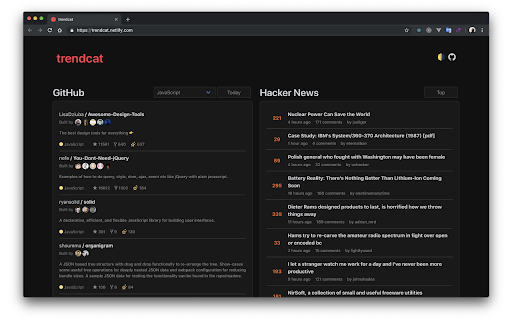
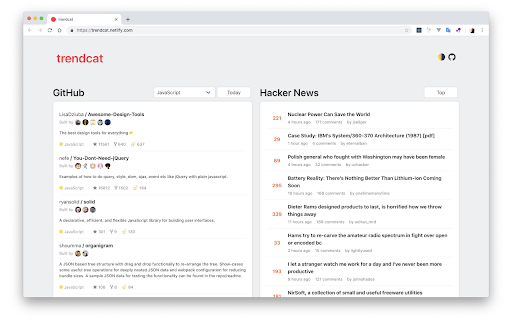
Pobierz plik CRX rozszerzenia Trendcat
Pobierz pliki rozszerzeń Trendcat w formacie crx, zainstaluj ręcznie rozszerzenia Chrome w przeglądarce lub udostępnij pliki crx znajomym, aby łatwo zainstalować rozszerzenia Chrome.
Instrukcja Użytkowania Rozszerzenia
                        Simple new tab extension for Github Trending Repositories and Hacker News Stories.


https://github.com/ergenekonyigit/trendcat

v2.4.2
- Github api changes

v2.4.1
- Github api changes
- Fix github language color issue

v2.4.0
- Github api url changes
- Move rust to favorite languages

v2.3.0
- Word break fix

v2.2.0
- New Settings Modal
- Digital Clock Splash Screen (Optional)
- Request Delay (Optional)

v2.1.0
- Redesigned Light Theme
- New Dark Theme

v2.0.0
- New Hacker News Column

v1.0.0
- Github Trending Feed
Podstawowe informacje o rozszerzeniu
| Nazwa |  Trendcat Trendcat |
| ID | efpdjmbhdeindmfegilaloknlpfloefd |
| Oficjalny URL | https://chromewebstore.google.com/detail/trendcat/efpdjmbhdeindmfegilaloknlpfloefd |
| Opis | A new tab extension for GitHub and HackerNews feeds |
| Rozmiar pliku | 1.16 MB |
| Liczba instalacji | 47 |
| Aktualna Wersja | 2.4.2 |
| Ostatnia Aktualizacja | 2021-03-05 |
| Data Publikacji | 2019-07-04 |
| Ocena | 5.00/5 Łącznie 3 Oceny |
| Deweloper | Ergenekon Yigit |
| [email protected] | |
| Typ Płatności | free |
| Strona Rozszerzenia | https://github.com/ergenekonyigit/trendcat |
| Adres URL Strony Pomocy | https://github.com/ergenekonyigit/trendcat/issues |
| Obsługiwane Języki | en |
| manifest.json | |
{
    "update_url": "https:\/\/clients2.google.com\/service\/update2\/crx",
    "manifest_version": 2,
    "name": "Trendcat",
    "author": "Ergenekon Yigit",
    "version": "2.4.2",
    "description": "A new tab extension for GitHub and HackerNews feeds",
    "incognito": "split",
    "icons": {
        "96": "img\/icon-96.png",
        "128": "img\/icon-128.png",
        "196": "img\/icon-196.png"
    },
    "chrome_url_overrides": {
        "newtab": "index.html"
    }
} | |