Translator - Select to Translate
Translator Web - translation of selected text or any words on a web page with use Google Translate. Translator, Dictionary, Voice
Co to jest Translator - Select to Translate?
Translator - Select to Translate to rozszerzenie Chrome opracowane przez App-Translator, a jego główną funkcją jest „Translator Web - translation of selected text or any words on a web page with use Google Translate. Translator, Dictionary, Voice”.
Zrzuty ekranu rozszerzenia
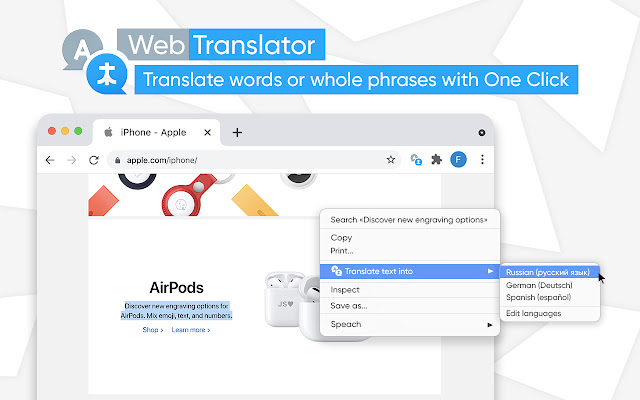


Pobierz plik CRX rozszerzenia Translator - Select to Translate
Pobierz pliki rozszerzeń Translator - Select to Translate w formacie crx, zainstaluj ręcznie rozszerzenia Chrome w przeglądarce lub udostępnij pliki crx znajomym, aby łatwo zainstalować rozszerzenia Chrome.
Instrukcja Użytkowania Rozszerzenia
                        Translator for Chrome is such a simple but extremely useful extension for your chrome browser. The name says itself – this extension allows you to translate selected text in language you need.

Are you reading something on the Internet and you come across an unfamiliar word?

We offer you the best and easiest way to quickly translate part of the content that you need, such as words, phrases, or even menu items. Click the right mouse button on the word that you need and select Translate. All in one simple and understandable browser extension.

Download Translator for Chrome for free to start translating today.

Translate while reading
You never have to skip an email, article, or website again. No matter what you’re browsing in Chrome, you can view it in context in your chosen language.

Translate your writing
Whether you’re writing a social media post, chat message, or email, you can translate your own words immediately after you type them. This means you no longer have to copy, paste, retype, or leave Chrome to communicate in another language.

Just like a real-life mate has your back, Translate Extension for Chrome has you covered for all your translation needs.

Translator - Select to Google Translate isn’t just for reading and writing but for full language mastery and comprehension. Download your Translate Chrome translator today and never feel lost in language again.

Important:
The Chrome extension "Translator" has no relation to the popular site https://translate.google.com

All copyrights belong to their respective owners.  Google does not support or sponsor this Chrome extension. This Chrome extension is not owned, licensed, or a subsidiary of Google Inc.

If you work with foreign languages or just want to have such a useful tool in your chrome browser, then this Translator extension is exactly what you was looking for.
Podstawowe informacje o rozszerzeniu
| Nazwa |  Translator - Select to Translate Translator - Select to Translate |
| ID | eggeoellnjnnglaibpcmggjnjifeebpi |
| Oficjalny URL | https://chrome.google.com/webstore/detail/translator-select-to-tran/eggeoellnjnnglaibpcmggjnjifeebpi |
| Opis | Translator Web - translation of selected text or any words on a web page with use Google Translate. Translator, Dictionary, Voice |
| Rozmiar pliku | 249 KB |
| Liczba instalacji | 528,896 |
| Aktualna Wersja | 1.4.2 |
| Ostatnia Aktualizacja | 2022-12-05 |
| Data Publikacji | 2021-03-02 |
| Ocena | 4.44/5 Łącznie 835 Oceny |
| Deweloper | App-Translator |
| [email protected] | |
| Typ Płatności | free |
| Adres URL Strony Polityki Prywatności | https://sites.google.com/view/translator-dictionary/privacy-policy |
| Obsługiwane Języki | id,ms,de,en,en-GB,en-US,fil,fr,nl,no,vi,tr,ca,da,et,es,es-419,hr,it,lv,lt,hu,pl,pt-BR,pt-PT,ro,sk,sl,fi,sv,cs,el,sr,bg,ru,uk,mr,hi,bn,gu,ta,te,ml,th,ja,ko |
| manifest.json | |
{
"update_url": "https:\/\/clients2.google.com\/service\/update2\/crx",
"name": "__MSG_name__",
"description": "__MSG_description__",
"short_name": "__MSG_short_name__",
"manifest_version": 2,
"version": "1.4.2",
"default_locale": "en",
"icons": {
"32": "img\/icon32.png",
"48": "img\/icon48.png",
"64": "img\/icon64.png",
"128": "img\/icon128.png"
},
"browser_action": {
"default_icon": {
"32": "img\/icon32.png",
"64": "img\/icon64.png"
},
"default_popup": "options.html",
"default_title": "__MSG_name__"
},
"background": {
"scripts": [
"js\/bg.js"
]
},
"content_scripts": [
{
"matches": [
" | |