Inspect CSS
The easiest way to inspect and edit CSS
Co to jest Inspect CSS?
Inspect CSS to rozszerzenie Chrome opracowane przez kholid060, a jego główną funkcją jest „The easiest way to inspect and edit CSS”.
Zrzuty ekranu rozszerzenia
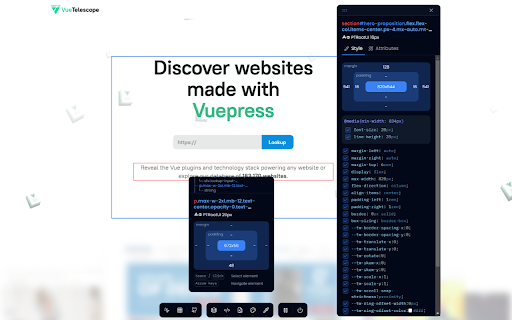

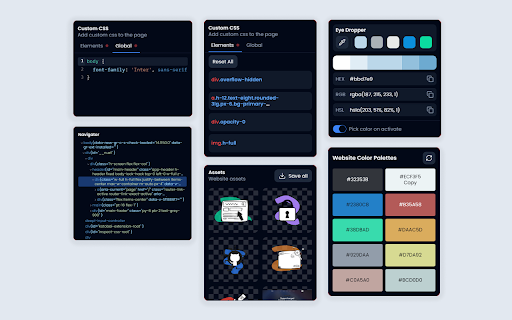
Pobierz plik CRX rozszerzenia Inspect CSS
Pobierz pliki rozszerzeń Inspect CSS w formacie crx, zainstaluj ręcznie rozszerzenia Chrome w przeglądarce lub udostępnij pliki crx znajomym, aby łatwo zainstalować rozszerzenia Chrome.
Instrukcja Użytkowania Rozszerzenia
                        Features:
🔎 Get CSS Properties from any element by selecting it
✏️ Get and edit element attributes
📷 Download website assets
⌨️ Add your custom CSS to the website
🎨 Get the color palette of the website
🧭 DOM Navigation
🎯 Color picker

GitHub:
https://github.com/Kholid060/inspect-css
Podstawowe informacje o rozszerzeniu
| Nazwa |  Inspect CSS Inspect CSS |
| ID | fbopfffegfehobgoommphghohinpkego |
| Oficjalny URL | https://chromewebstore.google.com/detail/inspect-css/fbopfffegfehobgoommphghohinpkego |
| Opis | The easiest way to inspect and edit CSS |
| Rozmiar pliku | 380 KB |
| Liczba instalacji | 5,344 |
| Aktualna Wersja | 1.0.2 |
| Ostatnia Aktualizacja | 2024-02-09 |
| Data Publikacji | 2020-09-15 |
| Ocena | 4.20/5 Łącznie 10 Oceny |
| Deweloper | kholid060 |
| [email protected] | |
| Typ Płatności | free |
| Strona Rozszerzenia | https://github.com/Kholid060/inspect-css |
| Adres URL Strony Pomocy | https://github.com/Kholid060/inspect-css/issues |
| Obsługiwane Języki | en |
| manifest.json | |
{
    "update_url": "https:\/\/clients2.google.com\/service\/update2\/crx",
    "manifest_version": 3,
    "default_locale": "en",
    "name": "__MSG_extensionName__",
    "version": "1.0.2",
    "description": "__MSG_extensionDescription__",
    "permissions": [
        "activeTab",
        "scripting",
        "storage"
    ],
    "action": [],
    "background": {
        "service_worker": "src\/pages\/background\/index.js",
        "type": "module"
    },
    "icons": {
        "128": "icon-128.png"
    },
    "web_accessible_resources": [
        {
            "resources": [
                "assets\/js\/*.js",
                "assets\/woff2\/*.woff2",
                "assets\/css\/*.css",
                "icon-128.png",
                "icon-34.png"
            ],
            "matches": [
                "*:\/\/*\/*"
            ]
        }
    ]
} | |