Zendesk Garden Inspect
Inspect web pages for Zendesk Garden design system usage.
Co to jest Zendesk Garden Inspect?
Zendesk Garden Inspect to rozszerzenie Chrome opracowane przez https://garden.zendesk.com, a jego główną funkcją jest „Inspect web pages for Zendesk Garden design system usage.”.
Zrzuty ekranu rozszerzenia
Pobierz plik CRX rozszerzenia Zendesk Garden Inspect
Pobierz pliki rozszerzeń Zendesk Garden Inspect w formacie crx, zainstaluj ręcznie rozszerzenia Chrome w przeglądarce lub udostępnij pliki crx znajomym, aby łatwo zainstalować rozszerzenia Chrome.
Instrukcja Użytkowania Rozszerzenia
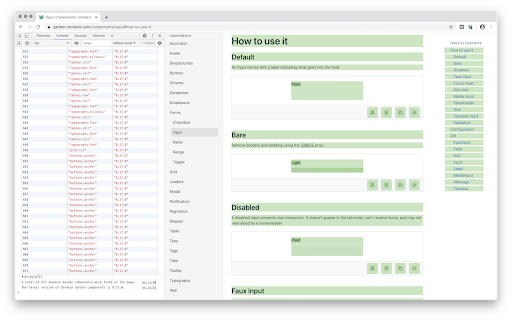
                        Click the extension icon – or press Ctrl+Shift+G – to toggle Garden Inspect. Features include:

• Color highlighting indicating Garden component freshness
    ○ Green = up-to-date
    ○ Yellow = time to update
    ○ Red = out-of-date
• Dashed outlines to indicate Garden container usage
• Overlay tooltips with component information
• Console logging with component IDs and versions
Podstawowe informacje o rozszerzeniu
| Nazwa |  Zendesk Garden Inspect Zendesk Garden Inspect |
| ID | gegnmdnjkodmkohdbljgjpaifiphnjig |
| Oficjalny URL | https://chromewebstore.google.com/detail/zendesk-garden-inspect/gegnmdnjkodmkohdbljgjpaifiphnjig |
| Opis | Inspect web pages for Zendesk Garden design system usage. |
| Rozmiar pliku | 12.85 KB |
| Liczba instalacji | 161 |
| Aktualna Wersja | 1.1.1 |
| Ostatnia Aktualizacja | 2023-11-10 |
| Data Publikacji | 2020-07-28 |
| Ocena | 5.00/5 Łącznie 1 Oceny |
| Deweloper | https://garden.zendesk.com |
| [email protected] | |
| Typ Płatności | free |
| Strona Rozszerzenia | https://github.com/zendeskgarden/chrome-extension |
| Obsługiwane Języki | en |
| manifest.json | |
{
    "update_url": "https:\/\/clients2.google.com\/service\/update2\/crx",
    "name": "Zendesk Garden Inspect",
    "version": "1.1.1",
    "description": "Inspect web pages for Zendesk Garden design system usage.",
    "action": {
        "default_title": "Zendesk Garden Inspect",
        "default_icon": "images\/off.png"
    },
    "background": {
        "service_worker": "background.js"
    },
    "commands": {
        "toggle-garden-inspect": {
            "suggested_key": {
                "default": "Ctrl+Shift+G",
                "mac": "MacCtrl+Shift+G"
            },
            "description": "Toggle Zendesk Garden Inspect"
        }
    },
    "homepage_url": "https:\/\/github.com\/zendeskgarden\/chrome-extension",
    "host_permissions": [
        "https:\/\/registry.npmjs.org\/@zendeskgarden\/react-theming"
    ],
    "icons": {
        "128": "images\/icon.png"
    },
    "manifest_version": 3,
    "permissions": [
        "activeTab",
        "scripting",
        "storage"
    ]
} | |