eversign: eSign in Gmail, Drive & Google Docs
Sign documents right from Gmail, Google Docs, Google Drive, and from your Chrome Browser PDF Preview.
Co to jest eversign: eSign in Gmail, Drive & Google Docs?
eversign: eSign in Gmail, Drive & Google Docs to rozszerzenie Chrome opracowane przez https://eversign.com, a jego główną funkcją jest „Sign documents right from Gmail, Google Docs, Google Drive, and from your Chrome Browser PDF Preview.”.
Zrzuty ekranu rozszerzenia

Pobierz plik CRX rozszerzenia eversign: eSign in Gmail, Drive & Google Docs
Pobierz pliki rozszerzeń eversign: eSign in Gmail, Drive & Google Docs w formacie crx, zainstaluj ręcznie rozszerzenia Chrome w przeglądarce lub udostępnij pliki crx znajomym, aby łatwo zainstalować rozszerzenia Chrome.
Instrukcja Użytkowania Rozszerzenia
                        eversign for Chrome allows you to place legally binding signatures on any document in Gmail, Google Drive, Google Docs, and sign documents right from your Chrome Browsers. You’ll never need to print, sign or scan a document again — just open a document file, place your signature and other dynamic fields, and let eversign do the rest. eversign ensures legally binding signatures and complies with worldwide e-Signature legality standards.

1. Sign from Gmail

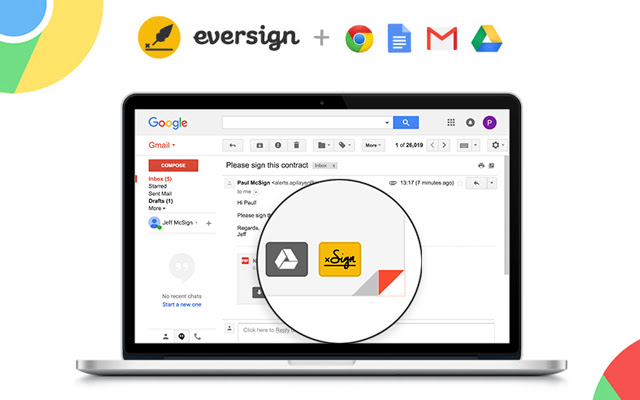
Just hover over an email attachment and click the new „Sign“ button in Gmail to immediately sign any document you receive without leaving your Gmail inbox. Once the document is signed, we’ll automatically attach it to your email’s draft response.

2. Sign from Google Docs

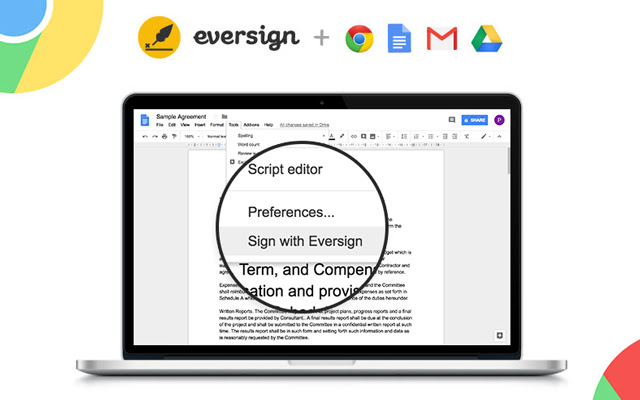
To sign a document right from Google Docs, just open the document, click „Tools“ in the top-options bar and select “Sign with eversign”. After signing you can download the document and we immediately archive it in your eversign account.

3. Sign from Google Drive

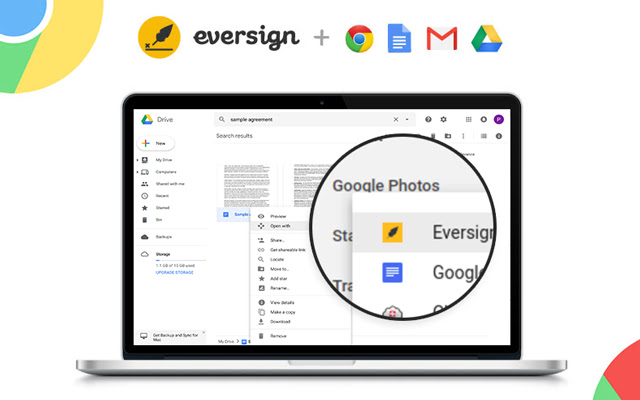
To sign a document right from Google Drive, simply right click on any File and choose „Open with eversign“. After signing you can download the final document and we immediately archive it in your eversign account.

4. Sign from Chrome Preview

Now you can sign PDF documents right from your Chrome Browser Preview Page. Simply click on the „Sign“ icon that appears in the lower right corner of your PDF Preview to sign any PDF document without leaving the page. After signing, you can download the document and we immediately archive it in your eversign account.

Want more information about eversign? Visit us at https://eversign.com
Podstawowe informacje o rozszerzeniu
| Nazwa |  eversign: eSign in Gmail, Drive & Google Docs eversign: eSign in Gmail, Drive & Google Docs |
| ID | hdlhmemcpdlkhkiglelebglchamjmhce |
| Oficjalny URL | https://chrome.google.com/webstore/detail/eversign-esign-in-gmail-d/hdlhmemcpdlkhkiglelebglchamjmhce |
| Opis | Sign documents right from Gmail, Google Docs, Google Drive, and from your Chrome Browser PDF Preview. |
| Rozmiar pliku | 253 KB |
| Liczba instalacji | 13,474 |
| Aktualna Wersja | 1.1.11 |
| Ostatnia Aktualizacja | 2021-05-27 |
| Data Publikacji | 2020-06-24 |
| Ocena | 3.44/5 Łącznie 18 Oceny |
| Deweloper | https://eversign.com |
| [email protected] | |
| Typ Płatności | free |
| Strona Rozszerzenia | https://eversign.com |
| Adres URL Strony Pomocy | https://eversign.com/help |
| Adres URL Strony Polityki Prywatności | https://eversign.com/legal/privacy |
| Obsługiwane Języki | de,en,fr,nl,tr,da,es,it,pl,pt-PT,sv,ru,zh-CN |
| manifest.json | |
{
    "update_url": "https:\/\/clients2.google.com\/service\/update2\/crx",
    "name": "__MSG_name__",
    "description": "__MSG_description__",
    "default_locale": "en",
    "version": "1.1.11",
    "manifest_version": 2,
    "author": "",
    "key": "MIIBIjANBgkqhkiG9w0BAQEFAAOCAQ8AMIIBCgKCAQEAmUy0PlVAsDxDMfG4ioIokYOht64Ilg9nVLSN7JvcKLvZ1Ooy5IOlurXyeE8GC1LnyMf4Jqacykvua3ZPSqvw9NHmmUNbOQfuvx1tuZGbyENx1CLbLzQfIh108L1KB\/SRGms3XGZLA1Qg+lW9Nkd8n8cS0hYCVkzb6ucAjdwW4BExhuaQXf1gqycHdq43BfH8rs6tkVCgArmSjVqweopnm4tlMWWee5f+qFlXUu4cNOrtPV8sy0z+cqBTe72EbA2fZOx4VuWSfG55OQ\/oTlKBykQlPvRPjqDM7tlhNsZ9To\/YLTBrVGnwitNRdlMGZqPIwvVzOyXvxAFowBk78n8kJQIDAQAB",
    "icons": {
        "128": "\/img\/logo_rounded.png"
    },
    "browser_action": {
        "default_icon": "\/img\/logo_rounded.png",
        "default_popup": "\/pages\/popup\/index.html"
    },
    "background": {
        "scripts": [
            "\/lib\/jquery.min.js",
            "\/lib\/x.js",
            "\/js\/background\/background.js"
        ],
        "persistent": false
    },
    "content_scripts": [
        {
            "matches": [
                "https:\/\/mail.google.com\/*",
                "https:\/\/drive.google.com\/*",
                "https:\/\/docs.google.com\/*",
                "https:\/\/eversign.com\/*",
                "https:\/\/*.eversign.com\/*"
            ],
            "all_frames": true,
            "js": [
                "\/lib\/jquery.min.js",
                "\/lib\/moment.min.js",
                "\/lib\/URI.min.js",
                "\/lib\/x.js",
                "\/js\/converters\/main_converter.js",
                "\/js\/converters\/gmail_converter.js",
                "\/js\/converters\/google_docs_converter.js",
                "\/js\/converters\/google_drive_converter.js",
                "\/js\/components\/FileDataManager.js",
                "\/js\/components\/InjectedCodeManager.js",
                "\/js\/components\/WidgetManager.js",
                "\/js\/components\/ApiManager.js",
                "\/js\/components\/GoogleDocsMenuItemManager.js",
                "\/js\/components\/GoogleDriveContextmenuManager.js",
                "\/js\/components\/GmailButtonManager.js",
                "\/js\/components\/PdfButtonManager.js",
                "\/js\/components\/Controller.js",
                "\/js\/content_scripts\/main.js"
            ]
        }
    ],
    "permissions": [
        "storage",
        "https:\/\/mail.google.com\/*",
        "https:\/\/drive.google.com\/*",
        "https:\/\/docs.google.com\/*",
        "https:\/\/*.googleusercontent.com\/*",
        "https:\/\/eversign.com\/*",
        "https:\/\/*.eversign.com\/*"
    ],
    "web_accessible_resources": [
        "\/*"
    ]
} | |