Music New Tab
Provides music-themed new tab page
Co to jest Music New Tab?
Music New Tab to rozszerzenie Chrome opracowane przez http://musicnewtab.com, a jego główną funkcją jest „Provides music-themed new tab page”.
Zrzuty ekranu rozszerzenia
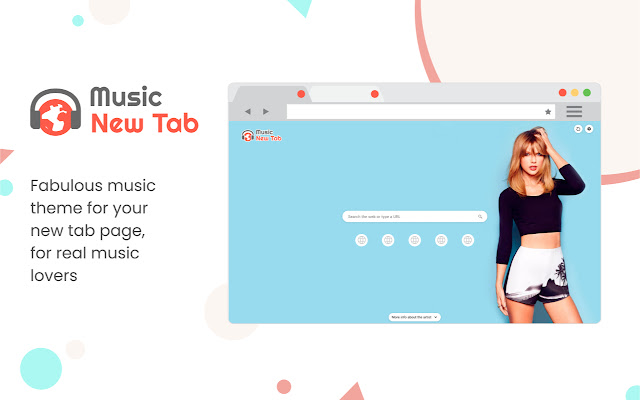


Pobierz plik CRX rozszerzenia Music New Tab
Pobierz pliki rozszerzeń Music New Tab w formacie crx, zainstaluj ręcznie rozszerzenia Chrome w przeglądarce lub udostępnij pliki crx znajomym, aby łatwo zainstalować rozszerzenia Chrome.
Instrukcja Użytkowania Rozszerzenia
                        Enjoy the new tab experience with its background musician and singing artist posters, most visited sites for your easy access, and a search box.

Know more about the musician:
Did you recognize the singer from the background poster and want to know more about him/her? Simply click on the “More info about the artist” button at the bottom of the page and check it out! The information of the artists is provided by YouTube.

Most Visited Sites:
Enable this feature and get quick access to the icons of your most visited websites on the New Tab page.

Enable/disable background poster:
Want some focus and concentration on your work? You can always turn off the background. It’s in the Settings of the extension. Don’t forget to turn it back on when you are in the mood again!

Background Refreshing Interval:
Set your preferred background poster refreshing interval (by hours).

Search Box and Supported Search Engines Inside:
Supporting Yahoo (default), Google, Bing, and DuckDuckGo from the search box. You can make your selection in the Settings of the extension.

Permissions used and reasons:

Access to “topSites” (optional). We require this permission to enable the display of the most visited sites on your New Tab page. It’s optional, only needed if you want to enable it.

How to remove this extension?

If you want to remove our extension, go to “Settings” on Chrome, and find our extension in the “Extensions” tab. Click “remove”. Alternatively, you can right-click on the extension’s icon on your browser and select “Uninstall” from the drop-down menu.

Chrome™  and YouTube™ are trademarks of Google LLC. The use of them does not imply any affiliation to or endorsement by Google LLC.

By adding this extension to your Chrome browser, you accept and agree to our Privacy Policy and End-User License Agreement.

Privacy Policy: https://www.musicnewtab.com/privacy

EULA: https://www.musicnewtab.com/terms

FAQ: https://www.musicnewtab.com/#faq

Contact Us: https://www.musicnewtab.com/contact

Uninstall: https://www.musicnewtab.com/uninstall
Podstawowe informacje o rozszerzeniu
| Nazwa |  Music New Tab Music New Tab |
| ID | hfamgdphmadpbopjpnjeclijgabhmeml |
| Oficjalny URL | https://chrome.google.com/webstore/detail/music-new-tab/hfamgdphmadpbopjpnjeclijgabhmeml |
| Opis | Provides music-themed new tab page |
| Rozmiar pliku | 42.42 KB |
| Liczba instalacji | 358,581 |
| Aktualna Wersja | 3.0.0 |
| Ostatnia Aktualizacja | 2021-01-11 |
| Data Publikacji | 2020-08-19 |
| Ocena | 3.40/5 Łącznie 20 Oceny |
| Deweloper | http://musicnewtab.com |
| [email protected] | |
| Typ Płatności | free |
| Strona Rozszerzenia | https://www.musicnewtab.com |
| Adres URL Strony Pomocy | https://www.musicnewtab.com/contact |
| Adres URL Strony Polityki Prywatności | https://www.musicnewtab.com/privacy |
| Obsługiwane Języki | en |
| manifest.json | |
null | |