Glance Back
You spend so much time staring at your computer... doesn't your computer deserve a chance to glance back at you?
Co to jest Glance Back?
Glance Back to rozszerzenie Chrome opracowane przez https://glanceback.info, a jego główną funkcją jest „You spend so much time staring at your computer... doesn't your computer deserve a chance to glance back at you?”.
Zrzuty ekranu rozszerzenia
Pobierz plik CRX rozszerzenia Glance Back
Pobierz pliki rozszerzeń Glance Back w formacie crx, zainstaluj ręcznie rozszerzenia Chrome w przeglądarce lub udostępnij pliki crx znajomym, aby łatwo zainstalować rozszerzenia Chrome.
Instrukcja Użytkowania Rozszerzenia
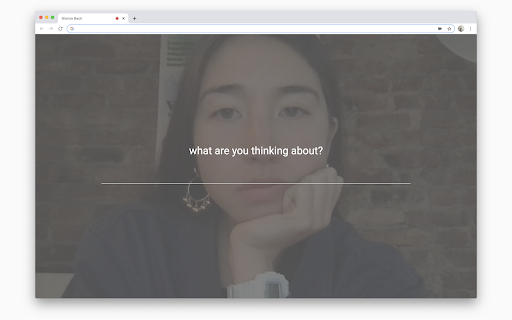
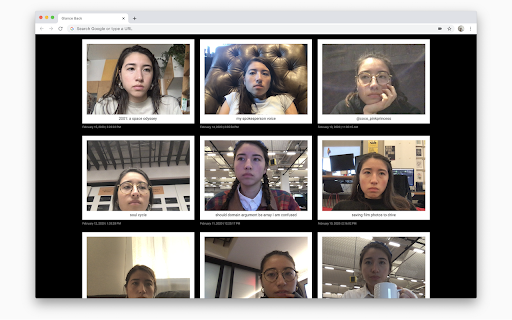
Glance Back is a daily photo diary, capturing the moments shared between you and your computer. Once a day, when you open a new tab, Glance Back will take your photo, ask you what you’re thinking about, and save both the photo and written thought to its locally stored archive. Podstawowe informacje o rozszerzeniu
| Nazwa |  Glance Back Glance Back |
| ID | hgickafobcmcfffbjiamhhejkockfccm |
| Oficjalny URL | https://chromewebstore.google.com/detail/glance-back/hgickafobcmcfffbjiamhhejkockfccm |
| Opis | You spend so much time staring at your computer... doesn't your computer deserve a chance to glance back at you? |
| Rozmiar pliku | 158 KB |
| Liczba instalacji | 9,687 |
| Aktualna Wersja | 0.1.7 |
| Ostatnia Aktualizacja | 2022-08-20 |
| Data Publikacji | 2020-05-23 |
| Ocena | 4.62/5 Łącznie 29 Oceny |
| Deweloper | https://glanceback.info |
| [email protected] | |
| Typ Płatności | free |
| Strona Rozszerzenia | https://glanceback.info/ |
| Adres URL Strony Pomocy | https://glanceback.info/about/ |
| Adres URL Strony Polityki Prywatności | https://glanceback.info/privacy |
| Obsługiwane Języki | en |
| manifest.json | |
{
    "update_url": "https:\/\/clients2.google.com\/service\/update2\/crx",
    "name": "Glance Back",
    "version": "0.1.7",
    "description": "You spend so much time staring at your computer...\u00a0doesn't your computer deserve a chance to glance back at you?",
    "permissions": [
        "storage",
        "unlimitedStorage"
    ],
    "icons": {
        "16": "assets\/logo_black_16x16.png",
        "48": "assets\/logo_black_48x48.png",
        "128": "assets\/logo_black_128x128.png"
    },
    "browser_action": {
        "default_title": "Glance Back",
        "default_icon": {
            "16": "assets\/logo_black_16x16.png",
            "48": "assets\/logo_black_48x48.png",
            "128": "assets\/logo_black_128x128.png"
        }
    },
    "chrome_url_overrides": {
        "newtab": "index.html"
    },
    "manifest_version": 2
} | |