data-qa Highlighter
Visualize data-qa´s areas in screen when click extension icon.
Co to jest data-qa Highlighter?
data-qa Highlighter to rozszerzenie Chrome opracowane przez https://albertovara.es, a jego główną funkcją jest „Visualize data-qa´s areas in screen when click extension icon.”.
Zrzuty ekranu rozszerzenia
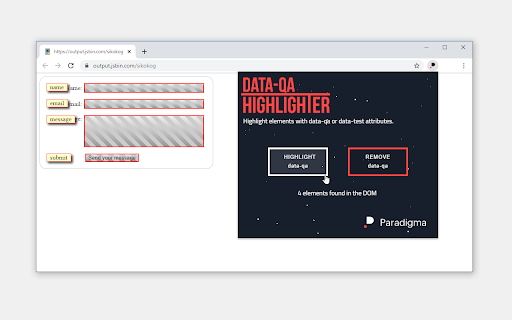
Pobierz plik CRX rozszerzenia data-qa Highlighter
Pobierz pliki rozszerzeń data-qa Highlighter w formacie crx, zainstaluj ręcznie rozszerzenia Chrome w przeglądarce lub udostępnij pliki crx znajomym, aby łatwo zainstalować rozszerzenia Chrome.
Instrukcja Użytkowania Rozszerzenia
                        Visualize "data-qa" elements on screen.

This extension helps QA and testing professionals who use "data-qa" or "data-test" attributes in HTML elements, making the content of these data attributes visible on screen.

If you need to show data-qa/data-test elements on screen, click "HIGHLIGHT data-qa" button and voilà. If you want to remove them, click on "REMOVE data-qa" button.

The extension shows the number of data elements found in the DOM. When the extension finds no items, the extension shows a demo page link to test the functionality.
Podstawowe informacje o rozszerzeniu
| Nazwa |  data-qa Highlighter data-qa Highlighter |
| ID | idhhdaefanknhldagkhodblcpifdddcf |
| Oficjalny URL | https://chromewebstore.google.com/detail/data-qa-highlighter/idhhdaefanknhldagkhodblcpifdddcf |
| Opis | Visualize data-qa´s areas in screen when click extension icon. |
| Rozmiar pliku | 23.61 KB |
| Liczba instalacji | 415 |
| Aktualna Wersja | 3.0 |
| Ostatnia Aktualizacja | 2023-12-10 |
| Data Publikacji | 2020-03-10 |
| Ocena | 3.50/5 Łącznie 4 Oceny |
| Deweloper | https://albertovara.es |
| [email protected] | |
| Typ Płatności | free |
| Strona Rozszerzenia | https://www.paradigmadigital.com/?utm_medium=dataqa-web-extension |
| Adres URL Strony Pomocy | https://www.paradigmadigital.com/dev/crea-tus-propias-extensiones-de-navegador/ |
| Adres URL Strony Polityki Prywatności | https://www.paradigmadigital.com/legal |
| Obsługiwane Języki | en |
| manifest.json | |
{
    "update_url": "https:\/\/clients2.google.com\/service\/update2\/crx",
    "name": "data-qa Highlighter",
    "version": "3.0",
    "description": "Visualize data-qa\u00b4s areas in screen when click extension icon.",
    "permissions": [
        "activeTab",
        "scripting",
        "storage"
    ],
    "background": {
        "service_worker": "service-worker.js"
    },
    "action": {
        "default_popup": "popup.html",
        "default_icon": {
            "128": "images\/icon_128.png",
            "32": "images\/icon_32.png"
        }
    },
    "icons": {
        "128": "images\/icon_128.png",
        "32": "images\/icon_32.png"
    },
    "manifest_version": 3
} | |