HTML Style Quick Viewer
HTML DOM element style quick viewer
Co to jest HTML Style Quick Viewer?
HTML Style Quick Viewer to rozszerzenie Chrome opracowane przez _(:з」∠)_, a jego główną funkcją jest „HTML DOM element style quick viewer”.
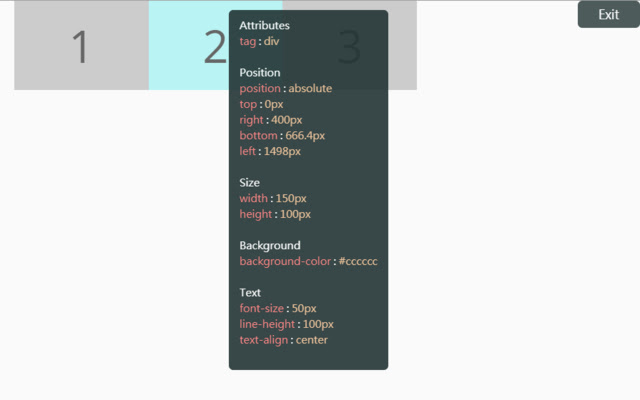
Zrzuty ekranu rozszerzenia
Pobierz plik CRX rozszerzenia HTML Style Quick Viewer
Pobierz pliki rozszerzeń HTML Style Quick Viewer w formacie crx, zainstaluj ręcznie rozszerzenia Chrome w przeglądarce lub udostępnij pliki crx znajomym, aby łatwo zainstalować rozszerzenia Chrome.
Instrukcja Użytkowania Rozszerzenia
                        How about viewing the HTML DOM styles in a different way?
Just move your mouse and it shows the target's styles.

After installation, you may have to reload tabs to for the extension to take effect.

Instructions:
1. Click HTML Style Quick Viewer in the toolbar, then click 'run' button to start.
2. Move mouse to see the element's styles.
3. Mouse left click to close the popup panel.
4. Mouse middle click to pin the popup panel.
5. Click the 'Exit' button at the top-right or click 'Stop' button through the toolbar to stop.
Podstawowe informacje o rozszerzeniu
| Nazwa |  HTML Style Quick Viewer HTML Style Quick Viewer |
| ID | inafmkpmbkldliccdbeieeafnbkcmmap |
| Oficjalny URL | https://chrome.google.com/webstore/detail/html-style-quick-viewer/inafmkpmbkldliccdbeieeafnbkcmmap |
| Opis | HTML DOM element style quick viewer |
| Rozmiar pliku | 15.88 KB |
| Liczba instalacji | 271 |
| Aktualna Wersja | 1.0.2 |
| Ostatnia Aktualizacja | 2018-08-26 |
| Data Publikacji | 2018-08-26 |
| Ocena | 5.00/5 Łącznie 3 Oceny |
| Deweloper | _(:з」∠)_ |
| [email protected] | |
| Typ Płatności | free |
| Obsługiwane Języki | en |
| manifest.json | |
{
    "update_url": "https:\/\/clients2.google.com\/service\/update2\/crx",
    "name": "HTML Style Quick Viewer",
    "description": "HTML DOM element style quick viewer",
    "version": "1.0.2",
    "permissions": [
        "activeTab"
    ],
    "content_scripts": [
        {
            "matches": [
                "http:\/\/*\/*",
                "https:\/\/*\/*"
            ],
            "js": [
                "content\/content.js"
            ],
            "css": [
                "content\/content.css"
            ],
            "run_at": "document_start"
        }
    ],
    "browser_action": {
        "default_title": "HTML Style Quick Viewer\nRight click (Close)\nMiddle click (Pin)",
        "default_icon": {
            "16": "icons\/icon_16.png",
            "32": "icons\/icon_32.png",
            "48": "icons\/icon_48.png",
            "128": "icons\/icon_128.png"
        },
        "default_popup": "popup\/popup.html"
    },
    "manifest_version": 2
} | |