Utorrent For Chrome
Send Link to Utorrent For Chrome
Co to jest Utorrent For Chrome?
Utorrent For Chrome to rozszerzenie Chrome opracowane przez nurullahbgt12, a jego główną funkcją jest „Send Link to Utorrent For Chrome”.
Zrzuty ekranu rozszerzenia

Pobierz plik CRX rozszerzenia Utorrent For Chrome
Pobierz pliki rozszerzeń Utorrent For Chrome w formacie crx, zainstaluj ręcznie rozszerzenia Chrome w przeglądarce lub udostępnij pliki crx znajomym, aby łatwo zainstalować rozszerzenia Chrome.
Instrukcja Użytkowania Rozszerzenia
                        It is used to send a link to the utorrent program with the "Utorrent for Chrome" extension. It is not used to download content found on the sites.
It sends the link of torrent files on the sites to the program.

How to use "Utorrent for Chrome" extension?
- Utorrent computer program is installed.
- The program opens.
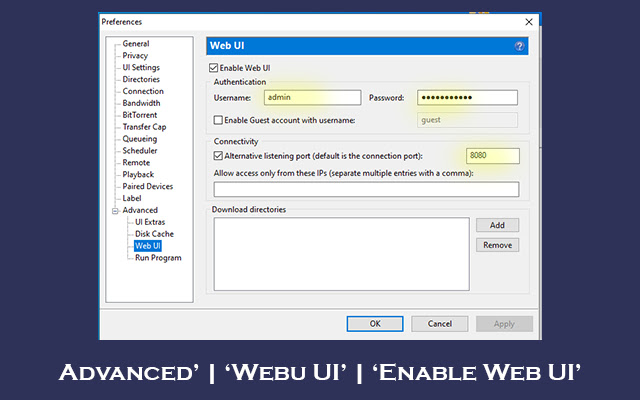
- Advanced in Program | Web User Interface | Username and password are determined on the page with the Web User Interface. The port number is selected.
- On the same page, the folder where the files will be saved is selected.
- The Utorrent for Chrome extension is installed and the settings on the first page are made.
- Right-click on the torrent site to download and click the "ADD TORRENT" button.
- Download link automatically goes to program.

Features
* With the this extension, you can easily send the download links to the program while browsing the sites.
* This extension does not create a new link.
* It sends the existing link on the site to the utorrent program.
* It is not used to download any content on the sites.
* The above settings are required to run the extension.
* If you cannot make the settings, they are explained in detail on our website.
* The extension is free.
Podstawowe informacje o rozszerzeniu
| Nazwa |  Utorrent For Chrome Utorrent For Chrome |
| ID | inpepohmmdkocfcgnkokllkcgfnkbmkd |
| Oficjalny URL | https://chrome.google.com/webstore/detail/utorrent-for-chrome/inpepohmmdkocfcgnkokllkcgfnkbmkd |
| Opis | Send Link to Utorrent For Chrome |
| Rozmiar pliku | 94.44 KB |
| Liczba instalacji | 65,320 |
| Aktualna Wersja | 12.0.0.17 |
| Ostatnia Aktualizacja | 2023-07-30 |
| Data Publikacji | 2021-07-22 |
| Ocena | 3.00/5 Łącznie 13 Oceny |
| Deweloper | nurullahbgt12 |
| [email protected] | |
| Typ Płatności | free |
| Obsługiwane Języki | id,de,en,en-GB,en-US,fr,nl,no,vi,tr,ca,da,et,es,hr,it,lv,lt,hu,pl,pt-BR,pt-PT,ro,sk,sl,fi,sv,cs,el,sr,bg,ru,uk,mr,hi,bn,gu,ta,te,th,zh-CN,zh-TW,ja,ko |
| manifest.json | |
{
"background": {
"service_worker": "service_worker.js"
},
"action": {
"default_icon": {
"128": "icon\/icon128.png",
"16": "icon\/icon16.png",
"48": "icon\/icon48.png",
"96": "icon\/icon96.png"
},
"default_popup": "popup\/popup.html"
},
"default_locale": "en",
"description": "__MSG_appDesc__",
"icons": {
"128": "icon\/icon128.png",
"16": "icon\/icon16.png",
"48": "icon\/icon48.png",
"96": "icon\/icon96.png"
},
"manifest_version": 3,
"name": "__MSG_appName__",
"options_ui": {
"open_in_tab": true,
"page": "options\/options.html"
},
"permissions": [
"storage",
"contextMenus",
"notifications",
"declarativeNetRequest"
],
"web_accessible_resources": [
{
"resources": [
"icon\/icon96.png"
],
"matches": [
" | |