One-Click Controls for Google Music
Control Google Music from your address bar.
Co to jest One-Click Controls for Google Music?
One-Click Controls for Google Music to rozszerzenie Chrome opracowane przez Procrastinating Student, a jego główną funkcją jest „Control Google Music from your address bar.”.
Zrzuty ekranu rozszerzenia

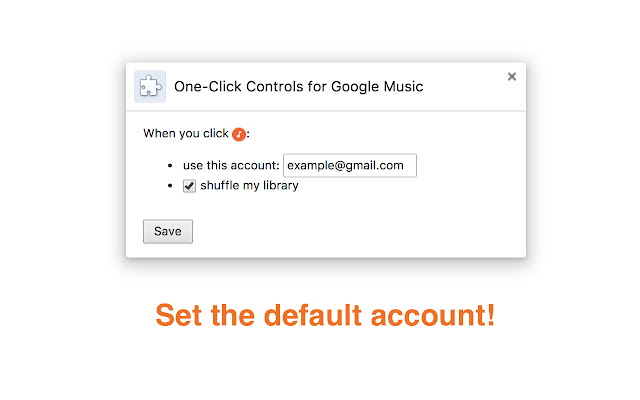

Pobierz plik CRX rozszerzenia One-Click Controls for Google Music
Pobierz pliki rozszerzeń One-Click Controls for Google Music w formacie crx, zainstaluj ręcznie rozszerzenia Chrome w przeglądarce lub udostępnij pliki crx znajomym, aby łatwo zainstalować rozszerzenia Chrome.
Instrukcja Użytkowania Rozszerzenia
                        Simply click the icon in the address bar to play and pause Google Music, no matter what tab you're in!

Upon installation, reload any open Google Music tabs and you'll be all set.

Update:
 - Added options to change default account and auto-shuffle behavior, plus general bug fixes.

Get the rewind button here:
https://chrome.google.com/webstore/detail/jecmhknpaakaljaahcpjpojlomilfcbk

Get the skip button here:
https://chrome.google.com/webstore/detail/bbeefcjnjicgkpjbhdnbegckifhooeeo
Podstawowe informacje o rozszerzeniu
| Nazwa |  One-Click Controls for Google Music One-Click Controls for Google Music |
| ID | iplcnndnkaahamcojidocbfdagapbcal |
| Oficjalny URL | https://chrome.google.com/webstore/detail/one-click-controls-for-go/iplcnndnkaahamcojidocbfdagapbcal |
| Opis | Control Google Music from your address bar. |
| Rozmiar pliku | 52.2 KB |
| Liczba instalacji | 42 |
| Aktualna Wersja | 0.0.5 |
| Ostatnia Aktualizacja | 2017-12-06 |
| Data Publikacji | 2017-12-06 |
| Ocena | 5.00/5 Łącznie 1 Oceny |
| Deweloper | Procrastinating Student |
| [email protected] | |
| Typ Płatności | free |
| Obsługiwane Języki | en |
| manifest.json | |
{
    "update_url": "https:\/\/clients2.google.com\/service\/update2\/crx",
    "name": "One-Click Controls for Google Music",
    "description": "Control Google Music from your address bar.",
    "version": "0.0.5",
    "permissions": [
        "http:\/\/play.google.com\/music\/",
        "storage"
    ],
    "options_ui": {
        "page": "options.html",
        "chrome_style": true
    },
    "background": {
        "scripts": [
            "background.js"
        ],
        "persistent": false
    },
    "browser_action": {
        "default_icon": {
            "19": "images\/no_song_19.png",
            "38": "images\/no_song_38.png"
        }
    },
    "content_scripts": [
        {
            "matches": [
                "*:\/\/play.google.com\/music*"
            ],
            "js": [
                "third-party\/jquery-1.12.0.min.js",
                "content_script.js"
            ],
            "run_at": "document_start"
        }
    ],
    "web_accessible_resources": [
        "images\/no_song_19.png",
        "images\/no_song_38.png",
        "images\/play_19.png",
        "images\/play_38.png",
        "images\/pause_19.png",
        "images\/pause_38.png"
    ],
    "manifest_version": 2
} | |