Solitaire New Tab
Play the classic card game solitaire on every new tab! You can even hide/unhide it!
Co to jest Solitaire New Tab?
Solitaire New Tab to rozszerzenie Chrome opracowane przez http://brandthunder.com, a jego główną funkcją jest „Play the classic card game solitaire on every new tab! You can even hide/unhide it!”.
Zrzuty ekranu rozszerzenia
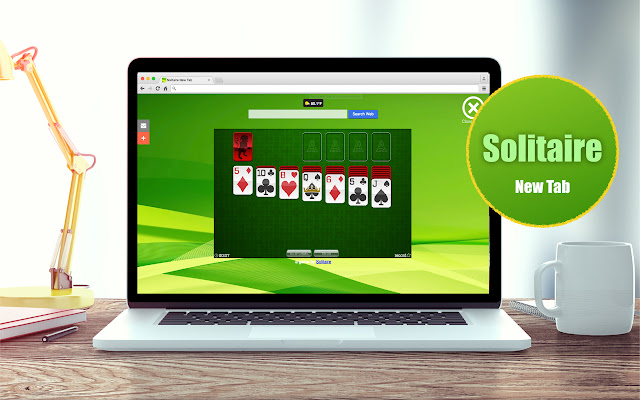


Pobierz plik CRX rozszerzenia Solitaire New Tab
Pobierz pliki rozszerzeń Solitaire New Tab w formacie crx, zainstaluj ręcznie rozszerzenia Chrome w przeglądarce lub udostępnij pliki crx znajomym, aby łatwo zainstalować rozszerzenia Chrome.
Instrukcja Użytkowania Rozszerzenia
                        Play solitaire game directly from every new tab!

QUESTIONS? ->  [email protected]

With our extension, you get a high-res new tab experience. We are search supported along with some banner advertising and quick-links to great brand partners!

Thanks for your support!
Podstawowe informacje o rozszerzeniu
| Nazwa |  Solitaire New Tab Solitaire New Tab |
| ID | kckajmiejefhkkfdpbmilgoeoanekjhm |
| Oficjalny URL | https://chrome.google.com/webstore/detail/solitaire-new-tab/kckajmiejefhkkfdpbmilgoeoanekjhm |
| Opis | Play the classic card game solitaire on every new tab! You can even hide/unhide it! |
| Rozmiar pliku | 38.73 KB |
| Liczba instalacji | 797 |
| Aktualna Wersja | 4.0.9 |
| Ostatnia Aktualizacja | 2021-01-03 |
| Data Publikacji | 2018-04-11 |
| Ocena | 2.22/5 Łącznie 9 Oceny |
| Deweloper | http://brandthunder.com |
| [email protected] | |
| Typ Płatności | free |
| Adres URL Strony Pomocy | http://support.brandthunder.com |
| Adres URL Strony Polityki Prywatności | http://brandthunder.com/privacy |
| Obsługiwane Języki | en-US |
| manifest.json | |
{
    "update_url": "https:\/\/clients2.google.com\/service\/update2\/crx",
    "manifest_version": 2,
    "name": "Solitaire New Tab",
    "version": "4.0.9",
    "description": "Play the classic card game solitaire on every new tab! You can even hide\/unhide it!",
    "icons": {
        "16": "icon16.png",
        "32": "icon32.png",
        "48": "icon48.png",
        "128": "icon128.png"
    },
    "background": {
        "page": "background.html"
    },
    "browser_action": {
        "default_title": "Solitaire New Tab",
        "default_icon": {
            "16": "icon16.png",
            "32": "icon32.png"
        }
    },
    "chrome_url_overrides": {
        "newtab": "newtab.html"
    },
    "content_security_policy": "script-src 'self' https:\/\/ssl.google-analytics.com; object-src 'self'"
} | |









![Swift Snake 3D [Popup]](https://lh3.googleusercontent.com/dKqYwZebdeKQLn9AIeB5kH9rj8_mTwn9ncTXV-dh0MJRTCgkxF1T_01rw30c0UcKRqnzp0N4TBL6GGDGMyFaXSp1qw)