image-to-text
An offline chrome extension to extract text from selected in a web page, image or video opened in chrome tab.
Co to jest image-to-text?
image-to-text to rozszerzenie Chrome opracowane przez marwan.sdeek.web, a jego główną funkcją jest „An offline chrome extension to extract text from selected in a web page, image or video opened in chrome tab.”.
Zrzuty ekranu rozszerzenia


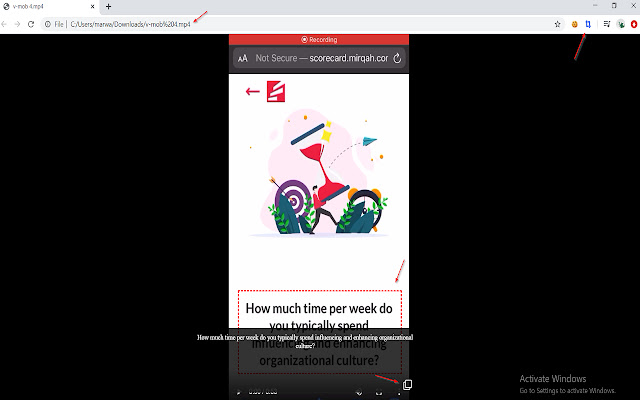
Pobierz plik CRX rozszerzenia image-to-text
Pobierz pliki rozszerzeń image-to-text w formacie crx, zainstaluj ręcznie rozszerzenia Chrome w przeglądarce lub udostępnij pliki crx znajomym, aby łatwo zainstalować rozszerzenia Chrome.
Instrukcja Użytkowania Rozszerzenia
                        Extract text from selected areas in web page, image, video or youtube.

image-to-text works just by selecting area need to extract text from.

image-to-text allows you to copy text from:
    - Web page contains text as an image or inside a video.
    - opened image in a tab
    - opened video in a tab

image-to-text also allows you to extract links.

image-to-text works offline. (That's why it's almost 12MB to include all needed files)
Podstawowe informacje o rozszerzeniu
| Nazwa |  image-to-text image-to-text |
| ID | kheogcfapledldcmebojknkelnhpjlgd |
| Oficjalny URL | https://chrome.google.com/webstore/detail/image-to-text/kheogcfapledldcmebojknkelnhpjlgd |
| Opis | An offline chrome extension to extract text from selected in a web page, image or video opened in chrome tab. |
| Rozmiar pliku | 11.63 MB |
| Liczba instalacji | 1,000 |
| Aktualna Wersja | 0.0.1 |
| Ostatnia Aktualizacja | 2020-06-01 |
| Data Publikacji | 2020-06-01 |
| Ocena | 1.00/5 Łącznie 4 Oceny |
| Deweloper | marwan.sdeek.web |
| Typ Płatności | free |
| Obsługiwane Języki | en |
| manifest.json | |
{
"update_url": "https:\/\/clients2.google.com\/service\/update2\/crx",
"name": "image-to-text",
"description": "An offline chrome extension to extract text from selected in a web page, image or video opened in chrome tab. ",
"version": "0.0.1",
"author": "MarwanSdeek | |