Spot Ai
Get the answers of questions that matter most to you.
Co to jest Spot Ai?
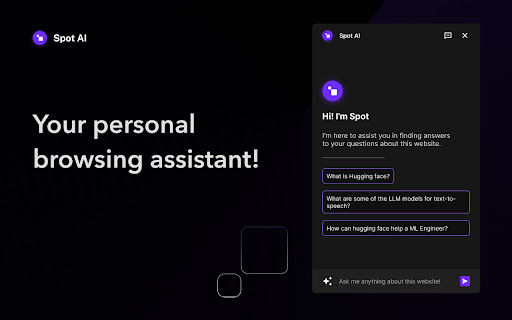
Spot Ai to rozszerzenie Chrome opracowane przez Spot, a jego główną funkcją jest „Get the answers of questions that matter most to you.”.
Zrzuty ekranu rozszerzenia


Pobierz plik CRX rozszerzenia Spot Ai
Pobierz pliki rozszerzeń Spot Ai w formacie crx, zainstaluj ręcznie rozszerzenia Chrome w przeglądarce lub udostępnij pliki crx znajomym, aby łatwo zainstalować rozszerzenia Chrome.
Instrukcja Użytkowania Rozszerzenia
                        🌟 Meet Spot AI - your new browsing buddy! 🌟
🤩 It reads the webpages for you, to answer your questions from their content.
 🔍 Research and uncover info with ease using Spot.
⚡️ Ready for Chrome, Brave, and Arc. Download Spot AI now!

Once installed in the browser, can be launched with:
👉 CMD/CTRL + K

📌 Pin it in your browser for best experience.
Podstawowe informacje o rozszerzeniu
| Nazwa |  Spot Ai Spot Ai |
| ID | klecemighfnommaecegoefedcdappbep |
| Oficjalny URL | https://chromewebstore.google.com/detail/spot-ai/klecemighfnommaecegoefedcdappbep |
| Opis | Get the answers of questions that matter most to you. |
| Rozmiar pliku | 323 KB |
| Liczba instalacji | 203 |
| Aktualna Wersja | 0.0.8 |
| Ostatnia Aktualizacja | 2024-01-25 |
| Data Publikacji | 2023-09-27 |
| Ocena | 5.00/5 Łącznie 5 Oceny |
| Deweloper | Spot |
| [email protected] | |
| Typ Płatności | free |
| Strona Rozszerzenia | https://mega-mind.io/spotai |
| Adres URL Strony Pomocy | https://twitter.com/spotAi_ |
| Adres URL Strony Polityki Prywatności | https://vgvishesh.com/spotAi.html |
| Obsługiwane Języki | en |
| manifest.json | |
{
"update_url": "https:\/\/clients2.google.com\/service\/update2\/crx",
"version": "0.0.8",
"manifest_version": 3,
"name": "Spot Ai",
"description": "Get the answers of questions that matter most to you.",
"icons": {
"16": "icons\/icon16.png",
"32": "icons\/icon32.png",
"48": "icons\/icon48.png",
"128": "icons\/icon128.png"
},
"action": {
"default_popup": "js\/index.html",
"default_title": "React Chrome Extension",
"default_icon": "icons\/icon48.png"
},
"permissions": [
"activeTab",
"scripting",
"favicon"
],
"host_permissions": [],
"commands": {
"_execute_action": {
"suggested_key": {
"windows": "Ctrl+K",
"mac": "Command+K",
"chromeos": "Ctrl+Shift+K",
"linux": "Ctrl+Shift+K"
}
}
},
"web_accessible_resources": [
{
"resources": [
"_favicon\/*"
],
"matches": [
" | |