Design Manager Product Clipper
Clip pictures & product information from vendors' websites for use in Design Manager Pro Cloud.
Co to jest Design Manager Product Clipper?
Design Manager Product Clipper to rozszerzenie Chrome opracowane przez https://designmanager.com, a jego główną funkcją jest „Clip pictures & product information from vendors' websites for use in Design Manager Pro Cloud.”.
Zrzuty ekranu rozszerzenia


Pobierz plik CRX rozszerzenia Design Manager Product Clipper
Pobierz pliki rozszerzeń Design Manager Product Clipper w formacie crx, zainstaluj ręcznie rozszerzenia Chrome w przeglądarce lub udostępnij pliki crx znajomym, aby łatwo zainstalować rozszerzenia Chrome.
Instrukcja Użytkowania Rozszerzenia
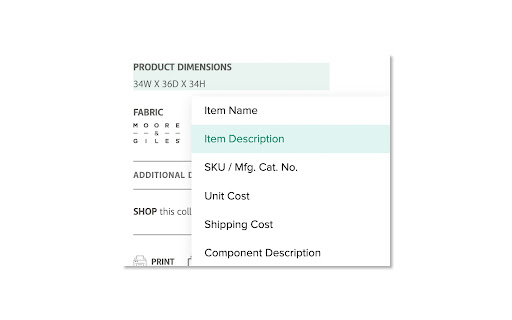
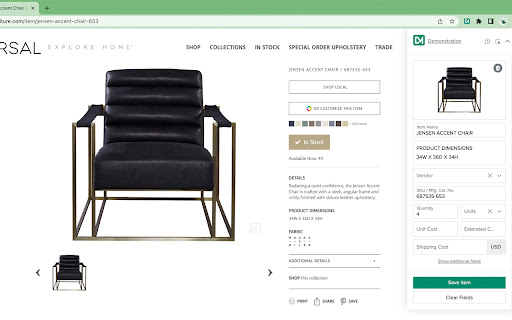
                        The Design Manager Product Clipper helps you capture item specification pictures & product details from vendors' websites.  Simply click on pictures and text of your product details to bring them into Design Manager, saving you time and effort.

Less frustration + less paperwork = happy designers.
Podstawowe informacje o rozszerzeniu
| Nazwa |  Design Manager Product Clipper Design Manager Product Clipper |
| ID | kloodacdcdmefdelbanijdonpljlbjnp |
| Oficjalny URL | https://chromewebstore.google.com/detail/design-manager-product-cl/kloodacdcdmefdelbanijdonpljlbjnp |
| Opis | Clip pictures & product information from vendors' websites for use in Design Manager Pro Cloud. |
| Rozmiar pliku | 591 KB |
| Liczba instalacji | 1,571 |
| Aktualna Wersja | 2.9.0 |
| Ostatnia Aktualizacja | 2023-05-04 |
| Data Publikacji | 2019-08-28 |
| Ocena | 5.00/5 Łącznie 1 Oceny |
| Deweloper | https://designmanager.com |
| [email protected] | |
| Typ Płatności | free |
| Strona Rozszerzenia | https://designmanager.com/ |
| Adres URL Strony Pomocy | https://designmanager.freshdesk.com/support/home |
| Adres URL Strony Polityki Prywatności | https://designmanager.com/privacy-statement |
| Obsługiwane Języki | en-US |
| manifest.json | |
{
"update_url": "https:\/\/clients2.google.com\/service\/update2\/crx",
"manifest_version": 3,
"name": "Design Manager Product Clipper",
"description": "Clip pictures & product information from vendors' websites for use in Design Manager Pro Cloud.",
"version": "2.9.0",
"background": {
"service_worker": "bundledAssets\/background-2.9.0.js"
},
"externally_connectable": {
"matches": [
"*:\/\/*.designmanager.com\/*"
]
},
"content_scripts": [
{
"matches": [
"https:\/\/*\/*",
"http:\/\/*\/*"
],
"exclude_matches": [
"*:\/\/*.designmanager.com\/*"
],
"css": [
"bundledAssets\/contentScript-2.9.0.css"
],
"js": [
"bundledAssets\/contentScript-2.9.0.js"
]
}
],
"icons": {
"16": "img\/16x16.png",
"48": "img\/48x48.png",
"128": "img\/128x128.png"
},
"web_accessible_resources": [
{
"resources": [
"img\/*"
],
"matches": [
"https:\/\/*\/*"
]
}
],
"action": {
"default_icon": "img\/48x48.png",
"default_popup": "popup-2.9.0.html"
},
"host_permissions": [
"https:\/\/*.designmanager.com\/",
" | |