Batch Data Collector - Next-Gen Web Scraper
Data extraction from any website
Co to jest Batch Data Collector - Next-Gen Web Scraper?
Batch Data Collector - Next-Gen Web Scraper to rozszerzenie Chrome opracowane przez http://batchdatacollector.com, a jego główną funkcją jest „Data extraction from any website”.
Zrzuty ekranu rozszerzenia


Pobierz plik CRX rozszerzenia Batch Data Collector - Next-Gen Web Scraper
Pobierz pliki rozszerzeń Batch Data Collector - Next-Gen Web Scraper w formacie crx, zainstaluj ręcznie rozszerzenia Chrome w przeglądarce lub udostępnij pliki crx znajomym, aby łatwo zainstalować rozszerzenia Chrome.
Instrukcja Użytkowania Rozszerzenia
                        The fastest, most feature-rich Web Scraper and Data Extractor available. Ever.

Latest Updates:
- Bug-fixes
- Removal of  and wildcards for plugin content settings (ref. Chrome > 85.0.4183.83)
- New one-click actions
- New "RegExp based" template group
- Advanced Interface: added 7 new string replace methods

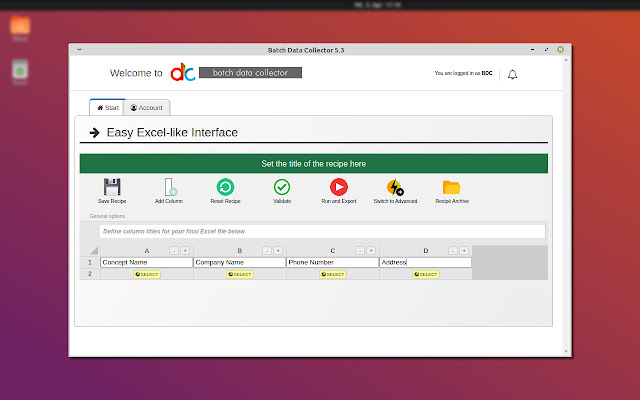
Batch Data Collector was completely rewritten to offer an interface similar to what you already know – Excel. You can visually compose your final file, and can easily capture the right web elements thanks to our point-and-click guide.

Batch Data Collector, the premium version of Free Data Collector, includes dozens of enhancements to support the most serious of data brokers. Create a recipe, define a multi-tab batch campaign, and watch as your computer executes your plans effectively, efficiently and, best of all, autonomously.

Free Data Collector Features
- Excel, CSV and JSON exports
- Recipe creator
- Source code “guide” integrated into recipe creation
- RegExp-ready, including character extraction and boolean presence test
- Standard and non-standard attribute analysis and extraction
- Custom text isolation and capture between two fixed points
- AJAX event management, such as page scrolls and button clicks
- In-app data manipulation, validation, and/or exclusion prior to export
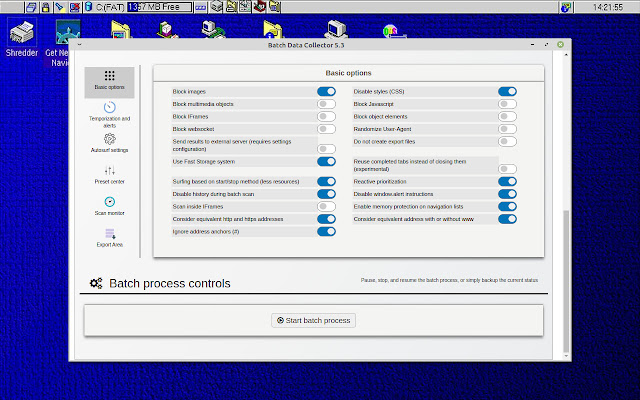
- Various browsing controls and throttles, such as blocking java script or multimedia objects for faster browsing

Batch Data Collector contains all features in Free Data Collector, plus:
- Simultaneous multi-tab browsing and extraction
- Multi-recipe functionality
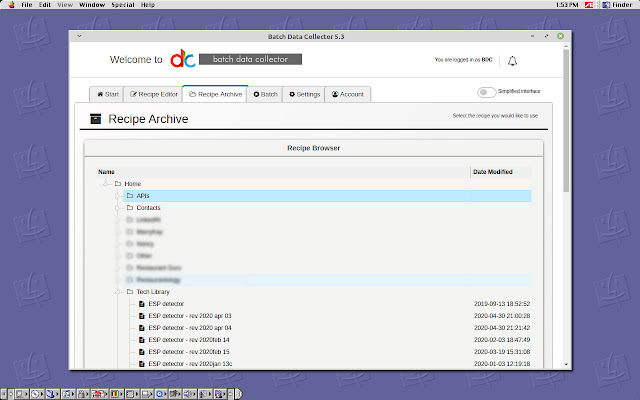
- Save recipes to your archive
- Execute recipes within parent and iframes
- Auto-save recovery and memory control
- Integration with user-defined database endpoint
- IF and nested IF logic, with interactive interface
- Simultaneous source code manipulation (ex. character insert, substitute, trim)
- Language detection
- Website redirect detector
- Form fill, including customizable field completion journeys and time-based throttles
- Tab prioritization and forced timeouts
- Much, much more

Check out the rest of our premium features here:
https://www.batchdatacollector.com/gopremium/

Visit our homepage for tutorials, knowledgebase, feature roadmap, and more:
https://www.batchdatacollector.com/

Visit our helpdesk to discuss features or ask questions:
https://www.batchdatacollector.com/helpdesk/
Podstawowe informacje o rozszerzeniu
| Nazwa |  Batch Data Collector - Next-Gen Web Scraper Batch Data Collector - Next-Gen Web Scraper |
| ID | ldlnaccjobmaealinkjmaogkamemfhge |
| Oficjalny URL | https://chrome.google.com/webstore/detail/batch-data-collector-next/ldlnaccjobmaealinkjmaogkamemfhge |
| Opis | Data extraction from any website |
| Rozmiar pliku | 4.38 MB |
| Liczba instalacji | 487 |
| Aktualna Wersja | 5.3.4.1 |
| Ostatnia Aktualizacja | 2020-09-14 |
| Data Publikacji | 2020-08-30 |
| Deweloper | http://batchdatacollector.com |
| [email protected] | |
| Typ Płatności | in_app |
| Strona Rozszerzenia | https://www.batchdatacollector.com |
| Adres URL Strony Pomocy | https://www.batchdatacollector.com/contact-us/ |
| Adres URL Strony Polityki Prywatności | https://www.batchdatacollector.com/privacy-policy |
| Obsługiwane Języki | en |
| manifest.json | |
{
    "update_url": "https:\/\/clients2.google.com\/service\/update2\/crx",
    "name": "Batch Data Collector - Next-Gen Web Scraper",
    "version": "5.3.4.1",
    "short_name": "BdC",
    "manifest_version": 2,
    "description": "Data extraction from any website",
    "icons": {
        "128": "BDataCollector.png"
    },
    "permissions": [
        "tabs",
        "http:\/\/*\/*",
        "https:\/\/*\/*",
        "unlimitedStorage",
        "contextMenus",
        "activeTab",
        "contentSettings",
        "proxy",
        "webRequest",
        "system.memory",
        "history",
        "downloads",
        "webRequestBlocking",
        "pageCapture"
    ],
    "browser_action": {
        "default_title": "Batch Data Collector",
        "default_icon": "BDataCollector.png"
    },
    "background": {
        "persistent": true,
        "scripts": [
            "background.js"
        ]
    },
    "content_security_policy": "script-src 'self' 'unsafe-eval'; object-src 'self'"
} | |