HKUL Search Assistant
Search the HKU Libraries Catalogue without leaving your current page
Co to jest HKUL Search Assistant?
HKUL Search Assistant to rozszerzenie Chrome opracowane przez HKU Libraries, a jego główną funkcją jest „Search the HKU Libraries Catalogue without leaving your current page”.
Zrzuty ekranu rozszerzenia

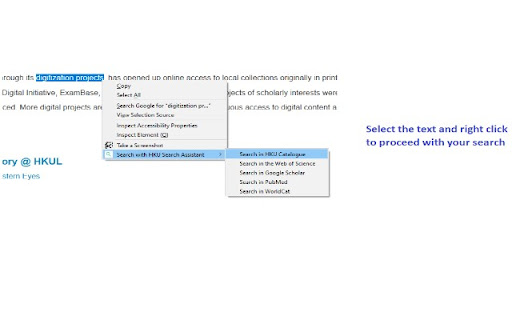
Pobierz plik CRX rozszerzenia HKUL Search Assistant
Pobierz pliki rozszerzeń HKUL Search Assistant w formacie crx, zainstaluj ręcznie rozszerzenia Chrome w przeglądarce lub udostępnij pliki crx znajomym, aby łatwo zainstalować rozszerzenia Chrome.
Instrukcja Użytkowania Rozszerzenia
                        HKUL Search Assistant helps you to search HKU Libraries Catalogue and other popular search engines within your current page.

Access from a non-HKUL website, such as a Publisher’s website, would not trigger the HKUL login page, and you will be asked to pay for access. HKUL Search Assistant identifies your affiliation with HKUL, you will need to route via the EZProxy server.
Podstawowe informacje o rozszerzeniu
| Nazwa |  HKUL Search Assistant HKUL Search Assistant |
| ID | lfjmkaiddobaebgokockcncpchpbnoad |
| Oficjalny URL | https://chromewebstore.google.com/detail/hkul-search-assistant/lfjmkaiddobaebgokockcncpchpbnoad |
| Opis | Search the HKU Libraries Catalogue without leaving your current page |
| Rozmiar pliku | 2.01 MB |
| Liczba instalacji | 4,000 |
| Aktualna Wersja | 3.0.16 |
| Ostatnia Aktualizacja | 2024-02-15 |
| Data Publikacji | 2020-08-03 |
| Ocena | 5.00/5 Łącznie 2 Oceny |
| Deweloper | HKU Libraries |
| [email protected] | |
| Typ Płatności | free |
| Strona Rozszerzenia | https://lib.hku.hk/ |
| Obsługiwane Języki | en |
| manifest.json | |
{
    "update_url": "https:\/\/clients2.google.com\/service\/update2\/crx",
    "manifest_version": 3,
    "name": "HKUL Search Assistant",
    "description": "Search the HKU Libraries Catalogue without leaving your current page",
    "version": "3.0.16",
    "author": "HKU Libraries",
    "content_security_policy": {
        "extension_pages": "script-src 'self'; object-src 'self';"
    },
    "action": {
        "default_icon": "images\/icons\/icon128.png",
        "default_popup": "popup.html",
        "default_title": "HKUL Search Assistant"
    },
    "icons": {
        "16": "images\/icons\/icon16.png",
        "48": "images\/icons\/icon48.png",
        "128": "images\/icons\/icon128.png"
    },
    "background": {
        "service_worker": "background.js"
    },
    "permissions": [
        "contextMenus",
        "activeTab",
        "tabs",
        "storage"
    ]
} | |