MUSE login
Automatically log in to shef.ac.uk without typing your details!
Co to jest MUSE login?
MUSE login to rozszerzenie Chrome opracowane przez georgepowell10, a jego główną funkcją jest „Automatically log in to shef.ac.uk without typing your details!”.
Zrzuty ekranu rozszerzenia
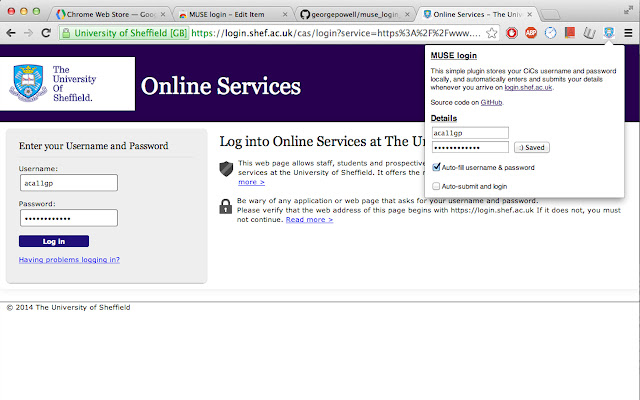
Pobierz plik CRX rozszerzenia MUSE login
Pobierz pliki rozszerzeń MUSE login w formacie crx, zainstaluj ręcznie rozszerzenia Chrome w przeglądarce lub udostępnij pliki crx znajomym, aby łatwo zainstalować rozszerzenia Chrome.
Instrukcja Użytkowania Rozszerzenia
                        Fed up of typing your MUSE login every single freaking time? Why can't chrome remember your password or keep you signed in like every other website? Now it can! Introducing the MUSE login chrome extension. The extension automatically fills in and submits the login form whenever you arrive on the university login page, so you don't have to!

Fully open source and free forever at https://github.com/georgepowell/muse_login_chrome

Extension does not access the internet and stores your details safely on the local machine. Feel free to check out the source code if you have any doubts.
Podstawowe informacje o rozszerzeniu
| Nazwa |  MUSE login MUSE login |
| ID | lgemcjddblhggnfeigkgoefcedkhmdnl |
| Oficjalny URL | https://chrome.google.com/webstore/detail/muse-login/lgemcjddblhggnfeigkgoefcedkhmdnl |
| Opis | Automatically log in to shef.ac.uk without typing your details! |
| Rozmiar pliku | 211 KB |
| Liczba instalacji | 31 |
| Aktualna Wersja | 0.1 |
| Ostatnia Aktualizacja | 2014-03-03 |
| Data Publikacji | 2014-03-03 |
| Ocena | 5.00/5 Łącznie 1 Oceny |
| Deweloper | georgepowell10 |
| Typ Płatności | free |
| Obsługiwane Języki | en-GB |
| manifest.json | |
{
    "update_url": "https:\/\/clients2.google.com\/service\/update2\/crx",
    "name": "MUSE login",
    "version": "0.1",
    "description": "Automatically log in to shef.ac.uk without typing your details!",
    "content_scripts": [
        {
            "js": [
                "jquery.js",
                "content_script.js"
            ],
            "matches": [
                "http:\/\/login.shef.ac.uk\/*",
                "https:\/\/login.shef.ac.uk\/*"
            ]
        }
    ],
    "permissions": [
        "declarativeContent",
        "storage"
    ],
    "icons": {
        "19": "icon-19.png",
        "48": "icon-48.png",
        "128": "icon-128.png"
    },
    "browser_action": {
        "default_icon": "icon-19.png",
        "default_title": "Muse Login!",
        "default_popup": "default_page.html"
    },
    "manifest_version": 2
} | |