Find website used fonts
Find and list all the fonts used on a web page
Co to jest Find website used fonts?
Find website used fonts to rozszerzenie Chrome opracowane przez Rebekah Bailey, a jego główną funkcją jest „Find and list all the fonts used on a web page”.
Zrzuty ekranu rozszerzenia

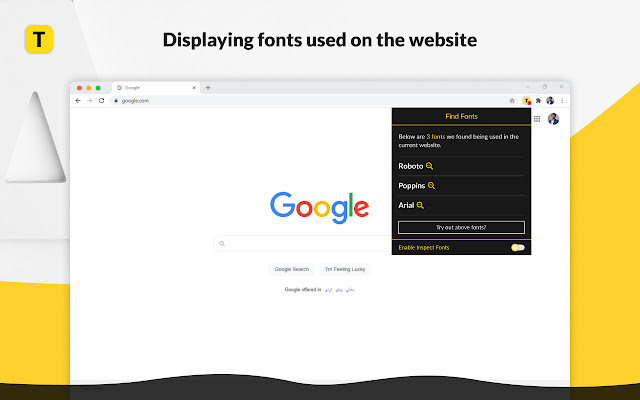


Pobierz plik CRX rozszerzenia Find website used fonts
Pobierz pliki rozszerzeń Find website used fonts w formacie crx, zainstaluj ręcznie rozszerzenia Chrome w przeglądarce lub udostępnij pliki crx znajomym, aby łatwo zainstalować rozszerzenia Chrome.
Instrukcja Użytkowania Rozszerzenia
                        Curious about the font styles used on a website?

Find website used fonts offers the simplest and easiest way to identify fonts on website. Simply click the extension and find together a list of all the fonts used on a web page.

The extension acts as a font inspector and accurately assesses all the different fonts used on any website you visit. The Best Feature: it provides a type-in space for you to preview any text in the same font styles as the ones identified on a web page. It’s that simple and easy to use!

This Chrome extension is quite handy for all the web developers and designers out-there searching for stunning web design ideas and attention-grabbing fonts. It allows them a preview of their text in the same style as the font that catches their attention from any trendy websites of their liking.
Podstawowe informacje o rozszerzeniu
| Nazwa |  Find website used fonts Find website used fonts |
| ID | lnebjgioddkafaldaaeooeghlcholnnp |
| Oficjalny URL | https://chrome.google.com/webstore/detail/lnebjgioddkafaldaaeooeghlcholnnp |
| Opis | Find and list all the fonts used on a web page |
| Rozmiar pliku | 64.23 KB |
| Liczba instalacji | 59,551 |
| Aktualna Wersja | 2.0.2 |
| Ostatnia Aktualizacja | 2022-09-24 |
| Data Publikacji | 2020-11-30 |
| Ocena | 4.84/5 Łącznie 96 Oceny |
| Deweloper | Rebekah Bailey |
| [email protected] | |
| Typ Płatności | free |
| Obsługiwane Języki | en |
| manifest.json | |
{
    "update_url": "https:\/\/clients2.google.com\/service\/update2\/crx",
    "manifest_version": 2,
    "name": "Find website used fonts",
    "description": "Find and list all the fonts used on a web page",
    "version": "2.0.2",
    "icons": {
        "16": "icons\/icon16.png",
        "19": "icons\/icon19.png",
        "32": "icons\/icon32.png",
        "38": "icons\/icon38.png",
        "48": "icons\/icon48.png",
        "96": "icons\/icon96.png",
        "128": "icons\/icon128.png",
        "256": "icons\/icon256.png"
    },
    "content_scripts": [
        {
            "matches": [
                "*:\/\/*\/*"
            ],
            "js": [
                "javascripts\/libraries\/Font-Guess\/font-guess.js",
                "javascripts\/content.js"
            ],
            "run_at": "document_start"
        },
        {
            "matches": [
                "*:\/\/*\/*"
            ],
            "js": [
                "content-scripts\/idle.js"
            ],
            "all_frames": true,
            "run_at": "document_idle"
        },
        {
            "matches": [
                "*:\/\/*\/*"
            ],
            "js": [
                "content-scripts\/start.js"
            ],
            "all_frames": true,
            "run_at": "document_start"
        }
    ],
    "background": {
        "persistent": true,
        "scripts": [
            "javascripts\/background.js"
        ]
    },
    "browser_action": {
        "default_title": "Find Font",
        "default_popup": "popup\/popup.html"
    },
    "web_accessible_resources": [
        "modal\/modal.html",
        "modal\/modal.css",
        "modal\/tooltip.css"
    ],
    "permissions": [
        "*:\/\/*\/*",
        "tabs",
        "storage",
        "activeTab",
        "webRequest",
        "webRequestBlocking"
    ]
} | |