Salesforce Credentials
Manage your Salesforce Credentials and login with one click.
Co to jest Salesforce Credentials?
Salesforce Credentials to rozszerzenie Chrome opracowane przez Alexandr Kurevlev, a jego główną funkcją jest „Manage your Salesforce Credentials and login with one click.”.
Zrzuty ekranu rozszerzenia
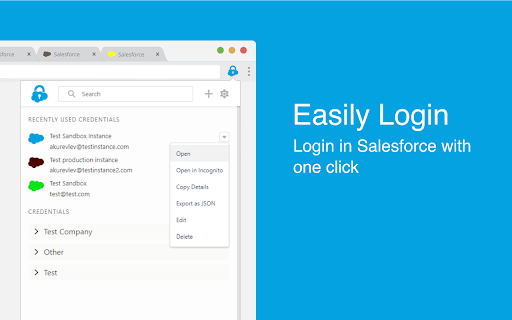


Pobierz plik CRX rozszerzenia Salesforce Credentials
Pobierz pliki rozszerzeń Salesforce Credentials w formacie crx, zainstaluj ręcznie rozszerzenia Chrome w przeglądarce lub udostępnij pliki crx znajomym, aby łatwo zainstalować rozszerzenia Chrome.
Instrukcja Użytkowania Rozszerzenia
                        This extension allows you to manage and store your Salesforce Credentials, login with one click and more...

Key features:

- Manage your credentials: Add/Edit/Delete your credentials within the extension

- Easily Login: Login in Salesforce with one click without the verification code

- Add credentials by logging in: Login in Salesforce as you usually do and click 'Add' to add credential

- Login from Address Bar: Enter 'sf' and space in your address bar and start typing username, name or group to login

- Never lose tab: Set your own color for every credential to work on multiple instances at the same time

- Collaborate with your сolleagues: Import and export credentials to file or clipboard to share with your colleagues

- Always in Sync: Keep your Credentials synced with your Google Account in Chrome
Podstawowe informacje o rozszerzeniu
| Nazwa |  Salesforce Credentials Salesforce Credentials |
| ID | mneimgababoaidaajoibedahomnpmbja |
| Oficjalny URL | https://chromewebstore.google.com/detail/salesforce-credentials/mneimgababoaidaajoibedahomnpmbja |
| Opis | Manage your Salesforce Credentials and login with one click. |
| Rozmiar pliku | 584 KB |
| Liczba instalacji | 874 |
| Aktualna Wersja | 1.4.3 |
| Ostatnia Aktualizacja | 2020-05-05 |
| Data Publikacji | 2020-05-05 |
| Ocena | 4.67/5 Łącznie 3 Oceny |
| Deweloper | Alexandr Kurevlev |
| [email protected] | |
| Typ Płatności | free |
| Obsługiwane Języki | en |
| manifest.json | |
{
    "update_url": "https:\/\/clients2.google.com\/service\/update2\/crx",
    "manifest_version": 2,
    "name": "Salesforce Credentials",
    "description": "Manage your Salesforce Credentials and login with one click.",
    "version": "1.4.3",
    "browser_action": {
        "default_icon": "icons\/logo\/icon48.png",
        "default_title": "Salesforce Credentials",
        "default_popup": "popup.html"
    },
    "icons": {
        "16": "icons\/logo\/icon16.png",
        "48": "icons\/logo\/icon48.png",
        "128": "icons\/logo\/icon128.png"
    },
    "content_scripts": [
        {
            "run_at": "document_end",
            "matches": [
                "https:\/\/*.salesforce.com\/*",
                "https:\/\/*.force.com\/*",
                "https:\/\/*.visualforce.com\/*"
            ],
            "js": [
                "js\/utils.js",
                "js\/setTabs.js"
            ]
        },
        {
            "matches": [
                "https:\/\/*.salesforce.com\/*",
                "https:\/\/*.force.com\/*",
                "https:\/\/*.visualforce.com\/*"
            ],
            "js": [
                "js\/loginHelper.js"
            ]
        }
    ],
    "web_accessible_resources": [
        "addCredentialPopup.html"
    ],
    "omnibox": {
        "keyword": "sf"
    },
    "background": {
        "scripts": [
            "js\/utils.js",
            "js\/background.build.js"
        ],
        "persistent": false
    },
    "permissions": [
        "https:\/\/*.salesforce.com\/*",
        "https:\/\/*.force.com\/*",
        "https:\/\/*.visualforce.com\/*",
        "storage",
        "tabs",
        "downloads",
        "cookies"
    ]
} | |