Pierce the Veil New Tabs HD Music Top Themes
Each time you open a new tab, you will get different HD wallpapers from Pierce the Veil. This new theme includes clock and more.
Co to jest Pierce the Veil New Tabs HD Music Top Themes?
Pierce the Veil New Tabs HD Music Top Themes to rozszerzenie Chrome opracowane przez http://mytab.me, a jego główną funkcją jest „Each time you open a new tab, you will get different HD wallpapers from Pierce the Veil. This new theme includes clock and more.”.
Zrzuty ekranu rozszerzenia
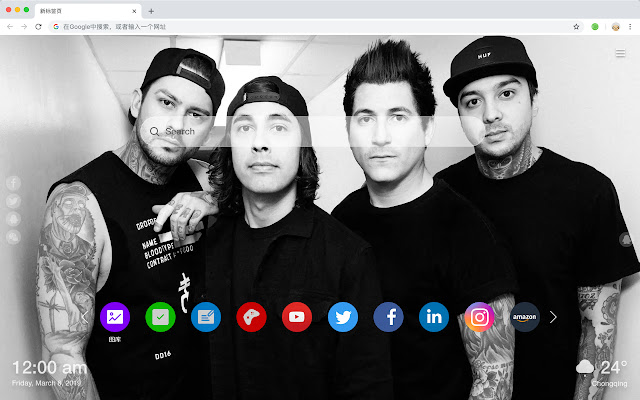


Pobierz plik CRX rozszerzenia Pierce the Veil New Tabs HD Music Top Themes
Pobierz pliki rozszerzeń Pierce the Veil New Tabs HD Music Top Themes w formacie crx, zainstaluj ręcznie rozszerzenia Chrome w przeglądarce lub udostępnij pliki crx znajomym, aby łatwo zainstalować rozszerzenia Chrome.
Instrukcja Użytkowania Rozszerzenia
                        Originated in San Diego, California, USA, after the genre of hardcore pop punk experimental rock emo metalcore, active since 2006.

You will get the following new features:
 - To-do list
 - Set your favorite wallpapers
 - Discover new hot spots
 - Bookmarks
 - Social network notifications
 - High quality wallpaper for each new label
 - Clock showing date and time
 - Weather widget
 - Open to search
Podstawowe informacje o rozszerzeniu
| Nazwa |  Pierce the Veil New Tabs HD Music Top Themes Pierce the Veil New Tabs HD Music Top Themes |
| ID | naabjfbaehbkecgldelpmmfnmnaajcgk |
| Oficjalny URL | https://chrome.google.com/webstore/detail/pierce-the-veil-new-tabs/naabjfbaehbkecgldelpmmfnmnaajcgk |
| Opis | Each time you open a new tab, you will get different HD wallpapers from Pierce the Veil. This new theme includes clock and more. |
| Rozmiar pliku | 40.49 KB |
| Liczba instalacji | 15 |
| Aktualna Wersja | 1.1.0.0 |
| Ostatnia Aktualizacja | 2019-05-28 |
| Data Publikacji | 2019-05-28 |
| Deweloper | http://mytab.me |
| Typ Płatności | free |
| Obsługiwane Języki | en,zh-CN,zh-TW |
| manifest.json | |
{
    "name": "__MSG_ext_name__",
    "manifest_version": 2,
    "description": "__MSG_ext_desc__",
    "browser_action": {
        "default_icon": {
            "48": "icons\/48.png"
        },
        "default_title": "__MSG_ext_name__"
    },
    "chrome_url_overrides": {
        "newtab": "pages\/newtab\/index.html"
    },
    "background": {
        "scripts": [
            "app.js",
            "pages\/background\/index.js"
        ],
        "persistent": false
    },
    "default_locale": "en",
    "icons": {
        "48": "icons\/48.png",
        "128": "icons\/128.png"
    },
    "minimum_chrome_version": "57",
    "offline_enabled": true,
    "update_url": "https:\/\/clients2.google.com\/service\/update2\/crx",
    "version": "1.1.0.0"
} | |