Tab Viewer
Preview all your open tabs in a grid view
Co to jest Tab Viewer?
Tab Viewer to rozszerzenie Chrome opracowane przez niiashikwei, a jego główną funkcją jest „Preview all your open tabs in a grid view”.
Zrzuty ekranu rozszerzenia
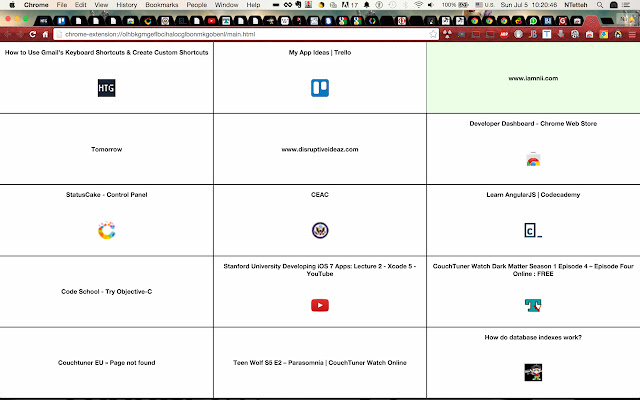
Pobierz plik CRX rozszerzenia Tab Viewer
Pobierz pliki rozszerzeń Tab Viewer w formacie crx, zainstaluj ręcznie rozszerzenia Chrome w przeglądarce lub udostępnij pliki crx znajomym, aby łatwo zainstalować rozszerzenia Chrome.
Instrukcja Użytkowania Rozszerzenia
                        Tab Viewer is a tool for managing and organizing open tabs. Currently it allows you to see all your open tabs in a tiled view. From the tiled view click a tile to jump to that tab.

Shortcut to trigger grid view: Alt + T

Features yet to come include:
1) closing tabs from tiled view
2) rearranging tabs from tiled view
3) saving a workspace, collection of tabs under a name
4) customizing the tabs with descriptions

and much much more! Stay tuned.
Podstawowe informacje o rozszerzeniu
| Nazwa |  Tab Viewer Tab Viewer |
| ID | nckgdfkgodfemnkdkfngdhfknlcokbha |
| Oficjalny URL | https://chrome.google.com/webstore/detail/tab-viewer/nckgdfkgodfemnkdkfngdhfknlcokbha |
| Opis | Preview all your open tabs in a grid view |
| Rozmiar pliku | 6.57 KB |
| Liczba instalacji | 477 |
| Aktualna Wersja | 0.0.6 |
| Ostatnia Aktualizacja | 2015-07-15 |
| Data Publikacji | 2015-07-15 |
| Ocena | 3.43/5 Łącznie 7 Oceny |
| Deweloper | niiashikwei |
| Typ Płatności | free |
| Obsługiwane Języki | en |
| manifest.json | |
{
"update_url": "https:\/\/clients2.google.com\/service\/update2\/crx",
"name": "Tab Viewer",
"short_name": "Tab Viewer",
"version": "0.0.6",
"manifest_version": 2,
"description": "Preview all your open tabs in a grid view",
"browser_action": {
"default_icon": "icons\/tab-viewer-logo.png",
"default_title": "displays grid view of open tabs"
},
"permissions": [
"tabs",
"activeTab",
" | |