Smart Page Ruler
Smart Page Ruler is the developer tool to measure every element of your web page more precisely. You can get the relative and…
Co to jest Smart Page Ruler?
Smart Page Ruler to rozszerzenie Chrome opracowane przez Karol Rola, a jego główną funkcją jest „Smart Page Ruler is the developer tool to measure every element of your web page more precisely. You can get the relative and…”.
Zrzuty ekranu rozszerzenia


Pobierz plik CRX rozszerzenia Smart Page Ruler
Pobierz pliki rozszerzeń Smart Page Ruler w formacie crx, zainstaluj ręcznie rozszerzenia Chrome w przeglądarce lub udostępnij pliki crx znajomym, aby łatwo zainstalować rozszerzenia Chrome.
Instrukcja Użytkowania Rozszerzenia
                        Smart Page Ruler is the developer tool to measure every element of your web page more precisely. You can get  the relative and absolute position of elements as Zeplin application and can get margin, padding, width, height everything you need.

Update v1.0.5:
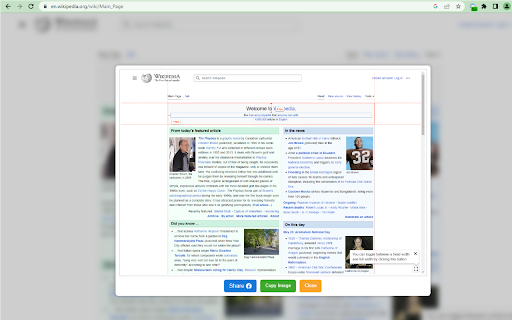
You can now take a screenshot when measuring the relative and absolute position of any element and share it on Facebook or copy the image. At the context menu select "Smart Page Ruler > Screen Capture" to execute.

Core Features:
=========================================
* Measure relative and absolute position of any element.
* Calculate Height, Width, Margin, Padding everything you need.
* Very much Useful to measure the alignment between components.
* Measure all the elements on webpage.
* Far easy to select and inspect the elements.
* Ensures the highest level of accuracy.
* Similar and powerful as Zeplin layer inspection tool.
* Amazing user experience and design.
* Easier accessibility, simply click and done.
Podstawowe informacje o rozszerzeniu
| Nazwa |  Smart Page Ruler Smart Page Ruler |
| ID | nmibbjghlmdiafjolcphdggihcbcedmg |
| Oficjalny URL | https://chromewebstore.google.com/detail/smart-page-ruler/nmibbjghlmdiafjolcphdggihcbcedmg |
| Opis | Smart Page Ruler is the developer tool to measure every element of your web page more precisely. You can get the relative and… |
| Rozmiar pliku | 603 KB |
| Liczba instalacji | 69,741 |
| Aktualna Wersja | 1.0.7 |
| Ostatnia Aktualizacja | 2023-10-16 |
| Data Publikacji | 2020-06-12 |
| Ocena | 3.79/5 Łącznie 57 Oceny |
| Deweloper | Karol Rola |
| [email protected] | |
| Typ Płatności | free |
| Strona Rozszerzenia | https://rbrahul.github.io/Smart-Webpage-Ruler/ |
| Adres URL Strony Pomocy | https://github.com/rbrahul/smart-ruller |
| Adres URL Strony Polityki Prywatności | https://sites.google.com/view/bitliy-link-2023/home |
| Obsługiwane Języki | en-US |
| manifest.json | |
{
"update_url": "https:\/\/clients2.google.com\/service\/update2\/crx",
"manifest_version": 3,
"name": "Smart Page Ruler",
"short_name": "Page Ruler",
"version": "1.0.7",
"icons": {
"16": "icon-16.c4a266c3.png",
"24": "icon-24.f054665d.png",
"32": "icon-32.2fe204e9.png",
"64": "icon-64.887e3c1c.png",
"128": "icon-128.c9968f51.png",
"256": "icon-256.bd37ec10.png",
"512": "icon-512.429e3e59.png"
},
"background": {
"service_worker": "background.3eb8d5ff.js"
},
"action": {
"default_icon": "icon-128.c9968f51.png"
},
"permissions": [
"storage",
"contextMenus",
"declarativeNetRequest",
"scripting",
"activeTab"
],
"host_permissions": [
" | |