VBot搜索:ChatGPT搜索助理(V起来®)
A browser extension to display ChatGPT response inside Google (and other search engines) results.
Co to jest VBot搜索:ChatGPT搜索助理(V起来®)?
VBot搜索:ChatGPT搜索助理(V起来®) to rozszerzenie Chrome opracowane przez ljchou, a jego główną funkcją jest „A browser extension to display ChatGPT response inside Google (and other search engines) results.”.
Zrzuty ekranu rozszerzenia

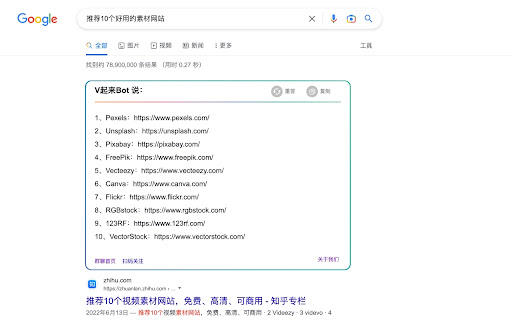

Pobierz plik CRX rozszerzenia VBot搜索:ChatGPT搜索助理(V起来®)
Pobierz pliki rozszerzeń VBot搜索:ChatGPT搜索助理(V起来®) w formacie crx, zainstaluj ręcznie rozszerzenia Chrome w przeglądarce lub udostępnij pliki crx znajomym, aby łatwo zainstalować rozszerzenia Chrome.
Instrukcja Użytkowania Rozszerzenia
A browser extension to display ChatGPT response inside Google (and other search engines) results. Podstawowe informacje o rozszerzeniu
| Nazwa |  VBot搜索:ChatGPT搜索助理(V起来®) VBot搜索:ChatGPT搜索助理(V起来®) |
| ID | oenponclegkcnpobjmagoibmmjoljjdj |
| Oficjalny URL | https://chromewebstore.google.com/detail/vbot%E6%90%9C%E7%B4%A2%EF%BC%9Achatgpt%E6%90%9C%E7%B4%A2%E5%8A%A9%E7%90%86%EF%BC%88v%E8%B5%B7%E6%9D%A5%C2%AE%EF%BC%89/oenponclegkcnpobjmagoibmmjoljjdj |
| Opis | A browser extension to display ChatGPT response inside Google (and other search engines) results. |
| Rozmiar pliku | 98.23 KB |
| Liczba instalacji | 777 |
| Aktualna Wersja | 2.0.5 |
| Ostatnia Aktualizacja | 2023-03-21 |
| Data Publikacji | 2023-02-27 |
| Ocena | 5.00/5 Łącznie 36 Oceny |
| Deweloper | ljchou |
| [email protected] | |
| Typ Płatności | free |
| Strona Rozszerzenia | https://blog.5yoo.com/60.html |
| Obsługiwane Języki | en,zh-CN |
| manifest.json | |
{
"update_url": "https:\/\/clients2.google.com\/service\/update2\/crx",
"manifest_version": 3,
"name": "VBot\u641c\u7d22\uff1aChatGPT\u641c\u7d22\u52a9\u7406\uff08V\u8d77\u6765\u00ae\uff09",
"version": "2.0.5",
"description": "A browser extension to display ChatGPT response inside Google (and other search engines) results.",
"icons": {
"16": "img\/icon-c.png",
"48": "img\/icon-c.png",
"128": "img\/icon-c.png"
},
"background": {
"service_worker": "js\/background.js"
},
"action": {
"default_icon": "img\/icon-c.png",
"default_popup": "popup.html",
"default_title": ""
},
"content_scripts": [
{
"matches": [
" | |