Image Photo Downloader
Download all images from a website. Easily save photos from Instagram, Facebook, Pinterest, Google Images and other website.
Co to jest Image Photo Downloader?
Image Photo Downloader to rozszerzenie Chrome opracowane przez ribeca_al, a jego główną funkcją jest „Download all images from a website. Easily save photos from Instagram, Facebook, Pinterest, Google Images and other website.”.
Zrzuty ekranu rozszerzenia

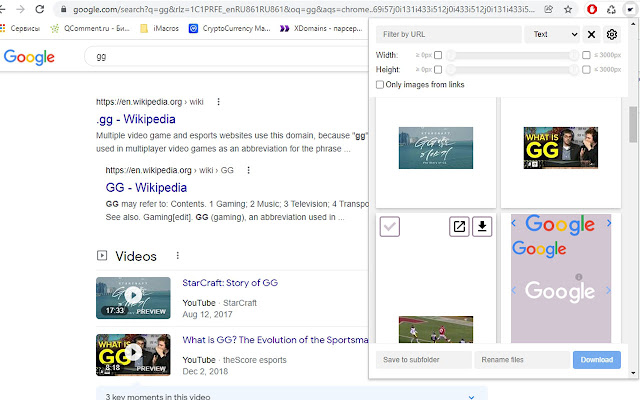
Pobierz plik CRX rozszerzenia Image Photo Downloader
Pobierz pliki rozszerzeń Image Photo Downloader w formacie crx, zainstaluj ręcznie rozszerzenia Chrome w przeglądarce lub udostępnij pliki crx znajomym, aby łatwo zainstalować rozszerzenia Chrome.
Instrukcja Użytkowania Rozszerzenia
                        Get all images from a web page
✔️Can download:
-all images on a web page in one go from
photo gallery (e.g. Flickr), social networks (e.g. Facebook) and Google Image Search.
-s hd 4k wallpaper mobile
-instagram photo
✔️Find tons of pictures for the topic you want
✔️Image downloader is absolutely free.
Podstawowe informacje o rozszerzeniu
| Nazwa |  Image Photo Downloader Image Photo Downloader |
| ID | oiegmjnjcjanadhmfebiafogkhmlfllm |
| Oficjalny URL | https://chrome.google.com/webstore/detail/image-photo-downloader/oiegmjnjcjanadhmfebiafogkhmlfllm |
| Opis | Download all images from a website. Easily save photos from Instagram, Facebook, Pinterest, Google Images and other website. |
| Rozmiar pliku | 301 KB |
| Liczba instalacji | 39,756 |
| Aktualna Wersja | 1.8 |
| Ostatnia Aktualizacja | 2022-02-22 |
| Data Publikacji | 2020-02-04 |
| Ocena | 3.29/5 Łącznie 31 Oceny |
| Deweloper | ribeca_al |
| [email protected] | |
| Typ Płatności | free |
| Adres URL Strony Polityki Prywatności | https://teletype.in/@prpolicy/HyOZBO6ZU |
| Obsługiwane Języki | id,ms,de,en,en-GB,en-US,fr,nl,no,vi,tr,ca,da,et,es,es-419,hr,it,lv,lt,hu,pl,pt-BR,pt-PT,ro,sk,sl,fi,sv,cs,el,sr,bg,ru,uk,mr,hi,bn,gu,ta,te,ml,th,zh-CN,zh-TW,ja,ko |
| manifest.json | |
{
    "update_url": "https:\/\/clients2.google.com\/service\/update2\/crx",
    "name": "Image Photo Downloader",
    "description": "Download all images from a website. Easily save photos from Instagram, Facebook, Pinterest, Google Images and other website.",
    "version": "1.8",
    "default_locale": "en",
    "minimum_chrome_version": "72",
    "manifest_version": 2,
    "icons": {
        "16": "\/images\/icon_16.png",
        "48": "\/images\/icon_48.png",
        "128": "\/images\/icon_128.png"
    },
    "browser_action": {
        "default_icon": "\/images\/icon_128.png",
        "default_popup": "\/src\/Popup\/index.html"
    },
    "options_page": "\/src\/Options\/index.html",
    "background": {
        "persistent": true,
        "scripts": [
            "\/src\/background\/downloadImages.js",
            "\/src\/background\/handleUpdates.js",
            "jess.js"
        ]
    },
    "permissions": [
        "activeTab",
        "downloads",
        "webRequest",
        "webRequestBlocking",
        "http:\/\/*\/*",
        "https:\/\/*\/*"
    ]
} | |