StackOverflow start page for Google Chrome
Shows StackOverflow and StackExchange questions in new tab window
Co to jest StackOverflow start page for Google Chrome?
StackOverflow start page for Google Chrome to rozszerzenie Chrome opracowane przez mihhail.maslakov, a jego główną funkcją jest „Shows StackOverflow and StackExchange questions in new tab window”.
Zrzuty ekranu rozszerzenia
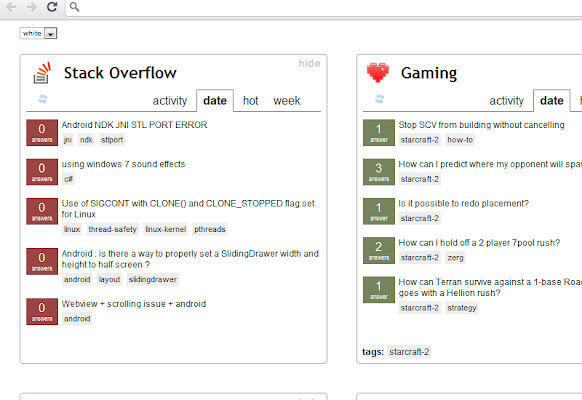
Pobierz plik CRX rozszerzenia StackOverflow start page for Google Chrome
Pobierz pliki rozszerzeń StackOverflow start page for Google Chrome w formacie crx, zainstaluj ręcznie rozszerzenia Chrome w przeglądarce lub udostępnij pliki crx znajomym, aby łatwo zainstalować rozszerzenia Chrome.
Instrukcja Użytkowania Rozszerzenia
                        Basically, what it does is it aggregates questions from StackExchange sites, and shows them on your New Tab window. You can select what sites you want to display, filter questions by tags, change themes and much more.

Now, when you open new tab, you always see most relevant questions for you.

I warn you, this extension is a real timekiller. So, if you appreciate your time, don't install it. Or if you're like me, and you just love StackExchange sites, then try it out! Who needs time, anyway :)
Podstawowe informacje o rozszerzeniu
| Nazwa |  StackOverflow start page for Google Chrome StackOverflow start page for Google Chrome |
| ID | omcplobmjajgpmpcdnbdiblienjeljan |
| Oficjalny URL | https://chrome.google.com/webstore/detail/stackoverflow-start-page/omcplobmjajgpmpcdnbdiblienjeljan |
| Opis | Shows StackOverflow and StackExchange questions in new tab window |
| Rozmiar pliku | 162 KB |
| Liczba instalacji | 184 |
| Aktualna Wersja | 1.0.5.4 |
| Ostatnia Aktualizacja | 2014-03-07 |
| Data Publikacji | 2014-03-07 |
| Ocena | 4.35/5 Łącznie 17 Oceny |
| Deweloper | mihhail.maslakov |
| Typ Płatności | free |
| Obsługiwane Języki | en |
| manifest.json | |
{
    "update_url": "https:\/\/clients2.google.com\/service\/update2\/crx",
    "name": "StackOverflow start page for Google Chrome",
    "version": "1.0.5.4",
    "manifest_version": 2,
    "description": "Shows StackOverflow and StackExchange questions in new tab window",
    "content_security_policy": "script-src 'self' 'unsafe-eval'; object-src 'self'",
    "chrome_url_overrides": {
        "newtab": "start-page.html"
    },
    "icons": {
        "16": "so_16.png",
        "48": "so_48.png",
        "128": "so_128.png"
    },
    "permissions": [
        "http:\/\/*.stackoverflow.com\/*"
    ]
} | |