Browse By Voice 2.0
Your personal voice activated browsing assistant.
Co to jest Browse By Voice 2.0?
Browse By Voice 2.0 to rozszerzenie Chrome opracowane przez Piyush Santwani, a jego główną funkcją jest „Your personal voice activated browsing assistant.”.
Zrzuty ekranu rozszerzenia
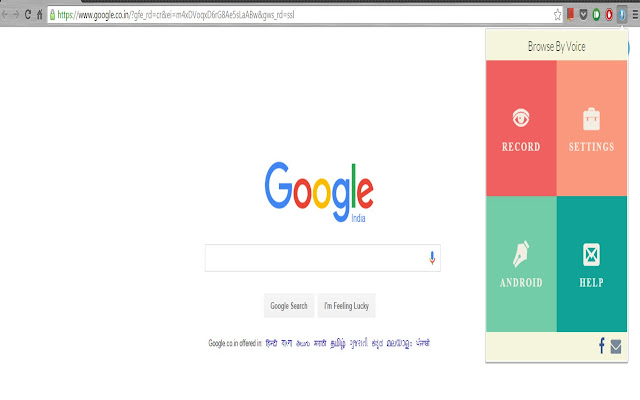


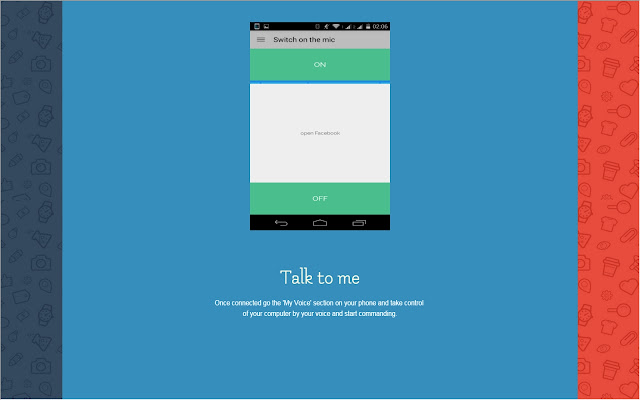
Pobierz plik CRX rozszerzenia Browse By Voice 2.0
Pobierz pliki rozszerzeń Browse By Voice 2.0 w formacie crx, zainstaluj ręcznie rozszerzenia Chrome w przeglądarce lub udostępnij pliki crx znajomym, aby łatwo zainstalować rozszerzenia Chrome.
Instrukcja Użytkowania Rozszerzenia
                        Visit our official website http://www.browsebyvoice.com/ to get started and get a step by step overview of how to setup and use browse by voice on your computer and your phone.
'Browse by Voice' is an end-to-end speech based browsing application that captures user commands from your computer based audio input or your android device. Here is what you can do using ‘Browse by Voice’ -

Check emails
Send Chat messages
Open websites
Navigate websites
Use search engines
Play videos
Open images
Automatically login to your social media and email accounts

All of these without using your keyboard or mouse. And this is not it. You can even connect your computer to your android device wirelessly and send voice commands via our android app.

While many people try to teach their parents and grandparents how to surf the web, most find it challenging to acclimatize them to the poorly placed computer components. Even after they take cognizance of the functional requirements of the components, it is a tedious task for them to type a sentence on a keyboard that is not alphabetically arranged or to drag the mouse pointer from one corner of the screen to the other to simply click a button. The frustration of the impatient makes you wonder if the QWERTY keyboard and the harmless mouse are amongst the worst User Experience designs ever. Consider installing this application for them, if you yourself don't find it much useful. My plan is to extend this application to as many foreign languages as possible. I'd appreciate support and suggestions from people using this application and contribute towards innovation of perceptual computing.
Podstawowe informacje o rozszerzeniu
| Nazwa |  Browse By Voice 2.0 Browse By Voice 2.0 |
| ID | omkiemleoghnkbbkpphhlgpooblcebja |
| Oficjalny URL | https://chrome.google.com/webstore/detail/browse-by-voice-20/omkiemleoghnkbbkpphhlgpooblcebja |
| Opis | Your personal voice activated browsing assistant. |
| Rozmiar pliku | 701 KB |
| Liczba instalacji | 424 |
| Aktualna Wersja | 2.0.2 |
| Ostatnia Aktualizacja | 2020-06-03 |
| Data Publikacji | 2020-06-02 |
| Ocena | 4.33/5 Łącznie 12 Oceny |
| Deweloper | Piyush Santwani |
| [email protected] | |
| Typ Płatności | free |
| Adres URL Strony Polityki Prywatności | https://linkedpin.website/privacy-policy |
| Obsługiwane Języki | en |
| manifest.json | |
{
    "update_url": "https:\/\/clients2.google.com\/service\/update2\/crx",
    "name": "Browse By Voice 2.0",
    "version": "2.0.2",
    "description": "Your personal voice activated browsing assistant.",
    "browser_action": {
        "default_title": "Your personal browsing assistant",
        "default_icon": "images\/bbv_128.png",
        "default_popup": "index.html"
    },
    "icons": {
        "16": "images\/bbv_16.png",
        "48": "images\/bbv_64.png",
        "128": "images\/bbv_128.png"
    },
    "background": {
        "scripts": [
            "eventPage.js"
        ],
        "persistent": true
    },
    "permissions": [
        "management",
        "storage",
        "tabs",
        "activeTab"
    ],
    "manifest_version": 2,
    "content_scripts": [
        {
            "matches": [
                "http:\/\/*\/*",
                "https:\/\/*\/*"
            ],
            "js": [
                "js\/jquery-2.0.2.min.js",
                "js\/jquery.visible.min.js",
                "js\/jquery.simulate.js",
                "js\/jquery.simulate.ext.js",
                "js\/bililiteRange.js",
                "js\/jquery.simulate.key-sequence.js",
                "content_scripts\/utilitiesContentScript.js",
                "content_scripts\/contentscript.js",
                "index.js",
                "content_scripts\/textContentScript.js",
                "content_scripts\/searchEngineContentScript.js",
                "content_scripts\/imageContentScript.js",
                "content_scripts\/videoContentScript.js",
                "content_scripts\/emailContentScript.js",
                "content_scripts\/typeContentScript.js",
                "web_resources\/sweetalert.min.js",
                "content_scripts\/addonContentScript.js"
            ],
            "css": [
                "web_resources\/sweetalert.css"
            ]
        }
    ],
    "web_accessible_resources": [
        "web_resources\/test.js",
        "bbv_64.png"
    ]
} | |