Multiple File Download
This extension enables the user to select all the documents present in the web page for download.
Co to jest Multiple File Download?
Multiple File Download to rozszerzenie Chrome opracowane przez prabhushan, a jego główną funkcją jest „This extension enables the user to select all the documents present in the web page for download.”.
Zrzuty ekranu rozszerzenia

Pobierz plik CRX rozszerzenia Multiple File Download
Pobierz pliki rozszerzeń Multiple File Download w formacie crx, zainstaluj ręcznie rozszerzenia Chrome w przeglądarce lub udostępnij pliki crx znajomym, aby łatwo zainstalować rozszerzenia Chrome.
Instrukcja Użytkowania Rozszerzenia
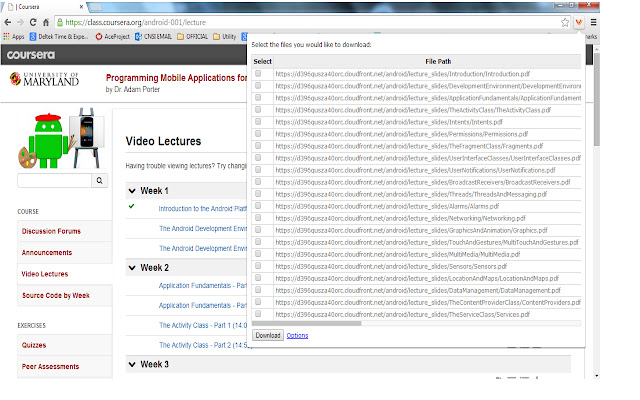
                        Many times we encounter situations where multiple files need to be downloaded from a web page. For example, user can download all the files in Coursera lessons in one shot. This would save lot of time.

Multiple file downloader facilitates the same. It scans through the web page and displays all the files, which user can download. User can select multiple files and click download.
It allows user to customize what file extensions should be downloaded in the web page.The user can also add custom extensions using the options page. User can also decide whether files need to be downloaded to default folder set in Chrome browser or prompt for each file.
BENEFITS FOR END USERS
1) Multi Select files in one go
2) Customise and also add your own extensions to download
KNOWN ISSUE
The extension scans for hyperlink across the web page. As per the design of the page, the hyperlink can be a button or image or both. So there are chances that duplicate links can appear on the extension.
Podstawowe informacje o rozszerzeniu
| Nazwa |  Multiple File Download Multiple File Download |
| ID | opncjdadngnekakilfcgjlgbmekljdbm |
| Oficjalny URL | https://chrome.google.com/webstore/detail/multiple-file-download/opncjdadngnekakilfcgjlgbmekljdbm |
| Opis | This extension enables the user to select all the documents present in the web page for download. |
| Rozmiar pliku | 154 KB |
| Liczba instalacji | 10,000 |
| Aktualna Wersja | 1.3 |
| Ostatnia Aktualizacja | 2014-09-09 |
| Data Publikacji | 2014-09-09 |
| Ocena | 2.56/5 Łącznie 55 Oceny |
| Deweloper | prabhushan |
| Typ Płatności | free |
| Obsługiwane Języki | en-US |
| manifest.json | |
{
"update_url": "https:\/\/clients2.google.com\/service\/update2\/crx",
"manifest_version": 2,
"name": "Multiple File Download",
"description": "This extension enables the user to select all the documents present in the web page for download. ",
"short_name": "File download",
"version": "1.3",
"background": {
"page": "popup.html"
},
"icons": {
"16": "sonicdownload.png",
"48": "sonicdownload.png",
"128": "sonicdownload.png"
},
"permissions": [
"tabs",
" | |