LiveJimaku
Subtitles generator for YouTube Live
Co to jest LiveJimaku?
LiveJimaku to rozszerzenie Chrome opracowane przez 塗田一帆, a jego główną funkcją jest „Subtitles generator for YouTube Live”.
Zrzuty ekranu rozszerzenia
Pobierz plik CRX rozszerzenia LiveJimaku
Pobierz pliki rozszerzeń LiveJimaku w formacie crx, zainstaluj ręcznie rozszerzenia Chrome w przeglądarce lub udostępnij pliki crx znajomym, aby łatwo zainstalować rozszerzenia Chrome.
Instrukcja Użytkowania Rozszerzenia
                        ◆features
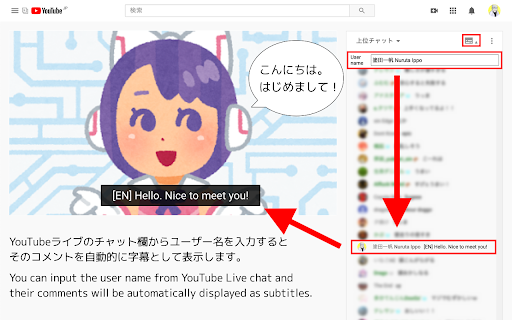
You can input the user name from YouTube Live chat and
their comments will be automatically displayed as subtitles.
If you specify the username of a volunteer who translate and comment what the streamer is saying as a real time , you can enjoy the live streams in any language.

◆Usage
(1) Click the icon in the chat field.
(2) Copy and paste the user name you want to specify
(3) Click the icon again to close it.

◆If you find a problem
Please contact me on Twitter (@nulltypo).
I can't respond to reviews.

◆Disclaimer
I'm not responsible for any loss or damage caused by this extension.
Podstawowe informacje o rozszerzeniu
| Nazwa |  LiveJimaku LiveJimaku |
| ID | pggagcnknjflkejaiimenbpdoebfegkm |
| Oficjalny URL | https://chromewebstore.google.com/detail/livejimaku/pggagcnknjflkejaiimenbpdoebfegkm |
| Opis | Subtitles generator for YouTube Live |
| Rozmiar pliku | 48.28 KB |
| Liczba instalacji | 1,108 |
| Aktualna Wersja | 1.3.1 |
| Ostatnia Aktualizacja | 2023-08-27 |
| Data Publikacji | 2020-10-26 |
| Ocena | 4.71/5 Łącznie 7 Oceny |
| Deweloper | 塗田一帆 |
| [email protected] | |
| Typ Płatności | free |
| Strona Rozszerzenia | https://null.style |
| Obsługiwane Języki | en,ja |
| manifest.json | |
{
    "update_url": "https:\/\/clients2.google.com\/service\/update2\/crx",
    "name": "LiveJimaku",
    "version": "1.3.1",
    "author": "@nulltypo",
    "manifest_version": 3,
    "description": "__MSG_ext_desc__",
    "default_locale": "en",
    "icons": {
        "16": "icons\/icon16.png",
        "48": "icons\/icon48.png",
        "128": "icons\/icon128.png"
    },
    "web_accessible_resources": [
        {
            "resources": [
                "button.svg"
            ],
            "matches": [
                "https:\/\/www.youtube.com\/*"
            ]
        }
    ],
    "content_scripts": [
        {
            "all_frames": true,
            "run_at": "document_end",
            "matches": [
                "https:\/\/www.youtube.com\/*"
            ],
            "js": [
                "jquery.min.js",
                "lj.js"
            ],
            "css": [
                "style.css"
            ]
        }
    ],
    "host_permissions": [
        "https:\/\/www.youtube.com\/*"
    ],
    "permissions": [
        "storage"
    ]
} | |




![HyperChat [Improved YouTube Chat]](https://lh3.googleusercontent.com/S3_Fc4pZJDp503jgQVTw7VzKPWn0jz7BnMHrrZriA4WCzN_NiTQLeo9sZa_oPc2crY_HNApbFjbzPYyFDu_oTjfG)