Trello Export
Exports your Trello data in CSV, JSON, XML, and TXT formats.
Co to jest Trello Export?
Trello Export to rozszerzenie Chrome opracowane przez Andrey Shevyakov, a jego główną funkcją jest „Exports your Trello data in CSV, JSON, XML, and TXT formats.”.
Zrzuty ekranu rozszerzenia

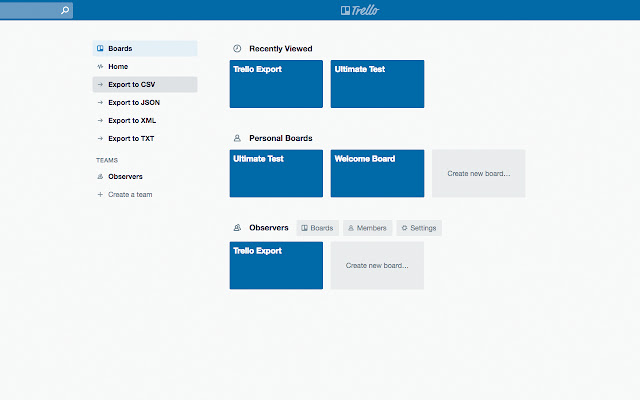
Pobierz plik CRX rozszerzenia Trello Export
Pobierz pliki rozszerzeń Trello Export w formacie crx, zainstaluj ręcznie rozszerzenia Chrome w przeglądarce lub udostępnij pliki crx znajomym, aby łatwo zainstalować rozszerzenia Chrome.
Instrukcja Użytkowania Rozszerzenia
                        DISCLAIMER:
The developer of this extension owns no rights or related in any way to the "Trello" software and related services and trademarks. This extension is not endorsed by any legal entities owning the rights to the "Trello" software and related services and trademarks. Use this extension at your own risk and discretion.

DESCRIPTION:
“Trello Export” provides an easy-to-use way to export your Trello data in CSV, JSON, XML, and TXT formats. "Trello Export" - your one-to-go tool for Trello data export!

FORMATS:
■ CSV - human-readable data, not recommended for the programmatic parsing
■ JSON - full comprehensive data
■ XML - full comprehensive data
■ TXT - human-readable data, not recommended for the programmatic parsing

INSTRUCTIONS:
■ To export all the Trello data available to you, simply click the relevant “Export” link on the Trello homepage and the archive download will start soon.
■ To export the board data, navigate to the required board and select the relevant “Export” option in the board menu.
■ To export the list and its child cards data, click the “List Actions” icon in the list header (multiple dots) and click the relevant “Export” link.

DATA STRUCTURE:
File generated on the export:
■ All - ZIP archive of the list-describing files grouped in board-named folders, each folder including the board data file.
■ Board - ZIP archive of the list-describing files along with the board data file.
■ List - list-describing file containing child cards data.

BOARD FILE DATA:
■ Name
■ Description
■ Last Activity Date
■ Closed
■ Subscribed
■ Organization Name
■ Organization Description
■ Visibility Level
■ Comments Restriction Level
■ Invitations Restriction Level
■ Voting
■ Self Join
■ Memberships
■ Short URL
■ Long URL

LIST FILE DATA - CARD ENTRY:
■ Name
■ Description
■ Labels
■ Due Date
■ Completed By Due Date
■ Last Activity Date
■ Closed
■ Subscribed
■ Comments
■ Checklists
■ Members
■ Attachments
■ Stickers
■ Short URL
■ Long URL
■ List Subscribed
■ List Closed
Podstawowe informacje o rozszerzeniu
| Nazwa |  Trello Export Trello Export |
| ID | pimkbaigbebcicajagcfdonkcmojelcd |
| Oficjalny URL | https://chrome.google.com/webstore/detail/trello-export/pimkbaigbebcicajagcfdonkcmojelcd |
| Opis | Exports your Trello data in CSV, JSON, XML, and TXT formats. |
| Rozmiar pliku | 51.39 KB |
| Liczba instalacji | 682 |
| Aktualna Wersja | 1.0 |
| Ostatnia Aktualizacja | 2018-10-16 |
| Data Publikacji | 2018-10-16 |
| Ocena | 3.00/5 Łącznie 2 Oceny |
| Deweloper | Andrey Shevyakov |
| [email protected] | |
| Typ Płatności | free |
| Adres URL Strony Polityki Prywatności | http://zitri.tech/privacy/chrome |
| Obsługiwane Języki | en |
| manifest.json | |
{
    "update_url": "https:\/\/clients2.google.com\/service\/update2\/crx",
    "manifest_version": 2,
    "name": "Trello Export",
    "short_name": "Trello Export",
    "description": "Exports your Trello data in CSV, JSON, XML, and TXT formats.",
    "version": "1.0",
    "icons": {
        "16": "img\/icon16.png",
        "48": "img\/icon48.png",
        "128": "img\/icon128.png"
    },
    "content_scripts": [
        {
            "matches": [
                "https:\/\/trello.com\/*"
            ],
            "js": [
                "libs\/FileSaver.min.js",
                "libs\/jszip.min.js",
                "libs\/xml2json.min.js",
                "scripts\/util\/util.js",
                "scripts\/util\/human_readable.js",
                "scripts\/data\/data.js",
                "scripts\/data\/generate.js",
                "scripts\/user\/export.js",
                "scripts\/user\/gui.js",
                "scripts\/user\/download.js"
            ]
        }
    ]
} | |