WebTime
WebTime. Keep tabs on your tabs.
Co to jest WebTime?
WebTime to rozszerzenie Chrome opracowane przez jrd, a jego główną funkcją jest „WebTime. Keep tabs on your tabs.”.
Zrzuty ekranu rozszerzenia

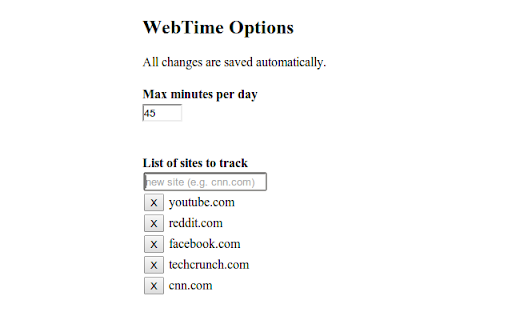
Pobierz plik CRX rozszerzenia WebTime
Pobierz pliki rozszerzeń WebTime w formacie crx, zainstaluj ręcznie rozszerzenia Chrome w przeglądarce lub udostępnij pliki crx znajomym, aby łatwo zainstalować rozszerzenia Chrome.
Instrukcja Użytkowania Rozszerzenia
                        WebTime is a dead-simple Chrome extension that keeps track of how much time you spend on certain sites each day.

You configure a list of sites on which you want to track time, and a daily time limit.  WebTime gives you a colored icon in the toolbar to help you keep track of your daily time on those sites.

The toolbar icon changes slowly from green --> yellow --> orange --> red.  When you're on a listed site, it shows you your total minutes today on your site list.  If you've gone over your alotment, it adds '!'.

I find it useful to know how much time I'm spending 'unproductively'.  I set my list to be domains that I go when I'm bored, e.g. 'cnn.com', 'techcrunch.com', etc.

PRIVACY: WebTime runs only on your computer and never sends any data anywhere. WebTime only knows what URL you have open.

WebTime is free and open source: https://github.com/jdurack/WebTime
Podstawowe informacje o rozszerzeniu
| Nazwa |  WebTime WebTime |
| ID | pkdfgdohnppmjackjjhcccdkonbndmjj |
| Oficjalny URL | https://chromewebstore.google.com/detail/webtime/pkdfgdohnppmjackjjhcccdkonbndmjj |
| Opis | WebTime. Keep tabs on your tabs. |
| Rozmiar pliku | 67.23 KB |
| Liczba instalacji | 46 |
| Aktualna Wersja | 0.0.6 |
| Ostatnia Aktualizacja | 2014-02-05 |
| Data Publikacji | 2014-02-05 |
| Ocena | 4.67/5 Łącznie 3 Oceny |
| Deweloper | jrd |
| Typ Płatności | free |
| Obsługiwane Języki | en-US |
| manifest.json | |
{
    "update_url": "https:\/\/clients2.google.com\/service\/update2\/crx",
    "name": "WebTime",
    "short_name": "WebTime",
    "version": "0.0.6",
    "manifest_version": 2,
    "description": "WebTime. Keep tabs on your tabs.",
    "background": {
        "scripts": [
            "js\/namespace.js",
            "js\/config.js",
            "js\/utils.js",
            "js\/background.js"
        ],
        "persistent": true
    },
    "options_page": "html\/options.html",
    "browser_action": [],
    "permissions": [
        "tabs"
    ]
} | |