Iframe Viewer
List all iframe links in a web page.
Co to jest Iframe Viewer?
Iframe Viewer to rozszerzenie Chrome opracowane przez nakamine11, a jego główną funkcją jest „List all iframe links in a web page.”.
Zrzuty ekranu rozszerzenia
Pobierz plik CRX rozszerzenia Iframe Viewer
Pobierz pliki rozszerzeń Iframe Viewer w formacie crx, zainstaluj ręcznie rozszerzenia Chrome w przeglądarce lub udostępnij pliki crx znajomym, aby łatwo zainstalować rozszerzenia Chrome.
Instrukcja Użytkowania Rozszerzenia
                        A chrome extension that helps you open iframe page in a separate tab.

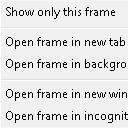
This tool automatically extracts iframe elements from any web site and show you links to open them in a separate tab.

The original intent for usage is as a machine translation helper. iframe elements are not translated by machine translation engine such as Google Translate. This tool makes it easier to translate contents in the iframe elements.
Podstawowe informacje o rozszerzeniu
| Nazwa |  Iframe Viewer Iframe Viewer |
| ID | pmijopnlkmdbfhnkcecagjlknmnljkcg |
| Oficjalny URL | https://chrome.google.com/webstore/detail/pmijopnlkmdbfhnkcecagjlknmnljkcg |
| Opis | List all iframe links in a web page. |
| Rozmiar pliku | 18.08 KB |
| Liczba instalacji | 74 |
| Aktualna Wersja | 1.0 |
| Ostatnia Aktualizacja | 2022-11-14 |
| Data Publikacji | 2022-11-14 |
| Deweloper | nakamine11 |
| [email protected] | |
| Typ Płatności | free |
| Strona Rozszerzenia | https://github.com/bilzard/iframe-viewer |
| Obsługiwane Języki | en |
| manifest.json | |
{
"update_url": "https:\/\/clients2.google.com\/service\/update2\/crx",
"manifest_version": 3,
"name": "Iframe Viewer",
"description": "List all iframe links in a web page.",
"version": "1.0",
"icons": {
"128": "icon-128.png",
"48": "icon-48.png",
"32": "icon-32.png",
"16": "icon-16.png"
},
"background": {
"service_worker": "background.js"
},
"action": {
"default_icon": "icon-32.png",
"default_popup": "popup.html",
"default_title": "no iframes"
},
"content_scripts": [
{
"all_frames": false,
"js": [
"content.js"
],
"matches": [
" | |