ScreenplaySubs - Netflix with Screenplays
Watch Netflix movies with its screenplays side-by-side
O que é ScreenplaySubs - Netflix with Screenplays?
ScreenplaySubs - Netflix with Screenplays é uma extensão do Chrome desenvolvida por justEgan, e sua principal característica é "Watch Netflix movies with its screenplays side-by-side".
Capturas de Tela da Extensão


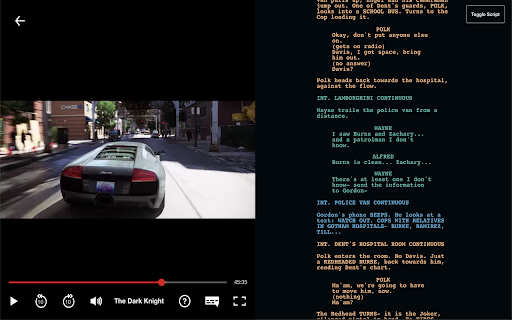


Baixar o arquivo CRX da Extensão ScreenplaySubs - Netflix with Screenplays
Baixe arquivos de extensão ScreenplaySubs - Netflix with Screenplays no formato crx, instale manualmente as extensões do Chrome no navegador ou compartilhe os arquivos crx com amigos para instalar facilmente as extensões do Chrome.
Instruções de Uso da Extensão
                        >What's this?
ScreenplaySubs displays a screenplay of the movie you're watching on Netflix, and automatically adjusts the position of the screenplay based on the timestamp of the movie. It essentially provides a subtitle-like experience for reading screenplays. Since not all movies in Netflix are supported, we show a constantly updated list of movies supported in our website here https://screenplaysubs.com/movies

>Who is this for?
ScreenplaySubs delivers plenty of rewatch value to the movie you're watching. You'll get insights to different scenes you may have not yet realized, including:
- When a dialogue is improvised/reworded.
- When a scene is omitted or included in production/post.
- What an action is trying to emphasize on.
- When the order between two scenes are switched.
- In general how an action, dialogue, or scene heading is translated to screen.

>I'm interested! How do I set this up?
- Awesome! Install the browser extension.
- Check out the movie catalogue for movies to watch, and press "Watch".
- That's about it! You'll be redirected to Netflix and can start watching the movie.

Movie, Film, Netflix, Education, Screenplays, Film Student, Filmmaker
Informações Básicas da Extensão
| Nome |  ScreenplaySubs - Netflix with Screenplays ScreenplaySubs - Netflix with Screenplays |
| ID | cacofhihgjfapcpaocgkaadkpmgfieki |
| URL Oficial | https://chromewebstore.google.com/detail/screenplaysubs-netflix-wi/cacofhihgjfapcpaocgkaadkpmgfieki |
| Descrição | Watch Netflix movies with its screenplays side-by-side |
| Tamanho do Arquivo | 182 KB |
| Contagem de Instalações | 4,108 |
| Versão Atual | 1.2 |
| Última Atualização | 2020-08-31 |
| Data de Publicação | 2020-08-04 |
| Classificação | 3.00/5 Total de 8 Avaliações |
| Desenvolvedor | justEgan |
| [email protected] | |
| Tipo de Pagamento | free |
| Site da Extensão | https://screenplaysubs.com/ |
| URL da Página de Ajuda | https://screenplaysubs.com/ |
| Idiomas Suportados | en,ru |
| manifest.json | |
{
    "update_url": "https:\/\/clients2.google.com\/service\/update2\/crx",
    "manifest_version": 2,
    "version": "1.2",
    "name": "ScreenplaySubs - Netflix with Screenplays",
    "short_name": "ScreenplaySubs",
    "description": "__MSG_appDesc__",
    "default_locale": "en",
    "background": {
        "scripts": [
            "background.js"
        ]
    },
    "browser_action": {
        "default_popup": "popup.html"
    },
    "content_scripts": [
        {
            "all_frames": false,
            "matches": [
                "*:\/\/netflix.com\/*",
                "*:\/\/www.netflix.com\/*"
            ],
            "js": [
                "content.js"
            ]
        }
    ],
    "icons": {
        "16": "assets\/img\/icon-16x16.png",
        "48": "assets\/img\/icon-48x48.png",
        "128": "assets\/img\/icon-128x128.png"
    },
    "permissions": [
        "tabs"
    ],
    "content_security_policy": "script-src 'self'; object-src 'self' https:\/\/ac68l4zjmb.execute-api.us-west-2.amazonaws.com\/dev\/fetchSupportedMovies https:\/\/8fnqprtjzi.execute-api.us-west-2.amazonaws.com\/dev\/getScriptDev; connect-src 'self' https:\/\/ac68l4zjmb.execute-api.us-west-2.amazonaws.com\/dev\/fetchSupportedMovies https:\/\/8fnqprtjzi.execute-api.us-west-2.amazonaws.com\/dev\/getScriptDev ws:\/\/localhost:9090\/",
    "web_accessible_resources": [
        "assets\/img\/*"
    ]
} | |