Send+Tag for Gmail
This is a simple extension to help you quickly tag emails you're sending out with your most commonly used label.
O que é Send+Tag for Gmail?
Send+Tag for Gmail é uma extensão do Chrome desenvolvida por PendarLabs.com, e sua principal característica é "This is a simple extension to help you quickly tag emails you're sending out with your most commonly used label.".
Capturas de Tela da Extensão

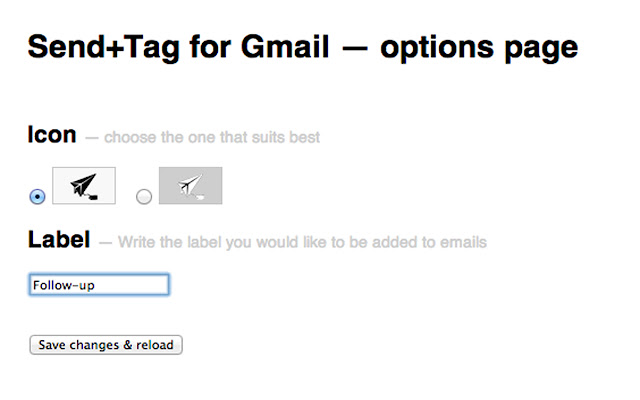
Baixar o arquivo CRX da Extensão Send+Tag for Gmail
Baixe arquivos de extensão Send+Tag for Gmail no formato crx, instale manualmente as extensões do Chrome no navegador ou compartilhe os arquivos crx com amigos para instalar facilmente as extensões do Chrome.
Instruções de Uso da Extensão
Simply set the label name you use most often in the extension's options page (comma separate the tags to attach more than one tag). Then every time you open a Gmail compose window, you'll see a "Send & Tag" button, which will automatically apply your tag to the outgoing message. Informações Básicas da Extensão
| Nome |  Send+Tag for Gmail Send+Tag for Gmail |
| ID | dgikghkkfnendpjahhbphoeflhfapabi |
| URL Oficial | https://chrome.google.com/webstore/detail/send+tag-for-gmail/dgikghkkfnendpjahhbphoeflhfapabi |
| Descrição | This is a simple extension to help you quickly tag emails you're sending out with your most commonly used label. |
| Tamanho do Arquivo | 103 KB |
| Contagem de Instalações | 22 |
| Versão Atual | 0.1.8 |
| Última Atualização | 2013-10-17 |
| Data de Publicação | 2013-10-17 |
| Classificação | 4.67/5 Total de 3 Avaliações |
| Desenvolvedor | PendarLabs.com |
| Tipo de Pagamento | free |
| Idiomas Suportados | en |
| manifest.json | |
{
    "update_url": "https:\/\/clients2.google.com\/service\/update2\/crx",
    "manifest_version": 2,
    "name": "Send+Tag for Gmail",
    "description": "This is a simple extension to help you quickly tag emails you're sending out with your most commonly used label.",
    "version": "0.1.8",
    "background": {
        "page": "background.html"
    },
    "options_page": "options.html",
    "permissions": [
        "https:\/\/mail.google.com\/",
        "http:\/\/mail.google.com\/",
        "tabs",
        "storage"
    ],
    "content_scripts": [
        {
            "matches": [
                "https:\/\/mail.google.com\/*",
                "http:\/\/mail.google.com\/*"
            ],
            "js": [
                "js\/jquery.js",
                "js\/follow.js"
            ]
        }
    ],
    "icons": {
        "16": "img\/icon_dark.png",
        "48": "img\/icon_big.png",
        "128": "img\/icon_big.png"
    },
    "browser_action": {
        "default_title": "Go to Gmail",
        "default_icon": "img\/icon_dark.png"
    }
} | |