Headless Recorder
A Chrome extension for recording browser interaction and generating Puppeteer & Playwright scripts
O que é Headless Recorder?
Headless Recorder é uma extensão do Chrome desenvolvida por http://checklyhq.com, e sua principal característica é "A Chrome extension for recording browser interaction and generating Puppeteer & Playwright scripts".
Capturas de Tela da Extensão

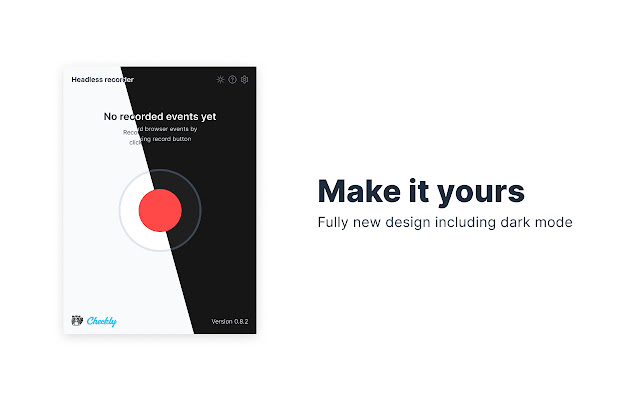


Baixar o arquivo CRX da Extensão Headless Recorder
Baixe arquivos de extensão Headless Recorder no formato crx, instale manualmente as extensões do Chrome no navegador ou compartilhe os arquivos crx com amigos para instalar facilmente as extensões do Chrome.
Instruções de Uso da Extensão
                        Headless Recorder is a popular open-source Chrome extension to easily generate Playwright/Puppeteer scripts without coding 🚀

The free extension makes writing Playwright/Puppeteer scripts way easier. It records your browser interactions and auto-generates the code. This is super useful for creating:

👉  E2E test scripts
👉  Web scraping scripts
👉  Synthetic monitoring scripts

Headless Recorder features:
- Record clicks, input events, etc.
- Record screenshots.
- Pause the recording when navigating.
- Identify elements from the overlay.
- Monitor recorded events.
- Export to Puppeteer code or to [Checkly](https://www.checklyhq.com/)
- Tweak the settings of the generated code.
- Light and dark mode

How to use it:
- Click the icon and hit Record.
- Hit TAB after you finish typing in an input element.
- Click links, inputs and other elements.
- Wait for full page load on each navigation.
- Click Pause when you want to navigate without recording anything. Hit Resume to continue recording.

This extension is actively developed. More events and actions will be added in later versions.
check https://checklyhq.com/headless-recorder/. If you have feedback and/or want to contribute have a look at https://github.com/checkly/headless-recorder.
Informações Básicas da Extensão
| Nome |  Headless Recorder Headless Recorder |
| ID | djeegiggegleadkkbgopoonhjimgehda |
| URL Oficial | https://chrome.google.com/webstore/detail/headless-recorder/djeegiggegleadkkbgopoonhjimgehda |
| Descrição | A Chrome extension for recording browser interaction and generating Puppeteer & Playwright scripts |
| Tamanho do Arquivo | 1.79 MB |
| Contagem de Instalações | 31,019 |
| Versão Atual | 1.1.0 |
| Última Atualização | 2021-08-25 |
| Data de Publicação | 2020-06-11 |
| Classificação | 4.28/5 Total de 40 Avaliações |
| Desenvolvedor | http://checklyhq.com |
| [email protected] | |
| Tipo de Pagamento | free |
| Site da Extensão | https://checklyhq.com/headless-recorder |
| URL da Página de Ajuda | https://github.com/checkly/headless-recorder |
| URL da Página de Política de Privacidade | https://github.com/checkly/headless-recorder/blob/master/PRIVACY_POLICY.md |
| Idiomas Suportados | en |
| manifest.json | |
{
    "update_url": "https:\/\/clients2.google.com\/service\/update2\/crx",
    "name": "Headless Recorder",
    "version": "1.1.0",
    "manifest_version": 2,
    "description": "A Chrome extension for recording browser interaction and generating Puppeteer & Playwright scripts",
    "default_locale": "en",
    "permissions": [
        "storage",
        "webNavigation",
        "activeTab",
        "cookies",
        "*:\/\/*\/"
    ],
    "icons": {
        "16": "icons\/16.png",
        "48": "icons\/48.png",
        "128": "icons\/128.png"
    },
    "content_security_policy": "script-src 'self' ; object-src 'self'",
    "background": {
        "scripts": [
            "js\/background.js"
        ],
        "persistent": false
    },
    "browser_action": {
        "default_popup": "popup.html",
        "default_title": "__MSG_extName__",
        "default_icon": {
            "19": "icons\/19.png",
            "38": "icons\/38.png"
        }
    },
    "options_ui": {
        "page": "options.html",
        "browser_style": true,
        "open_in_tab": true
    },
    "web_accessible_resources": [
        "icons\/dark\/play.svg",
        "icons\/light\/play.svg",
        "icons\/dark\/pause.svg",
        "icons\/light\/pause.svg",
        "icons\/dark\/screen.svg",
        "icons\/light\/screen.svg",
        "icons\/dark\/clip.svg",
        "icons\/light\/clip.svg",
        "icons\/dark\/sync.svg",
        "icons\/light\/sync.svg",
        "icons\/dark\/duplicate.svg",
        "icons\/light\/duplicate.svg"
    ]
} | |