LogMote
LogMote provides a way to manage web site login/passwords stored on your smartphone when surfing the internet with your computer.
O que é LogMote?
LogMote é uma extensão do Chrome desenvolvida por http://www.logmote.com, e sua principal característica é "LogMote provides a way to manage web site login/passwords stored on your smartphone when surfing the internet with your computer.".
Capturas de Tela da Extensão
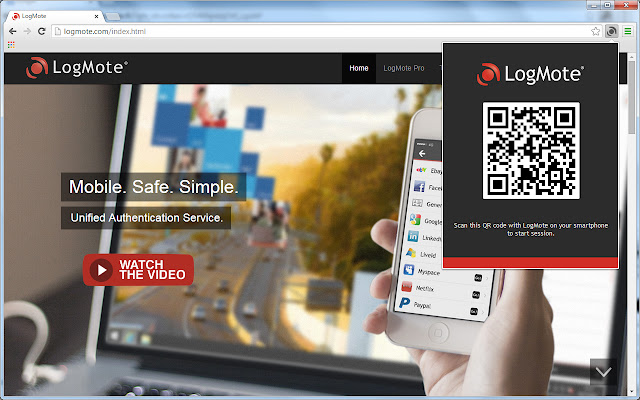


Baixar o arquivo CRX da Extensão LogMote
Baixe arquivos de extensão LogMote no formato crx, instale manualmente as extensões do Chrome no navegador ou compartilhe os arquivos crx com amigos para instalar facilmente as extensões do Chrome.
Instruções de Uso da Extensão
                        LogMote provides a patented revolutionary way to manage web site login/passwords when surfing the internet with your computer(s) (Windows & Mac OS X). LogMote removes the daily burden of online passwords management/typing/remembering.

It securely stores your login/passwords on your smartphone, and then establishes a secured connection with your computer to open and login to your web sites automatically.

Your smartphone becomes the key to unlock and accelerate your web experience.

FEATURES:
- Store your website login/passwords securely to never forget them again
- Connect to your computer with a strong and unique QR Code-based authentication
- Automatic websites login and automatic login/passwords acquisition for new websites
- Recover your login/passwords in case of Theft/Loss/Renewal of your smartphone
- Only one access code to login to all your web accounts
- Protect yourself against keylogging and phishing threats

LogMote is the only solution to provide you with a way to recover your account if you forgot your access code.

The premium service offers you an online backup facility in case of theft, loss or renewal of your smartphone. This means you don't have to worry about making the backup of your login/passwords. We do it for you on our secure servers and deliver it to you whenever you need it.

The Premium service is accessible through a monthly/yearly subscription. Subscription is available from the LogMote application on your smartphone.

*All your data is encrypted and only YOU can access it (even LogMote employees can not).*

Please visit http://www.logmote.com for more information.
Informações Básicas da Extensão
| Nome |  LogMote LogMote |
| ID | gidehhimhonhalglmckmogcclkeimdjp |
| URL Oficial | https://chrome.google.com/webstore/detail/logmote/gidehhimhonhalglmckmogcclkeimdjp |
| Descrição | LogMote provides a way to manage web site login/passwords stored on your smartphone when surfing the internet with your computer. |
| Tamanho do Arquivo | 1.46 MB |
| Contagem de Instalações | 89 |
| Versão Atual | 1.1.5.0 |
| Última Atualização | 2017-04-06 |
| Data de Publicação | 2017-04-06 |
| Classificação | 4.14/5 Total de 7 Avaliações |
| Desenvolvedor | http://www.logmote.com |
| Tipo de Pagamento | free |
| URL da Página de Ajuda | http://logmote.com/contact.html |
| URL da Página de Política de Privacidade | http://logmote.com/privacy.html |
| Idiomas Suportados | en,fr |
| manifest.json | |
{
    "update_url": "https:\/\/clients2.google.com\/service\/update2\/crx",
    "name": "LogMote",
    "version": "1.1.5.0",
    "author": "LogMote SAS",
    "manifest_version": 2,
    "description": "__MSG_description__",
    "default_locale": "en",
    "minimum_chrome_version": "36",
    "permissions": [
        "notifications",
        "contextMenus",
        "clipboardWrite",
        "clipboardRead",
        "tabs",
        "idle",
        "http:\/\/*\/*",
        "https:\/\/*\/*"
    ],
    "icons": {
        "16": "images\/icon16.png",
        "48": "images\/icon48.png",
        "128": "images\/icon128.png"
    },
    "background": {
        "page": "background.html",
        "persistent": true
    },
    "content_scripts": [
        {
            "matches": [
                "http:\/\/*\/*",
                "https:\/\/*\/*"
            ],
            "js": [
                "jscripts\/browser.js",
                "jscripts\/jquery.min.js",
                "jscripts\/proto\/long.min.js",
                "jscripts\/proto\/bytebuffer.min.js",
                "jscripts\/proto\/protobuf.min.js",
                "v2\/Logger.js",
                "v2\/Browser.js",
                "v2\/Browser\/Message.js",
                "v2\/Tools\/Proto.js",
                "inject-min.js"
            ],
            "run_at": "document_idle",
            "all_frames": true
        }
    ],
    "browser_action": {
        "default_icon": {
            "32": "images\/logo_disconnected.png"
        },
        "default_title": "__MSG_title__",
        "default_popup": "notification.html"
    },
    "web_accessible_resources": [
        "jscripts\/proto\/ads.proto",
        "jscripts\/proto\/comAgent.proto",
        "jscripts\/proto\/comAgentQrCode.proto",
        "jscripts\/proto\/comCompany.proto",
        "jscripts\/proto\/comCredentials.proto",
        "jscripts\/proto\/comDescriptors.proto",
        "jscripts\/proto\/comLight.proto",
        "jscripts\/proto\/connectionLess.proto",
        "jscripts\/proto\/extension.proto",
        "jscripts\/proto\/reporting.proto",
        "jscripts\/proto\/rules.proto",
        "html\/SlideFrame.html",
        "jscripts\/qrcode\/ocrad.js",
        "html\/GenPwdFrame.html",
        "html\/AccountFrame.html",
        "html\/LoginFrame.html",
        "html\/QRcodeFrame.html",
        "html\/AlertMessageFrame.html",
        "html\/RegisterAccount.html"
    ]
} | |