ChromeBackground
Add your own custom background to Google.com
O que é ChromeBackground?
ChromeBackground é uma extensão do Chrome desenvolvida por Unknown, e sua principal característica é "Add your own custom background to Google.com".
Capturas de Tela da Extensão
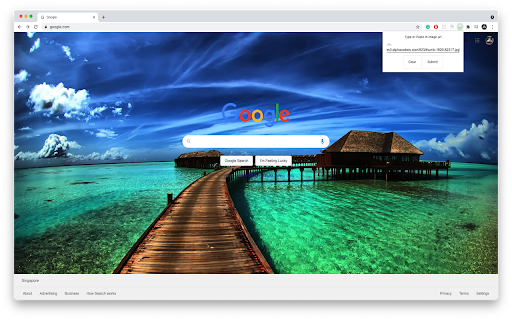
Baixar o arquivo CRX da Extensão ChromeBackground
Baixe arquivos de extensão ChromeBackground no formato crx, instale manualmente as extensões do Chrome no navegador ou compartilhe os arquivos crx com amigos para instalar facilmente as extensões do Chrome.
Instruções de Uso da Extensão
Add custom background to https://www.gooogle.com/* Informações Básicas da Extensão
| Nome |  ChromeBackground ChromeBackground |
| ID | hiohpginbllenbjfohemjliffknnafnn |
| URL Oficial | https://chromewebstore.google.com/detail/chromebackground/hiohpginbllenbjfohemjliffknnafnn |
| Descrição | Add your own custom background to Google.com |
| Tamanho do Arquivo | 1.44 MB |
| Contagem de Instalações | 18 |
| Versão Atual | 1.0.0 |
| Última Atualização | 2021-11-16 |
| Data de Publicação | 2021-11-15 |
| Classificação | 5.00/5 Total de 1 Avaliações |
| Desenvolvedor | Unknown |
| [email protected] | |
| Tipo de Pagamento | free |
| Site da Extensão | https://github.com/seanjyjy/chrome-bg |
| URL da Página de Ajuda | https://github.com/seanjyjy/chrome-bg |
| Idiomas Suportados | en |
| manifest.json | |
{
    "update_url": "https:\/\/clients2.google.com\/service\/update2\/crx",
    "manifest_version": 2,
    "name": "ChromeBackground",
    "description": "Add your own custom background to Google.com",
    "version": "1.0.0",
    "author": "Sean Lum",
    "icons": {
        "16": ".\/images\/background16.png",
        "48": ".\/images\/background48.png",
        "128": ".\/images\/background128.png"
    },
    "page_action": {
        "default_icon": ".\/images\/background16.png",
        "default_popup": "popup.html",
        "default_title": "Custom google chrome background"
    },
    "background": {
        "scripts": [
            "background.js"
        ],
        "persistent": false
    },
    "content_scripts": [
        {
            "matches": [
                "https:\/\/www.google.com\/*"
            ],
            "js": [
                "content.js"
            ],
            "run_at": "document_end"
        }
    ],
    "permissions": [
        "https:\/\/www.google.com\/*",
        "declarativeContent",
        "storage",
        "notifications",
        "webNavigation"
    ]
} | |