Pacman Popup
Play original pacman games in one click. Game opens in browser popup window
O que é Pacman Popup?
Pacman Popup é uma extensão do Chrome desenvolvida por mereshkova1988, e sua principal característica é "Play original pacman games in one click. Game opens in browser popup window".
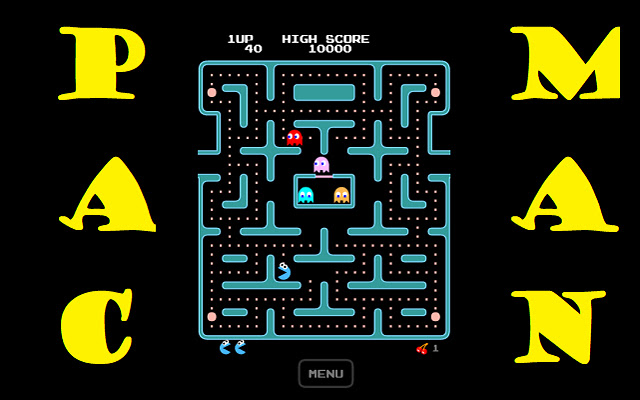
Capturas de Tela da Extensão

Baixar o arquivo CRX da Extensão Pacman Popup
Baixe arquivos de extensão Pacman Popup no formato crx, instale manualmente as extensões do Chrome no navegador ou compartilhe os arquivos crx com amigos para instalar facilmente as extensões do Chrome.
Instruções de Uso da Extensão
In Pac-Man, the player moves within a maze to end the yellow discs. The goal is to collect all the small disks by escaping the ghosts and monsters, and then going to the next stage when they collect all the disks. Collecting fruits appearing on the maze gives the player extra points. When they take the big yellow discs, the monsters and ghosts turn blue and become edible for a while. Informações Básicas da Extensão
| Nome |  Pacman Popup Pacman Popup |
| ID | hmcoiagnmbaapppjhkfpdienclnkgapd |
| URL Oficial | https://chrome.google.com/webstore/detail/pacman-popup/hmcoiagnmbaapppjhkfpdienclnkgapd |
| Descrição | Play original pacman games in one click. Game opens in browser popup window |
| Tamanho do Arquivo | 1.11 MB |
| Contagem de Instalações | 218 |
| Versão Atual | 3.9.2021.1 |
| Última Atualização | 2021-09-06 |
| Data de Publicação | 2021-09-06 |
| Desenvolvedor | mereshkova1988 |
| [email protected] | |
| Tipo de Pagamento | free |
| URL da Página de Política de Privacidade | https://sites.google.com/view/terms-and-policies |
| Idiomas Suportados | en |
| manifest.json | |
{
    "update_url": "https:\/\/clients2.google.com\/service\/update2\/crx",
    "name": "Pacman Popup",
    "version": "3.9.2021.1",
    "description": "Play original pacman games in one click. Game opens in browser popup window",
    "manifest_version": 2,
    "browser_action": {
        "default_title": "Pacman in popup",
        "default_popup": "index.html",
        "default_icon": {
            "16": "app\/style\/graphics\/logo16.png",
            "48": "app\/style\/graphics\/logo48.png",
            "128": "app\/style\/graphics\/logo128.png"
        }
    },
    "icons": {
        "16": "app\/style\/graphics\/logo16.png",
        "48": "app\/style\/graphics\/logo48.png",
        "128": "app\/style\/graphics\/logo128.png"
    }
} | |