Calamander: Quick add to Google Calendar
Send events from Facebook, meetup.com, wherevent.com & eventseeker.com right to your Google Calendar in a click. No re-typing!
O que é Calamander: Quick add to Google Calendar?
Calamander: Quick add to Google Calendar é uma extensão do Chrome desenvolvida por http://redwerk.com, e sua principal característica é "Send events from Facebook, meetup.com, wherevent.com & eventseeker.com right to your Google Calendar in a click. No re-typing!".
Capturas de Tela da Extensão
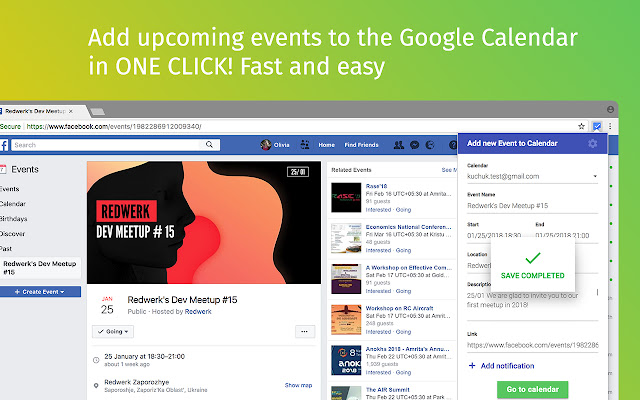


Baixar o arquivo CRX da Extensão Calamander: Quick add to Google Calendar
Baixe arquivos de extensão Calamander: Quick add to Google Calendar no formato crx, instale manualmente as extensões do Chrome no navegador ou compartilhe os arquivos crx com amigos para instalar facilmente as extensões do Chrome.
Instruções de Uso da Extensão
                        Store all your plans in Google Calendar with Calamander!

This extension lets you add any event to Google Calendar faster and easier so that you would never miss the most exciting gatherings around. If you come across an interesting concert or meeting while surfing Facebook, Meetup, Wherevent or Eventseeker, just click on a calendar icon, and it will automatically save the name, date, location and link to the currently viewed event.

You can easily change any event data anytime later or create custom events yourself.

No need to type everything in, just use Calamander to maintain your calendar of events. This is the best way to add Facebook events to Google Calendar in a couple of clicks.
Informações Básicas da Extensão
| Nome |  Calamander: Quick add to Google Calendar Calamander: Quick add to Google Calendar |
| ID | hohnpmkejpmaachibpifmdfjkckiggnk |
| URL Oficial | https://chrome.google.com/webstore/detail/calamander-quick-add-to-g/hohnpmkejpmaachibpifmdfjkckiggnk |
| Descrição | Send events from Facebook, meetup.com, wherevent.com & eventseeker.com right to your Google Calendar in a click. No re-typing! |
| Tamanho do Arquivo | 1.4 MB |
| Contagem de Instalações | 132 |
| Versão Atual | 1.0.0 |
| Última Atualização | 2018-04-04 |
| Data de Publicação | 2018-04-04 |
| Classificação | 3.13/5 Total de 8 Avaliações |
| Desenvolvedor | http://redwerk.com |
| Tipo de Pagamento | free |
| Idiomas Suportados | en |
| manifest.json | |
{
    "update_url": "https:\/\/clients2.google.com\/service\/update2\/crx",
    "name": "__MSG_appFullName__",
    "short_name": "__MSG_appShortName__",
    "version": "1.0.0",
    "manifest_version": 2,
    "description": "__MSG_appDescription__",
    "icons": {
        "16": "images\/icon-16.png",
        "48": "images\/icon-48.png",
        "96": "images\/icon-96.png",
        "144": "images\/icon-144.png",
        "192": "images\/icon-192.png"
    },
    "default_locale": "en",
    "background": {
        "scripts": [
            "scripts\/background.js"
        ]
    },
    "oauth2": {
        "client_id": "981634903783-npnmgp4rkb5ocr3d75t65pr5dcbl6hue.apps.googleusercontent.com",
        "scopes": [
            "https:\/\/www.googleapis.com\/auth\/calendar"
        ]
    },
    "content_security_policy": "script-src 'self' https:\/\/connect.facebook.net; object-src 'self'",
    "permissions": [
        "https:\/\/connect.facebook.net\/en_US\/all.js",
        "tabs",
        "http:\/\/*\/*",
        "https:\/\/*\/*",
        "background",
        "contextMenus",
        "identity"
    ],
    "content_scripts": [
        {
            "matches": [
                "http:\/\/*\/*",
                "https:\/\/*\/*"
            ],
            "js": [
                "bower_components\/moment\/moment.js",
                "bower_components\/jquery\/dist\/jquery.min.js",
                "scripts\/contentscript.js"
            ],
            "run_at": "document_end",
            "all_frames": false
        }
    ],
    "browser_action": {
        "default_icon": {
            "16": "images\/icon-16.png",
            "48": "images\/icon-48.png",
            "96": "images\/icon-96.png",
            "144": "images\/icon-144.png",
            "192": "images\/icon-192.png"
        },
        "default_title": "events",
        "default_popup": "popup.html"
    }
} | |